
QR & Barcode Scanner review
 Analysis by Appsdrops
I reach for a QR and barcode scanner when I need to get from a printed code to useful information without much fuss. Gamma Play’s QR & Barcode Scanner is a free Android and iOS tools app built around that straightforward job. In my view, its appeal is less about being an all-purpose shopping assistant and more about having a dedicated scanner ready when a code appears on a label, poster, menu, or screen.
What the free access is worth
There is no purchase price to weigh up: the app is free. That makes it easy to try for occasional tasks, such as opening a QR code on a package or checking what a barcode leads to, without committing money to a tool you may only use now and then. I would judge its value by whether it saves a few steps when a code turns up, rather than by expecting a large suite of extra functions.
The app comes from Gamma Play, a developer focused here on a familiar utility rather than an entertainment product. Its Everyone age rating also makes it a reasonable option for a shared family device, though I would still treat any destination opened from a code with the same care I use for other links. Scanning reveals where a code points; it does not make that destination trustworthy.
Its broad adoption is notable: it has more than 500 million installs, and its average rating is 4.8 from around 4.8 million ratings. Those figures suggest that many people find the basic task useful, but they are not a substitute for deciding whether a dedicated scanner fits your own phone habits. Some phones already include QR scanning in the camera, so the extra app may be unnecessary for users who only scan occasionally.
Useful when a code interrupts an ordinary task
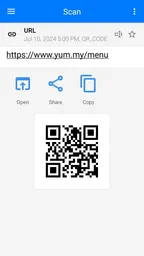
The practical strength of a scanner is being able to act at the moment you encounter a code. Imagine unpacking a household item and spotting a barcode while deciding whether it is the exact model you bought. A dedicated scanner gives you a clear next step: point the phone at the code, read the result, and decide what to do. The same workflow can help with a QR code on a printed notice or a sign at an event.
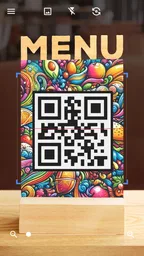
I find this kind of tool most valuable when the code is not already part of an app I am using. If I am looking at a printed menu, for example, switching to a scanner can be more direct than hunting through the phone’s camera settings. On the other hand, if the code is on the same phone screen, scanning it with that phone is not always convenient; sharing the image or using another device may be a better route.
A useful habit is to pause at the result instead of tapping through automatically. A QR code can lead to a page, and a barcode can connect to product information, but the code itself does not establish that the result is accurate or safe. I would check that a link looks relevant before opening it, especially when the code is on an unexpected flyer or a label that could have been placed over another one.
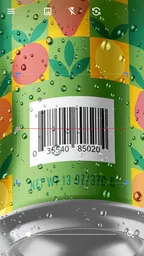
For barcodes, I also recommend treating a scan as a lookup starting point rather than a final verdict. Product identifiers can help distinguish one item from another, but a result may not answer questions about condition, compatibility, local availability, or whether a particular listing is current. When buying something important, I would compare the scan result with the packaging and the seller’s own description rather than relying on one lookup alone.
Where a dedicated scanner helps—and where it adds friction
The main tradeoff is that a separate scanner may duplicate a capability already built into the phone’s camera. If your camera recognizes QR codes quickly and gives you a result you trust, installing another app just for occasional scans may add an unnecessary step. I would try the built-in option first if convenience and keeping the home screen uncluttered matter more than having a dedicated tool.
A dedicated app makes more sense if you regularly encounter both QR codes and product barcodes, or if you prefer keeping scanning separate from ordinary photography. That separation can make the task feel more focused: open the scanner when you need a code read, then return to the camera for pictures. The tradeoff is still an extra app to find and maintain, so frequent use is the clearest reason to keep it.
Scanning conditions can also create friction. A code that is small, glossy, damaged, or poorly lit may be harder for any phone to read. I would first move closer or farther away until the code fits clearly in the view, reduce glare by changing the angle, and steady the phone. These simple adjustments are often more useful than repeatedly tapping the screen or assuming the scanner has failed.
There is another practical distinction between QR codes and barcodes. A QR code often acts as a doorway to digital content, while a retail barcode is generally a product identifier. That means the useful result depends on what the code contains and what information is available for it. I would not choose this app expecting every scan to provide a complete product comparison or a full explanation of an item.
Who is likely to get real value
I would recommend trying it if you often scan packaging, printed notices, event materials, or other codes that appear away from a screen. It is especially reasonable for someone who wants one familiar place to handle QR and barcode scans instead of relying on whichever app happens to be open. Since it is free, the decision can be based on whether it improves your routine, not on recovering a purchase cost.
It is less compelling for someone who scans a code only once in a while and already gets reliable results from the phone’s camera. It may also be the wrong choice if what you really need is a specialized tool for inventory, detailed product research, or managing collections of saved codes. A simple scanner should not be mistaken for a full catalog or a shopping research service.
One small workflow improvement is to decide what you need from a scan before opening the app. For a QR code, I might want to reach a page or service; for a barcode, I may simply be checking that I have the right packaged item. Having that question in mind helps me evaluate the result instead of treating every scan as an invitation to browse. It also reduces the temptation to follow an unfamiliar destination without checking it first.
Another useful approach is to use the scanner at the point of decision. When comparing two similar packages, scan each one separately and verify that the displayed result matches the product in your hand. If the two items look alike but the results are unclear, the code has not settled the question; checking the label or asking the retailer is more sensible. That is a modest use case, but it shows the difference between a scanner that assists a choice and one that makes the choice for you.
My verdict on keeping it installed
QR & Barcode Scanner is a sensible free utility when scanning is a regular part of your day and you want a dedicated tool for both kinds of codes. Gamma Play’s app has been available since March 13, 2015, and its strong average rating and broad reach make it an established option in the category. I would still base my decision on the phone I actually use: a built-in camera scanner may already cover the occasional QR code just fine.
For me, the best reason to keep it is convenience in repeated, ordinary situations—not a promise that every scan will deliver a complete answer. It can help bridge the gap between a physical code and whatever information or destination is associated with it, while a cautious pause keeps that convenience from becoming careless tapping. If that is the job you need done, I think it is worth trying; if your camera already handles your rare scans, skipping another app is equally reasonable.
Overall, QR & Barcode Scanner offers clear value through free access and a focused purpose, rather than through a paid feature set. I would install it for frequent packaging and printed-code use, then keep it only if it proves quicker than the scanner already on my phone. For light users, the built-in alternative is likely enough; for people who regularly move between QR codes and barcodes, a dedicated scanner can earn its place.
What we like
- Scans QR codes and barcodes without requiring a separate reader.
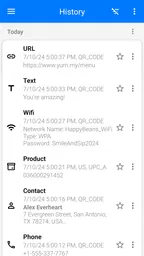
- Keeps a history of previously scanned codes for easy reference.
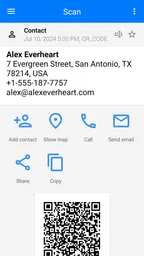
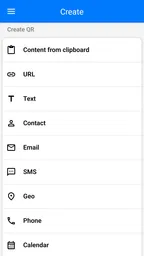
- Can create QR codes for sharing links and contact details.
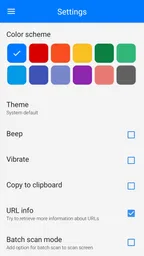
- Simple controls make common scanning tasks easy to learn.
- Useful for checking product codes while shopping.
What could be better
- Camera access is required to scan codes.
- Scanning may be difficult in dim or uneven lighting.
- Damaged or poorly printed codes may not scan reliably.
- Some features may require an internet connection.
- Frequent ads can interrupt the scanning experience.





