



ExpressVPN: VPN Fast & Secure review
 Analysis by Appsdrops
I judge a VPN less by the thrill of turning it on once than by whether I still reach for it weeks later. ExpressVPN makes a strong first impression because its main job is easy to grasp: choose a connection, switch it on, and carry on with your day. It is a free-to-install tools app from ExpressVPN, and its straightforward layout suits people who want added privacy without making network settings a new hobby.
That simplicity is appealing, but a VPN is not a magic shield. It routes your internet connection through a VPN server; it does not make every account, app, or online action anonymous. In my view, ExpressVPN is most useful when you want a convenient extra layer on unfamiliar networks or a more consistent way to connect while travelling. It is less compelling if you rarely leave a trusted home connection or expect a VPN to replace careful security habits.
What makes the first week easy
The app’s core routine is refreshingly uncomplicated. I can think of a specific reason to connect—joining public Wi-Fi, for example—open the app, and establish a VPN connection without first learning networking terminology. The emphasis is on getting protected quickly, rather than asking a newcomer to decide among a long list of technical settings before doing anything useful.
That matters in ordinary situations. Imagine stopping at a café to check a work message while waiting for a friend. The practical benefit is not that every risk disappears; it is that a VPN can help protect the connection between your device and its VPN endpoint on a network you do not control. I would still use secure sign-in practices and avoid treating a VPN as permission to ignore suspicious messages or questionable downloads.
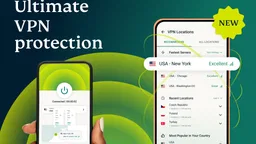
ExpressVPN’s stated server reach—113 countries—also gives the location choice real relevance for people who travel or need to connect through different regions. A broad choice can be useful when a nearby route is not the one you need. Still, I would start with a nearby location for routine use and change it only when I have a clear reason. Choosing a faraway server can make a connection less convenient, and a country list by itself does not promise that every website or service will behave as expected.
The app is rated for Everyone, which makes its intended audience broad, but the practical decision is still about the person using it. A first-time VPN user may appreciate the one-tap approach; someone who wants to inspect detailed routing choices or build a highly customised network setup may prefer a tool designed around deeper control. I would not confuse ease of use with suitability for every technical need.
Making the habit useful, not automatic
In the first few days, I would decide when I actually want the VPN active instead of switching it on merely because the button is there. Public Wi-Fi, travel, and moments when I want my traffic routed through a VPN are clear occasions. A simple personal rule—connect before using a shared network, then check the app’s connection state—makes the protection easier to remember without turning it into a ritual that interrupts everything.
One non-obvious point is that a VPN changes the route your traffic takes; it does not improve every part of internet use. If a video call is already struggling because the café connection is congested, adding a VPN may not solve the underlying problem and could make the route less direct. For a time-sensitive call, I would compare how the connection behaves with the VPN on and off, then choose the stable option rather than assuming the protected route is automatically the faster one.
Another useful habit is to think about the destination as well as the network. A VPN can reduce exposure on a shared connection, but a website you sign in to can still associate activity with your account. If I am logging into email or a shopping account, I treat account security and VPN use as separate layers: the VPN helps with the connection, while a strong password and sensible sign-in choices protect the account itself.
Whether it earns a place month after month
Once the initial novelty wears off, recurring value depends on how often the app fits naturally into a real routine. For someone who travels regularly, works from cafés, or often uses networks they do not manage, the quick connection flow can make repeated use feel worthwhile. If most of your time is spent on a trusted home network and you have no particular need to route traffic elsewhere, the app may sit unopened. That is not a failure of the software; it is a sign that your own use case may be occasional.
It also helps to separate the app’s free download from the cost of using a service over time. ExpressVPN is free to install, but it includes in-app purchases, with listed items ranging from $9.99 to $999.00. I would check the current subscription terms in the app store before committing, and judge the recurring expense against how often I genuinely use a VPN. Those purchase options are a meaningful consideration for someone who only wants protection for a rare trip.
The app’s scale gives a prospective user some context without deciding the question for them: it has an average rating of 4.6 from around 499,000 ratings, with roughly 33,000 written reviews and over 100 million installs. I see that as evidence of broad adoption, not proof that it will suit my device, network, or budget. A VPN’s everyday usefulness is personal: connection quality can depend on location, local network conditions, and the route selected.
Compared with the usual alternatives, ExpressVPN leans toward a polished, accessible experience rather than making technical configuration the main event. A browser’s private mode is not a substitute: it mainly affects what is saved locally in that browser and does not route all device traffic through a VPN. A built-in VPN from another provider might be enough for someone who wants a basic connection and is comfortable with its limits. On the other hand, a user who values broad location choice and a simple app-level workflow may find ExpressVPN easier to keep using than a more hands-on alternative.
My practical test for long-term value would be straightforward: after a few weeks, can I name the situations when I use it, and do those situations matter enough to justify any ongoing cost? If the answer is yes, its low-friction approach has a chance of becoming a useful habit. If I cannot remember the last time I needed it, I would reconsider paying for a service simply because its first-day setup felt reassuring.
Keeping upkeep and frustration in perspective
A VPN should not need constant attention, but it does benefit from a quick check now and then. The current version is 12.87.0, and the minimum operating system requirement is 7.0. I would keep the app updated through the app store and make sure the device still meets that requirement, especially if I am setting it up on an older phone. Updates are a normal part of maintaining an app; they do not remove the need to confirm that the VPN is connected when I intend to use it.
The maintenance burden is modest when the app behaves as expected: open it, connect, and verify the active state. The more important friction is remembering that a VPN can affect access to services that react to a different apparent location or network route. If a site behaves unexpectedly, I would first check whether the VPN connection is responsible and try a suitable location or temporarily disconnect when privacy is not the priority. That small bit of troubleshooting is part of using a VPN, not necessarily a flaw unique to this app.
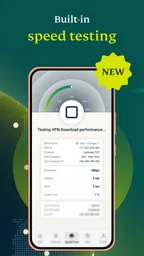
Speed expectations are another source of fatigue. The service promotes fast connections, but no VPN can guarantee that every route will feel identical to a direct connection in every place. Distance to the server, the Wi-Fi itself, and congestion can all matter. If I need the most responsive possible connection for a particular task, I would test it rather than assume that a VPN will be invisible in every practical sense. The app’s convenience is real; the idea of a cost-free, consequence-free connection is not a safe assumption.
There is also a difference between privacy and anonymity. Using a VPN changes how traffic is routed, but it does not erase a signed-in identity or make online behaviour untraceable in every context. I would not rely on it alone for sensitive work, nor would I use it as a reason to bypass workplace or school rules. People with strict organisational requirements should follow those rules and use the tools their organisation approves.
Who should keep it, and who can skip it
I would recommend ExpressVPN to a friend who regularly connects from hotels, cafés, or other shared networks and wants a simple way to establish a VPN connection. It is also a sensible candidate for someone who values a wide range of server locations but does not want to spend much time configuring a connection. ExpressVPN has been available since January 6, 2012, so it is an established name rather than a brand-new utility, though longevity alone cannot settle whether its current offering meets an individual need.
I would be more cautious about recommending it to someone whose only goal is to hide browsing history from other people using the same device, or to block every online threat. A VPN does not replace device security, careful account practices, or the privacy controls inside individual apps. Likewise, if someone needs highly specific network controls, they should compare the available settings with their requirements before choosing a one-tap-oriented app. The easiest interface is not automatically the best fit for an advanced workflow.
For a traveller, I would connect before doing sensitive tasks on a shared network, confirm the app shows an active connection, and avoid changing server locations without a reason. If a service stops working normally, I would test a nearby location or disconnect briefly when appropriate, rather than repeatedly reinstalling the app or assuming the phone is broken. That small routine is more useful than leaving the VPN on unquestioned and being surprised when a service reacts to the changed route.
My long-term verdict is that ExpressVPN earns a lasting place most easily for people whose routines repeatedly expose them to networks they do not control. Its strongest quality is how little effort it asks for when the need is clear. Its weaker fit is for occasional users who do not want an ongoing purchase, people expecting a VPN to guarantee anonymity, or users who require specialised controls beyond a streamlined experience.
I see ExpressVPN as a practical habit-builder, not a set-and-forget promise of complete privacy. If I were deciding today, I would install it, try it in the situations where I actually need a VPN, and judge the recurring value after that routine has had time to settle. For frequent travellers and shared-network users, that may be a worthwhile addition. For everyone else, the right choice may be to skip a paid VPN until a regular need appears.
What we like
- Offers a broad server network across many countries.
- Supports simultaneous connections on multiple devices.
- Its interface makes server selection straightforward.
- Includes a kill switch to help prevent accidental data leaks.
- Provides browser extensions for supported desktop browsers.
What could be better
- A subscription is required after the trial period.
- Long-term plans require paying upfront.
- Some streaming services may block VPN connections.
- VPN use can reduce connection speeds.
- Advanced settings may feel limited for power users.





