
Google’s Find Hub review
 Analysis by Appsdrops
I judge a device-finding app less by how reassuring its name sounds than by the decisions it asks me to make. Google’s Find Hub sits in a sensitive part of everyday phone use: it can help you locate devices and other items, and it supports sharing your location with people you choose. That can be genuinely useful, but location tools deserve a little more thought than an ordinary utility. My view is that this is most valuable when you decide in advance what you want it to do, rather than treating it as something to configure only after a phone goes missing.
Trust starts with deliberate use
Find Hub is a free tools app from Google LLC. It has an average rating of 4.2 from around 1.7 million ratings, with about 40,000 written reviews and over one billion installs. Those figures suggest that it is widely used, but popularity is not a substitute for deciding whether its location-related functions suit your needs. I would treat the rating as context, not as proof that every setup will feel right for every household.
The practical trust question is straightforward: do you want one Google app to help you find your own belongings and coordinate location sharing with selected people? Those are related jobs, but they are not the same choice. I would think about each separately. A person who only wants help finding a misplaced device may not want to share their whereabouts with anyone; a family that uses location sharing may value that option while still keeping the circle small.
It is also useful to separate what the app is for from what it can guarantee. A location tool can help when a device or item has a useful signal and the relevant setup is in place, but it should not be treated as a promise that every lost object can be recovered. I see it as a practical aid for reducing uncertainty, not a replacement for ordinary precautions such as keeping a device secured and noting where valuable items are stored.
Two jobs that are easy to confuse
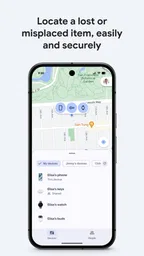
The app’s appeal is that it brings device and item finding together with location sharing. That convenience can make it feel like one broad “keep track of everything” service, but I would resist that framing. Finding a device you own and sharing your location with another person involve different expectations. Before using the sharing side, decide who needs to see your location and for what everyday reason. Before relying on the finding side, make sure the device or item you care about is represented in the app in the way you expect.
This distinction helps avoid a common setup mistake: installing the app and assuming that installation alone has prepared every device, item, and person. I would open it while everything is safe and available, review what is shown, and make choices at a calm moment. That is a more reliable habit than waiting until you are already searching a crowded room or trying to coordinate a pickup.
Make the controls part of setup
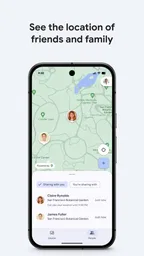
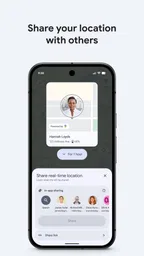
Location sharing is the most personal part of the experience, so I would approach it as an opt-in arrangement rather than a default convenience. Choose the people who have a clear reason to see your location, and revisit that decision when a relationship, routine, or need changes. If you are setting it up for a family, talk through the purpose with everyone involved instead of assuming that sharing is automatically welcome because it is technically available.
For a shared household, a useful approach is to keep the arrangement narrow and practical. Someone might share location while travelling home late or meeting a group, then decide whether ongoing sharing is actually needed. The important point is not to enable more than the situation calls for. A location-sharing tool can make coordination easier, but the boundary should come from the people using it, not from convenience alone.
I would also make a habit of reviewing the app whenever I change phones or reorganize my devices. The question to ask is not merely “Does it open?” but “Are the devices and people I expect still the ones represented here?” That small check can prevent misplaced confidence. It is especially worthwhile if a phone is used by more than one person or if an item has changed hands.
Location is useful, but context matters
Consider an ordinary scenario: I leave home in a hurry, then realize at work that I cannot find an item I expected to have with me. A finding app is most helpful when I have already made it part of my routine and can use it to narrow down the search. If I wait until the moment of panic to learn how the app is organized, I have added another task to an already stressful situation. Familiarity beforehand is a real, if unglamorous, advantage.
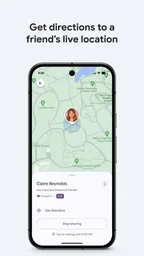
Another useful case is coordinating with someone who is travelling to meet me. Location sharing can reduce repeated “Where are you now?” messages, particularly when plans are changing. But it is not always the better option. If someone only needs a one-time meeting point, a direct message with the place and time may be simpler and less revealing. I would choose the least intrusive method that solves the actual problem.
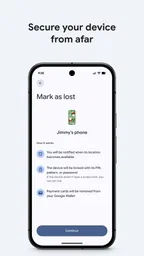
There is a similar trade-off when finding a device. It is tempting to assume that an app will remove all uncertainty, but the real value is often that it gives you a more informed next step. If the situation is urgent, I would still use common sense: check likely places, contact the people who may have seen the device, and protect any accounts or information that could be at risk. A finder tool is one part of a response, not the whole response.
How it compares with familiar alternatives
Many people already use a built-in phone-finding service or a separate location-sharing app. If your needs are limited to one phone platform’s own devices, its built-in option may feel more direct because it is already part of the device experience. If your main priority is coordinating with a particular group, the service that your friends or family already understand may be easier to use consistently. Familiarity matters: a tool everyone forgets to open is less useful than a simpler arrangement people actually follow.
Find Hub makes more sense to me when you want a Google-developed tool that combines device and item finding with location sharing. That does not mean it is automatically the best choice for every setup. Someone who dislikes tying practical utilities to a Google account, or who wants to keep location coordination separate from device recovery, may prefer different tools or a more limited routine. The right comparison is not a contest of feature lists; it is whether the service fits your devices, your trusted circle, and your comfort with sharing.
For people already comfortable with Google’s services, the familiar developer may lower the learning curve. Google LLC is behind the app, and its scale is reflected in more than one billion installs. Still, I would not use brand familiarity as a reason to skip careful choices. Trust is built through understanding what you are using and being intentional about who can see your location, not simply through recognizing a company name.
Who will appreciate it—and who may not
I would recommend considering Find Hub if you regularly misplace devices or items, want a central place to work with finding tools, or have a clear, limited reason to share location with friends or family. It is also a sensible option for someone who would rather set up a routine before trouble happens than search for a solution in the middle of a stressful day. The app is free, so trying it does not require a purchase, though the more important cost to weigh is the attention required to make thoughtful choices.
I would hesitate to recommend it to someone who has no interest in location sharing and already finds their devices reliably with another service. I would also suggest caution for anyone who feels pressured to share their whereabouts, or who does not want location tools to become part of their relationships. In those cases, declining to share or choosing a simpler way to coordinate is a valid decision, not a failure to use the app properly.
The app is rated for Everyone, which makes it broadly suitable in terms of its content rating, but that does not remove the need for adults to discuss location sharing with younger users. The meaningful issue is understanding the choice and its purpose. For a household, I would explain who can see location and why, and make sure each person knows how to raise concerns. A tool can assist with safety and coordination without replacing trust or conversation.
What to check before relying on it
My most useful tip is to do a low-stakes rehearsal. When you are at home, open the app and familiarize yourself with how your own setup appears. Check that the devices or items you care about are the ones you expect to find, and make sure location sharing is limited to people you intended to include. This is not a technical guarantee; it is a way to discover confusion before a real search or an awkward conversation makes it harder to think clearly.
A second tip is to treat sharing as something that can be reviewed, not a one-time decision that disappears into the background. When the reason for sharing ends, reconsider whether it still makes sense. Likewise, if you lend a device or change who uses one, take a moment to think through whose location or belongings the app should represent. These small checks are more useful than enabling every available option simply because it is there.
My third takeaway is to have a fallback plan. If a device is missing, know what other steps you would take, such as checking familiar locations and asking nearby people. If a location-sharing arrangement is not working for someone, agree on a less sensitive alternative for coordinating. This keeps the app in its proper role: a helpful layer of support, rather than the sole source of reassurance.
A cautious recommendation
After weighing the convenience against the sensitivity of location, I see Google’s Find Hub as a useful utility for people who will actively manage its role. Its combination of finding tools and location sharing can solve ordinary problems, from locating a misplaced belonging to making a meetup less frustrating. The strongest case for it is not that it should track more, but that it can make specific tasks easier when the people using it agree on clear boundaries.
Its broad adoption and solid average rating make it an established choice, but neither should replace your own judgement. I would install it if I wanted Google’s approach to finding devices and items and could name a real use for location sharing. I would skip the sharing side if I had no need for it, and choose a more familiar or narrower alternative if that better matched my devices and relationships.
Overall, my recommendation is measured: set it up before you need it, keep sharing intentional, and check that the app reflects your current choices. For someone who values those habits, Find Hub can be a practical addition to a phone. For someone who wants no location-based coordination or already has a simpler system that works, there is no reason to adopt it just because it is popular.
What we like
- Find Hub can locate compatible Android devices from one place.
- It can show a device's last known location when it is offline.
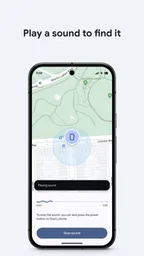
- You can make a nearby device ring to help find it.
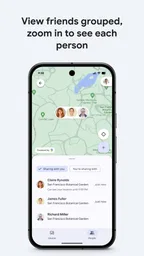
- Location sharing helps you keep track of trusted contacts.
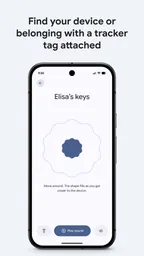
- It supports locating compatible everyday items with trackers.
What could be better
- Some location features depend on device settings and permissions.
- Offline finding may not work equally well on every device.
- Accurate results depend on nearby Android devices and network coverage.
- Location sharing requires care to protect personal privacy.
- Tracker compatibility varies by item and supported device.





