


Volume Control Sound Launcher review
 Analysis by Appsdrops
When music, calls, or alarms sound too quiet, the obvious first move is to reach for the device’s volume buttons. If that still doesn’t give you the level you want, a dedicated sound tool may be worth a look. Volume Control Sound Launcher is built around that everyday problem: it aims to make audio louder and put sound adjustment within easier reach. I see the appeal most clearly for people who regularly switch between listening to music, taking calls, and relying on alarms.
From a quiet starting point to louder audio
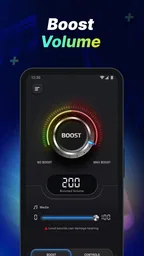
The app’s focus is straightforward. Its store summary describes a volume booster and sound enhancer for music, calls, and alarms, while its short description sums it up as volume control. That makes the intended flow easy to understand: start with audio that feels too soft, use the app as a sound-control tool, and judge whether the result better suits the moment.
That simplicity is useful because volume problems are often situational. A song may seem fine in a quiet room but get lost in background noise; a call may need a different level from music; an alarm needs to be noticeable when it matters. Rather than presenting itself as a broad audio-production suite, Volume Control Sound Launcher keeps its promise centered on louder sound and accessible control.
It belongs in the practical tools category, not in the entertainment bucket. I’d approach it as a helper for adjusting everyday listening, rather than as a replacement for headphones, speakers, or the device’s own sound settings. The key question is whether its volume-control approach makes an ordinary audio task feel easier and whether the resulting level is comfortable for the situation.
Getting started with a clear goal
A useful first step is to decide what you want to improve. If a call is difficult to hear, focus on that listening situation; if music is the issue, try it with the kind of track you normally play. For alarms, the goal is simply to make the alert more noticeable. Keeping one use case in mind makes it easier to assess the app without confusing a change in content or surroundings with a change in sound.
From there, the natural workflow is to open the app, use its volume-control purpose, and listen again. The app is free, so trying it does not involve an upfront purchase. It is developed by AtomApplications, and its current version is 1.17.3. Those details help identify the product, but the real test for me would still be practical: does the audio become more audible in the situation where I need it?
One point is worth keeping in mind with any sound booster: louder is not automatically better. A comfortable level for a quiet room may be inadequate in a noisy setting, while a setting that seems useful at first can become unpleasant if left too high. I’d increase sound cautiously and pay attention to clarity as well as loudness. The goal is a better listening experience, not simply the highest possible output.
Moving between music, calls, and alarms
The app’s stated uses cover three familiar audio moments. Music is the most obvious place to start because a track gives you a steady reference: you can listen, adjust, and decide whether the change helps. Calls are a different handoff. You are moving from entertainment to conversation, where understanding speech matters more than making every sound stronger. Alarms are different again, since the desired outcome is an alert that catches your attention.
This is where a dedicated volume booster can fit naturally into a daily routine. Instead of thinking about sound as one fixed setting, you can consider what you are listening to and what outcome you want. That framing is practical even before making any adjustment: it helps avoid using a music-oriented level for a call or treating an alarm as if it were background audio.
The handoff between the app and the audio itself is also important. You make an adjustment in a control tool, then return to the activity you care about—listening, speaking, or waiting for an alert. A good result should feel useful in that second step, not merely noticeable while looking at a control screen. I’d judge the experience by whether it helps me get back to the task with sound that feels appropriate.
What the result should feel like
For music, a successful result is sound that is easier to hear without making the listening session tiring. For calls, it is speech that is more comfortable to follow. For alarms, it is an alert that stands out enough to serve its purpose. Those outcomes are related, but they are not identical, which is why it makes sense to assess each one in its own context rather than assume one adjustment solves every sound problem.
The app has reached more than a million installs and holds a 4.5 average from around thirty-five thousand ratings. It also has roughly twelve thousand written reviews. That level of adoption suggests the basic idea resonates with a substantial audience, though individual results will still depend on the device, the audio source, and the environment in which someone listens.
Its age rating is Everyone, and it was released on December 3, 2025. It requires Android 10 or later. These details make it easier to check whether the app suits a device and household, while the core value remains the same: an accessible tool intended to make everyday audio louder and easier to manage.
Where the workflow can lose momentum
The main friction point is expectation. A volume-control app can help with the experience of quiet audio, but it cannot make every source or listening setup identical. A weak recording, a noisy room, or the limits of a device can all affect what you hear. If an adjustment does not produce the improvement you want, it may be the listening situation—not simply the control—that needs attention.
Another potential snag is treating every kind of sound as though it needs the same treatment. Music, calls, and alarms have different jobs, and pushing all of them toward maximum loudness can undermine comfort. I’d use a measured approach: make a change, listen for the outcome, and stop when the audio is clear enough for the task. That keeps the focus on usefulness instead of numbers or novelty.
There is also a small mental handoff involved. You need to remember that the app is a tool for sound adjustment, then return to whatever you were doing and check the result there. If that loop feels worthwhile, the app’s focused purpose is a plus. If you rarely encounter audio that feels too quiet, a dedicated booster may not become part of your routine. Its appeal depends on how often that starting problem comes up for you.
Who may find it useful
I can see this app suiting people who want a straightforward audio control option for regular listening. It may be especially relevant if music, calls, or alarms sometimes seem too soft and you would like a tool aimed specifically at making those sounds louder. The plain-language purpose is a strength: you do not need to approach it as a complicated editing app to understand why you might open it.
It is also a reasonable fit for anyone who wants to try a free sound-enhancement tool without committing to a purchase. The clearest way to assess it is to choose a familiar audio situation, make a careful adjustment, and decide whether the result is more comfortable and useful. That personal test matters more than assuming that a booster will have the same effect across every phone and sound source.
A practical verdict
Overall, Volume Control Sound Launcher has a focused job: help make music, calls, and alarms louder through a volume-control experience. I like that its purpose is easy to grasp and tied to situations people encounter every day. Its strongest case is practical rather than flashy: if your usual sound level leaves something hard to hear, it offers a tool centered on that exact frustration.
My recommendation is to approach it as a modest utility, not a promise that every audio problem will disappear. Start with the sound that bothers you, make changes carefully, and judge the result while doing the activity itself. With a 4.5 average, more than a million installs, and a free price, it has broad appeal as a tool to try. For anyone looking for a simple way to explore louder everyday audio on Android 10 or later, it is a sensible option to consider.
What we like
- Adjust volume levels quickly from the launcher.
- Useful for managing sound without opening Settings.
- Can help prevent sudden loud audio.
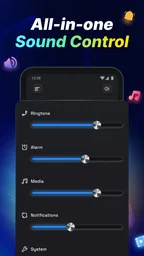
- Offers convenient access to sound controls.
- Simple functionality is easy to understand.
What could be better
- Features may vary across Android versions.
- Some controls may require extra permissions.
- Launcher integration may not suit every setup.
- System restrictions can limit volume adjustments.
- It may offer fewer options than full audio apps.





