
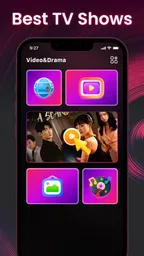

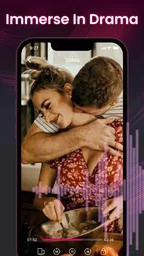

Video&Drama Player All Format review
 Analysis by Appsdrops
When I want to play a video or put on music without turning the moment into a technical project, I look for a player that keeps the basic job simple: open something and enjoy it. Video&Drama Player All Format is built around that everyday use, presenting itself as an HD video player and music player. Its appeal is easy to understand, especially if you want one app for watching and listening rather than a tool that feels aimed at editing or production.
A straightforward start for video and music
The first impression is shaped by the app’s broad purpose. It is a video player for Android that also covers music playback, so the main expectation is a convenient place to handle both kinds of media. The name puts format flexibility front and center, while the store summary describes HD video and music playback. That combination makes it sound like a practical everyday player rather than a specialist studio app.
The app is free and has an Everyone content rating, which makes it approachable for a wide audience. It was released on February 26, 2025, and its current version is 1.1.17. The minimum operating system is Android 7.0, so it is aimed at a broad range of Android devices that meet that requirement. These basics give a useful picture of who can consider it before making it part of a regular media routine.
In use, the most sensible starting point is to think about the task at hand: watching a video or listening to music. That clear split is helpful because it gives the app a familiar role from the outset. I would approach it as a personal playback option, not as a place to discover or stream a catalogue. The focus is on playing media, which keeps expectations grounded and makes the app easiest to judge on convenience.
From choosing media to pressing play
A typical workflow for a player begins with deciding what you want to watch or hear, then opening the relevant item and letting playback take over. Video&Drama Player All Format is presented for exactly those two broad activities. The value of that arrangement is less about adding extra steps and more about keeping video and music within one general-purpose app. If you switch between a clip and a track during the day, that unified role can feel more convenient than treating them as unrelated tasks.
For video, the HD positioning sets an expectation of a clear viewing experience, while the format-focused name suggests that the app aims to be accommodating with media files. I would treat those as the central reasons to try it: a player for watching everyday video and a straightforward interface to playback. The name alone should not be taken as a guarantee that every file in every situation will behave identically; compatibility can depend on the media itself and the device. What matters in practice is whether the videos you regularly use open and play in a way that suits you.
For music, the workflow is similarly direct in concept. You move from wanting audio to choosing a track and listening, without needing a separate app solely because the content is not video. That makes the app potentially useful for casual listening alongside watching. I find this kind of crossover most appealing when the goal is convenience: one player can cover two familiar needs, and there is less reason to pause and rethink which tool to use.
The most successful experience with any playback app is one where the controls and playback feel unobtrusive. The app’s broad positioning gives it a clear job, but the everyday result still depends on how comfortably it fits your habits. If you mainly want to open personal media and press play, the concept is easy to grasp. If you expect a highly customized media library or advanced editing controls, that is a different kind of product and a different set of expectations.
Where the app fits in a device routine
The handoff between video and audio is the app’s most natural practical advantage. A user may be watching a saved clip, then later want music, and the app’s combined identity makes that transition feel logical. Instead of defining itself narrowly as a video-only tool, it covers both formats of everyday entertainment. That can simplify a device routine, especially for people who prefer keeping their media playback needs together.
There is also a handoff between the app and the Android device itself. The operating system requirement matters here: an Android phone or tablet needs version 7.0 or newer to run it. Once installed, the app’s role is to handle playback, while the device remains the place where your media and daily activities live. This is a familiar arrangement, and it means the player is best considered as one part of a broader mobile setup rather than a complete entertainment service on its own.
Another handoff is between expectation and reality. “All Format” sounds expansive, and it naturally draws attention from people who have encountered files that other players do not handle smoothly. I see that wording as a promise of flexibility in spirit, but the meaningful test is always the media a person actually owns. A player can be broadly useful while still meeting edge cases differently. Starting with a few common files is a sensible way to decide whether it matches your particular library.
Likewise, “HD” is a useful signal about the intended viewing experience, but it does not tell the whole story of how a video will look. The source file, screen, and device all play a part. For ordinary use, the promise is easy to appreciate: the app is designed for watching video with a high-definition focus. For someone choosing a player, that is a relevant starting point, while personal playback results remain the final measure.
The outcome: convenient playback, with realistic expectations
At its best, Video&Drama Player All Format gives you a simple destination for playing video and music. That is a modest but worthwhile goal. Not every app needs to transform entertainment; sometimes it is enough for a player to make a common task feel uncomplicated. The combined video-and-music focus is the clearest benefit, and the app’s identity is easy to understand without a long learning curve in concept.
Its audience is likely to include people who want a free Android media player for everyday playback and appreciate having video and audio in one place. It may also appeal to users who are looking for a broadly compatible player, though the best way to judge that is with the files they actually use. The app has reached over five million installs and holds an average rating of 3.0 from around 3,400 ratings, alongside 236 written reviews. Those figures suggest substantial interest, while the middling average is a reminder to weigh your own needs rather than assume it will suit everyone equally.
That balance is important. A broad audience has tried the app, but a moderate average rating does not make it an automatic recommendation for every Android owner. I would consider it when the priority is basic video and music playback, particularly if you want to explore one app that covers both. I would be more cautious about choosing it solely on the promise implied by its name, because personal results depend on the particular files and routine that matter to you.
The developer is Griffin Atlas USA. That identifies who publishes the app, but the more useful decision point for most people is still whether the player handles their regular media comfortably. A good playback app should fit quietly into the moment: choose a video, watch; choose music, listen. When that is the whole job, a straightforward tool can be more appealing than a feature-heavy alternative that asks you to spend time configuring it.
Where the flow can lose its ease
The workflow can break down whenever a player’s broad promise and a user’s specific expectations do not line up. Someone may arrive expecting every uncommon format to play perfectly, or may look for extensive library organization when their main need is simply playback. Those are different requirements, and a general-purpose video-and-music player should be judged against the task you actually need it to perform. Keeping the goal simple makes it easier to tell whether the app is a good fit.
Rating averages also offer a useful prompt to be selective. A 3.0 average is neither a strong endorsement nor a reason by itself to dismiss the app. Instead, it suggests that experiences are mixed enough to make personal testing worthwhile. Start with the media you use most, pay attention to whether playback feels convenient, and then decide whether it deserves a place in your routine. That practical approach is more reliable than choosing on a feature phrase alone.
There is a similar limit to the app’s all-in-one appeal: combining video and music playback is convenient, but it does not automatically mean the app is the perfect choice for every media habit. Some users want a focused video player; others care most about managing a large music collection. If your needs are specialized, the broad scope may not be the deciding advantage. If they are ordinary, having both playback roles under one roof may be enough.
Ultimately, Video&Drama Player All Format is best understood as a practical playback app with a clear, everyday purpose. It aims to bring HD video and music playback together, and its broad availability makes it worth considering for Android users on a compatible system. I like the simplicity of that proposition, while the average rating encourages a measured approach: try it with the media you care about and decide from the result. If your goal is uncomplicated watching and listening in one place, it is a reasonable option to explore.
What we like
- Plays common video formats without requiring separate codecs.
- Supports subtitle files for a more flexible viewing experience.
- Offers playback controls for seeking and adjusting the viewing experience.
- Can play locally stored videos without an internet connection.
- Handles both video and audio files in one app.
What could be better
- Playback quality may depend on the device's hardware.
- Some advanced features may require extra setup.
- Ads may interrupt the experience in the free version.
- Subtitle compatibility can vary between files.
- The app may request access to media files on your device.





