




Video Player - AnyPlay review
 Analysis by Appsdrops
Choosing a video player is less about collecting features and more about making everyday viewing feel straightforward. I want an app that can handle the files I already have, make subtitles usable, and keep videos and folders easy to find. Video Player - AnyPlay brings playback and file management together, with support for multiple formats and HD and 4K media. That combination makes it worth considering if you would rather use one app for browsing local files and watching them than bounce between separate tools.
What to consider before choosing a video player
My first decision criterion is compatibility. A player can look polished, but it is only useful if it works with the kinds of video files I want to watch. AnyPlay is presented as a player for all formats, so its broad-format focus is central to its appeal. It also supports HD and 4K media, which gives it a place in the conversation for people who keep higher-resolution videos on their devices.
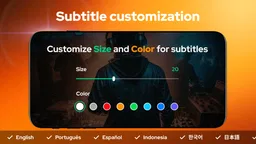
Subtitles are another practical consideration. For films, shows, and other videos where dialogue matters, subtitle support can make a noticeable difference to the viewing experience. AnyPlay includes subtitle support, so it covers an important everyday need rather than treating playback as simply pressing play. I would still judge any player by how comfortably its controls and subtitle options fit my own habits, but the feature itself is a useful part of the package.
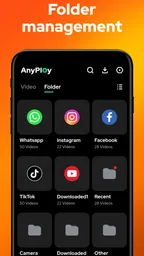
Then there is organization. Many people do not only need a player; they need a convenient way to find media among other files. AnyPlay combines a video player with a file manager, which may appeal if you prefer to browse and play your media from one place. That pairing is the key decision point: if you value a combined tool, it makes sense to explore; if you want a dedicated player with a narrower purpose, a more specialized alternative may be a better match.
Finally, I look at practical details such as cost, device compatibility, and the overall level of adoption. AnyPlay is free to download, while offering in-app purchases. It is rated for Teen audiences and works on Android devices running version seven or later. Those details help set expectations before installing, especially if you are checking compatibility on an older phone or tablet.
A combined player and file manager
The most distinctive reason to consider Video Player - AnyPlay is its dual role. Instead of presenting itself only as a screen for playing videos, it also includes file management. In everyday use, that concept can reduce friction: browsing for a clip and watching it are closely related tasks, so bringing them into one app is a sensible approach.
This setup may be particularly handy for people who keep a personal collection of videos on their device. Rather than treating media playback and file browsing as unrelated activities, AnyPlay puts both within the same product. I see that as a practical convenience, not a guarantee that it will replace every file tool or player someone already uses. The value depends on whether the combined workflow feels natural for you.
Its broad-format positioning also makes the app approachable for users who do not want to think too much about file compatibility before opening a video. Add subtitle support and HD and 4K playback, and the feature mix covers several common reasons people look for a new player. The app’s pitch is easy to understand: find media, play it, and watch with subtitle support when needed.
Why its popularity may matter
AnyPlay has reached over ten million installs and holds an average rating of 4.3 from around fifty-three thousand ratings. Those figures suggest that the app has attracted a substantial audience, which can be reassuring when deciding whether a general-purpose media app is worth trying. Popularity alone does not tell me whether its interface suits my preferences, but it does indicate that the product has found a place among many Android users.
The app was released on September 15, 2023, and its current version is 1.6.6. For me, those details are useful context rather than a reason to install on their own. What matters more is how the combination of playback and file management fits the way I handle video. If I want one place to work with media files, the app’s central idea is more relevant than a version number.
Where different alternatives may fit better
Not every viewer wants the same kind of app. Someone who only needs a quick way to play a video may prefer a simple, dedicated player rather than a broader tool that also manages files. A specialist app can be a better fit when the main priority is a focused playback experience and the user does not need another way to browse media.
On the other hand, people whose videos are scattered among folders may appreciate having a file manager and player together. If that describes your routine, AnyPlay’s combined approach is worth comparing against tools that separate those jobs. The right choice comes down to what you do most often: open a file and watch, or spend more time organizing and locating the files you want.
There is also a difference between choosing an app for broad convenience and choosing one for a particular personal workflow. Some users may already be happy with the player included on their device. Others may rely on a file manager they know well and want to keep that separate from playback. I would not switch simply because an app lists several capabilities; I would switch when those capabilities solve a recurring annoyance.
For viewers who prioritize HD and 4K support, AnyPlay has a clear reason to enter the shortlist. But resolution support is only one part of an enjoyable experience. The app still needs to feel comfortable to navigate and work well with the files you actually watch. The sensible approach is to compare the overall workflow, rather than assuming that any single feature settles the choice.
What switching involves
Moving to a new media player is usually a small decision, but it can affect a routine you have already settled into. Before replacing a familiar app, I would consider where my videos are stored, how I normally locate them, and whether I want file browsing integrated with playback. If those tasks currently feel disconnected, AnyPlay may offer a more unified approach.
If your existing setup already handles your formats, subtitles, and file organization comfortably, there may be little reason to change. Switching is most compelling when a player struggles with the videos you use, when subtitles are important to your viewing, or when you want playback and file management in one app. In other words, the best reason to try AnyPlay is a specific need, not simply the promise of having another app installed.
It is free to download, which makes trying it a relatively accessible way to see whether its approach suits you. In-app purchases range from $2.99 to $13.99 per item, so it is sensible to pay attention to any optional purchase details shown in the app before deciding to spend. The free entry point gives you a chance to judge the basic fit first; the availability of purchases is worth keeping in mind if you prefer to avoid paid extras.
Compatibility is straightforward to check: AnyPlay requires Android 7.0 or later. That makes the minimum operating system an important filter if you use an older device. It is also rated Teen, a detail parents and other users may want to consider when choosing apps for a shared device.
Who should give AnyPlay a try?
I would put AnyPlay on the shortlist for Android users looking for a video player with file management, broad format support, subtitle capability, and HD and 4K playback. It is especially relevant if you want to browse media and watch it through a single app rather than relying on separate tools. The feature mix is broad enough to address common needs without making the decision depend on a narrowly specialized use case.
I would be more cautious about recommending a switch to someone who already has a player that works smoothly and a file-management routine they like. In that situation, the app’s combined design may not add enough value to justify changing habits. A good player is not only about the list of features; it is also about whether the way it organizes everyday tasks feels comfortable.
AnyPlay is a practical option rather than an automatic choice for everyone. Its strongest case is convenience: it brings media playback and file management together, supports subtitles, and is positioned for multiple formats as well as HD and 4K video. Its free download makes it easy to consider, while optional in-app purchases are part of the overall cost picture.
My recommendation is to try AnyPlay if you want a single app for finding and watching videos, or if your current setup is missing the combination of features it offers. If a dedicated player already meets your needs, there is no need to switch just for the sake of switching. For the right user, AnyPlay is a sensible, accessible media app whose appeal lies in putting everyday video tasks under one roof.
What we like
- Plays a wide range of common video formats.
- Subtitle support makes dialogue easier to follow.
- Playback controls are simple to learn.
- Useful for watching videos stored on your device.
- Portrait and landscape viewing options suit different clips.
What could be better
- Some formats may require additional codecs.
- Ads may interrupt the viewing experience.
- Advanced playback tools may be limited.
- Video quality depends on the original file.
- Battery use can rise during extended playback.





