
Video Downloader review
 Analysis by Appsdrops
Video Downloader is best understood as a practical shortcut, not a complete media library or a video-editing suite. I’d consider it when I want to save online video or music for later and prefer a focused tool over a bigger app packed with unrelated features. Its appeal is straightforward: it comes from InShot Inc., it is free to install, and its purpose is easy to grasp. The trade-off is that a downloader’s usefulness depends heavily on whether it works smoothly with the particular content and services I want to use.
A focused tool for saving media
In the crowded world of video players and editors, this app takes a narrower route. It is designed around downloading video and music from the internet, rather than recording, trimming, adding effects, or organizing a creator’s whole workflow. That difference matters: if your goal is simply to keep a piece of media available on your device, a dedicated downloader can feel more direct than opening a full editing app and searching through tools you do not need.
The basic use case is easy to picture. I come across a clip or a piece of music while browsing, decide I want it available when I am away from a reliable connection, and use a downloader to save it for later. That can be handy before a commute, a trip, or a stretch of time in a place where streaming is inconvenient. The value is not flashy; it is the convenience of having the item ready when the network is not.
The app has a substantial audience: it has passed 100 million installs, with a 4.7 average from around 2.8 million ratings. Those figures suggest that many people find the basic idea useful, but they do not guarantee that every source behaves the same way or that every user’s workflow will be trouble-free. I would treat the rating as a reason to give it a look, not as a promise that it can save anything from anywhere.
Where the straightforward approach helps
A dedicated downloader can reduce friction when all I want is an offline copy for personal viewing. I do not need to import a clip into an editor, decide how to crop it, or export a new version just to keep it accessible. For someone who already knows what they want to save, that focused purpose is the app’s strongest argument.
One useful habit is to think about the download before starting it: where will I watch or listen, and how much space do I want to devote to it? Saving a long video for a short wait may be less sensible than keeping a brief clip or a few tracks. A downloader makes offline access possible, but it does not remove the need to manage storage or choose what is worth keeping.
Another practical point is to check whether a saved item is genuinely useful offline before relying on it. If I am preparing for travel, I would test playback while disconnected before leaving, rather than assume a completed download automatically solves every access issue. This simple check can reveal whether the file is available in the way I expect and avoids discovering a problem when a connection is no longer available.
Limitations that shape the experience
The biggest limitation is not a missing editing tool; it is the nature of downloading from online sources. A video downloader is only as useful as its compatibility with the content I want to save. Services can handle media differently, and some content may be restricted or unavailable for downloading. I would not choose this app on the assumption that every link will work, nor would I expect it to replace an authorized offline feature inside a streaming service.
There is also a meaningful distinction between saving something and having permission to reuse it. Keeping a copy for personal access is not the same as having rights to repost, redistribute, or edit someone else’s work. I would use the app with content I own, content whose creator permits downloading, or material that is otherwise legally available for that use. If I need dependable offline access to subscription content, the service’s own download option is usually the safer and clearer choice.
Compared with a browser’s built-in download handling, a standalone app offers a more purpose-specific experience, but it also adds another tool to manage. Compared with an all-in-one media editor, it is a better fit for saving than transforming. And compared with streaming apps that offer official offline playback, it may be less predictable for protected or service-specific content. Those are not reasons to dismiss it; they are reasons to match it to the job.
There can be a small planning cost, too. Downloads need to be found and managed after they are saved, and a collection can become cluttered if I keep everything indiscriminately. I would make a habit of reviewing saved media and removing items I have finished with. That keeps the app’s practical benefit—having useful material available—without turning the device into a dumping ground.
Who will get the most from it
I see this as a sensible option for people who regularly want offline copies of media they are allowed to save and who value a direct, single-purpose tool. It may suit a student keeping permitted reference material handy, a traveler preparing personal videos for a long journey, or someone who wants to save a creator’s downloadable audio for listening when connectivity is limited. In each case, the benefit is convenience, not a new way to produce or publish content.
A realistic example: before a train ride, I might collect a few short videos that I know I can download and intend to watch later. I would avoid saving a large pile “just in case,” check that each item plays offline, and clear them out once I no longer need them. That workflow makes the tool useful without assuming it can overcome content restrictions or that local storage is unlimited.
It is less suitable for someone whose main goal is to edit clips, add captions, build a montage, or publish polished social videos. In that case, a dedicated editor is the better starting point. It is also not my first recommendation for someone who only needs offline playback from one subscription service; using that service’s own feature is typically more predictable. And if a user expects universal downloads from every website, this is the wrong expectation to bring to any downloader.
Cost, maturity, and what to expect
The app is free to install, with in-app purchases ranging from $2.99 to $6.99 per item. That makes it easy to try the basic idea before deciding whether any paid option is worth considering. I would first establish that the app fits my sources and routine, then weigh any purchase against how often I actually use it. Paying for a tool does not change the underlying limits imposed by content availability or permissions.
It is rated Teen, so younger users and families should take that classification into account when deciding whether it is appropriate. The current version is 2.7.4, and the app requires Android 7.0 or later. Those details are useful when checking whether an existing device can run it, especially if it is an older phone kept as a travel or backup device.
With 54,000 reviews alongside its large rating base, Video Downloader is clearly a familiar choice in its niche. I still would not read popularity as proof of a perfect fit: the key question is whether the media you want to save is supported and whether the app’s focused role matches your needs. Keeping that question in mind leads to a more realistic trial than expecting a universal media grabber.
My verdict
Video Downloader makes the most sense as a convenient, focused way to save suitable online media for later, especially when offline access matters more than editing or library management. Its scale and strong average rating make it a credible option to try, while its free entry point keeps that first step simple. I like the clarity of its purpose, but I would keep expectations grounded: source compatibility, storage habits, and permission to download all matter.
If you want a straightforward downloader for occasional personal use, this is a reasonable app to consider. If you need guaranteed access to protected streaming content, an editor for creative work, or a tool that works with every online source, I would choose a different approach. For the right user, the best recommendation is also the most modest one: use it for media you are entitled to save, test important downloads before you need them, and keep only what you will actually use.
What we like
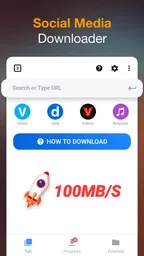
- Supports downloads from multiple video sites.
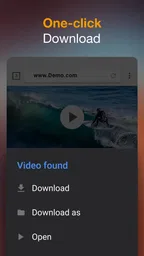
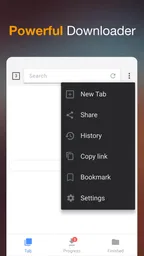
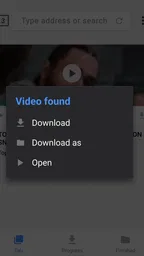
- Offers a built-in browser for finding videos.
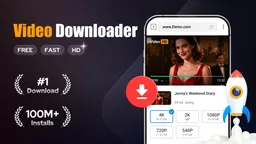
- Lets you choose video quality before downloading.
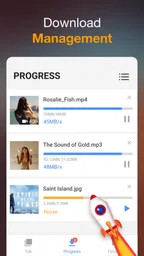
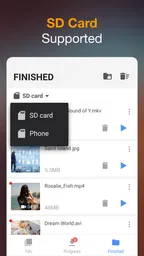
- Includes a download manager to track progress.
- Allows offline playback of saved videos.
What could be better
- Some sites may block downloads due to restrictions.
- The app may show frequent advertisements.
- High-quality videos can use substantial storage.
- Download speeds depend on your internet connection.
- Some formats may not work with every device.





