



Video Downloader, Download All review
 Analysis by Appsdrops
I judge a video downloader less by how many buttons it offers than by whether it makes a simple job feel dependable: find a video, save it, and locate it again when I need it. Video Downloader, Download All is aimed squarely at that routine. It is a free Android app in the video player and editing category, developed by Shotcut Video Workshop, and its central appeal is straightforward downloading rather than elaborate editing. My impression is that it suits people who want a dedicated place to handle video saves, provided they are comfortable checking that a particular video is available to download.
Making the basic download routine work
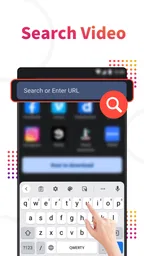
The most sensible way to approach Video Downloader, Download All is to treat it as a practical tool, not a magic answer to every online video. Start by opening the app and using its search or browsing workflow to find the video you want. When the app detects a downloadable video, check that you have the right item before starting the download. That small pause matters: a page can contain several clips, and saving the wrong one creates clutter you then have to sort out.
Once a download is underway, think ahead about where you will use the file. A clip meant for a commute, a trip, or a presentation is more useful when you can find it quickly later. I recommend giving yourself a consistent habit: finish the download, confirm it appears where you expect, then open it once to make sure it plays. That is a more reliable routine than assuming every detected item was saved properly and leaving the check until you are offline.
For an everyday example, imagine finding a recipe video you want to follow in a kitchen with unreliable connectivity. I would save it beforehand, play it once while still online, and make sure the useful section is the clip I intended to keep. The same approach works for a tutorial you plan to watch during a commute. It avoids discovering at the worst moment that you saved a page rather than a playable video, or that the clip is not the one you meant to use.
The app has been available since August 5, 2019, and its current version is 1.89.0. Those details are useful context, but they do not replace the practical test that matters to me: whether the specific video I want can be found, detected, saved, and played on my device. The app’s stated minimum Android requirement is version 7.0, so it is intended for a broad range of Android devices, though the experience can still vary with the phone and the source being accessed.
Check the result, not just the download button
A downloader’s most useful moment is not necessarily the tap that begins saving. It is the point where I can verify that the file is usable. If you are collecting several clips, checking each one as it completes can prevent a batch of uncertain files from accumulating. If you only need one video, a quick playback check is enough. Either way, this habit gives you a clear answer before you depend on the saved copy.
That distinction also helps manage storage. Video files can take up space, and keeping every saved clip indefinitely is rarely a good plan. I would remove downloads once they have served their purpose, especially if I have saved several versions or no longer need a tutorial. A little housekeeping makes the app easier to use because the videos you do want are less likely to get buried among old saves.
Settings and choices worth checking
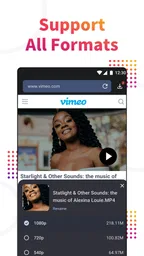
Before relying on the app for a longer session, spend a moment checking the choices it presents during the download process and any settings that are visible in your installed version. In particular, pay attention to the destination or save location if one is offered, and learn how the app identifies a video on a page. I would not assume that every source behaves the same way: detection depends on what the page makes available, so a result that works for one video may not work for another.
It is also worth deciding whether you need a copy at all. If you are only going to watch a clip once and have a stable connection, streaming through the source’s normal player may be simpler and avoids creating another file to manage. Downloading makes more sense when you want offline access, expect poor connectivity, or need to keep a clip handy for repeated viewing. That trade-off is more important than chasing every option in an app’s settings.
On the cost side, the app is free to install, with optional in-app purchases listed from $3.99 to $23.99 per item. I would begin with the free experience and only consider a purchase if a specific option you need is clearly presented in the app. That keeps the decision grounded in your actual use rather than paying in advance for a downloader you may only open occasionally.
The audience rating is Everyone. That makes it broadly accessible as an app, but it is still sensible to be thoughtful about the videos you choose to save and the sources you use. The app itself is a tool; your own judgment about whether a video is appropriate to keep or share remains part of using it responsibly.
Build a faster, repeatable pattern
Once you know how the app behaves with the kinds of pages you use, you can make the routine quicker without relying on supposed hidden shortcuts. Keep the process simple: identify the clip, confirm the detected item, start the save, and check playback. Repeating the same sequence is faster than tapping through screens on instinct, especially when a page contains multiple videos or you are saving material for later.
A useful refinement is to download in small, purposeful groups rather than collecting every interesting clip in one long session. For example, save the few tutorials you need for a project, check each one, and then stop. This makes it easier to spot a failed or incorrect download and reduces the chance that a large batch will leave you unsure which files are worth keeping. The habit is particularly valuable on a phone, where file management is less comfortable than on a computer.
If you often watch saved clips in a particular order, decide on that order before downloading. This is not an app-specific playlist feature; it is simply a way to avoid turning a handful of useful videos into an unorganized pile. You can also make a quick note of why you saved a clip if its title is not distinctive. Those small habits are more dependable than expecting a downloader to organize your personal library automatically.
In comparison with the usual alternatives, this app occupies the focused downloader side of the category. A browser’s built-in viewing experience is often the easier choice for quick streaming, while a full video editor is better when the goal is trimming, arranging, or polishing footage. Video Downloader, Download All is more relevant when the task is to save an accessible online video for later viewing. It should not be mistaken for an editing suite or a replacement for a source’s own viewing app.
Where the limits matter
The biggest practical limitation is that “download” does not mean every video on the internet will be available to save. The source, the way its page is built, and the video’s availability all affect whether detection can work. If a clip is not found, repeatedly trying random controls is unlikely to improve the experience. In that situation, I would use the source’s own offline option if it has one, or keep watching through its regular player.
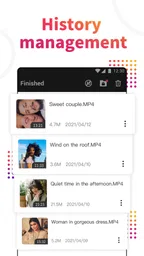
There is also a difference between a video being detected and the saved file being convenient. A download may be perfectly usable but still awkward to locate if you have not paid attention to where it went. That is why checking the result and keeping a tidy collection are part of the workflow, not optional finishing touches. People who expect a downloader to handle every organizational detail for them may find this less effortless than they hoped.
I would also skip this app if your main goal is editing footage, creating social clips, adding effects, or assembling a polished video. Its category is video players and editors, but its described role is downloading; those are different needs. Likewise, if you only ever stream videos online and have no reason to keep local copies, adding a download app may create extra steps rather than solve a problem.
Its popularity suggests that many people find the basic idea useful: it has an average rating of 4.5 from around 233,000 ratings, with about 2,600 written reviews, and over 50 million installs. I treat those figures as a sign that it is widely used, not a guarantee that every source will work for my particular needs. The more helpful question is whether your own routine involves videos you want to access offline and whether the app can detect those sources reliably.
Who will get the most from it
I would recommend giving it a try if you regularly save tutorials, reference clips, or other videos you plan to revisit without depending on a connection. It is especially suitable for someone who values a repeatable, straightforward workflow and is willing to verify downloads rather than assuming the app has handled everything. Starting with one low-stakes video is a sensible way to learn how it behaves on your device before relying on it for an important trip or task.
On the other hand, someone who wants a broad media library with sophisticated organization, a dedicated editing workspace, or guaranteed downloading from every service should look for a tool designed specifically for that requirement. The same goes for users who prefer to keep everything inside an official streaming app. In those cases, the source’s own features or a separate editor may fit better than a downloader focused on saving accessible clips.
My overall view is that Video Downloader, Download All is most useful when you treat it as one step in a careful offline-viewing routine. Search or browse, confirm the video, download it, test playback, and clear it when you are done. That approach turns a simple utility into a dependable helper without expecting it to solve problems beyond its purpose. For an occasional or regular downloader, that focused role is a reasonable reason to try it; for someone who only streams or wants to edit, it is probably not the right fit.
The best reason to use it is practical: save videos you genuinely need offline, then verify and manage them with care. That modest expectation is also the key to judging it fairly. It is free to start, aimed at a broad audience, and backed by Shotcut Video Workshop, but your experience will depend on the videos and sources you actually use. If those fit its detection workflow, it can make later viewing more convenient. If not, the normal player or a tool built for editing will serve you better.
What we like
- Simple controls make downloads easy to start.
- Built-in browsing helps locate videos without switching apps.
- Download progress is easy to track.
- Supports saving files for offline viewing.
- A practical option for managing video downloads in one place.
What could be better
- Downloaded content may take up substantial storage space.
- Some websites may block downloads.
- Availability can vary by website and video format.
- Ads may interrupt parts of the experience.
- Downloading copyrighted videos without permission may violate the law.





