

VicoHome: Smart Home Camera review
 Analysis by Appsdrops
I approach VicoHome as a companion app for people who want to check and manage smart-home devices from a phone, rather than as a conventional video player or editor. That distinction matters: its place among video-focused apps comes from its camera connection and monitoring role, not from editing clips or organizing a personal video library. If your main goal is to keep an eye on a connected camera while you are away, that’s the kind of everyday task this app is designed to support.
What VicoHome is for today
In practice, a camera app earns its place by making the routine parts feel straightforward: finding the device, checking what it sees, and returning to it when you need to. VicoHome, developed by VicoTech, is built around controlling smart devices remotely. I’d judge it less by how many screens or features it offers and more by whether it fits naturally into a quick check between other tasks.
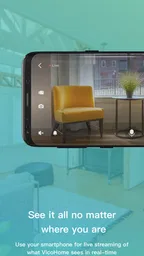
That makes it a useful option for a household that wants camera access on a phone without treating the camera as a separate technical project. A realistic example is leaving home, then opening the app later to check whether a delivery has arrived or whether a familiar space looks as expected. The value is convenience and access in the moment, not replacing a dedicated video-editing suite or a broad media player.
The key trade-off is that VicoHome’s usefulness depends on having compatible smart devices to connect. Without a device that works with it, there is little reason to install it. If you already use another camera ecosystem and its own app reliably, switching just for the sake of trying a different interface may not improve your routine.
How it fits among camera and video apps
Compared with a typical video player, VicoHome serves a different purpose: it is about accessing a camera and its connected device experience, rather than playing a collection of saved films. Compared with a general smart-home hub, its camera-centered identity is the more relevant lens for deciding whether it belongs on your phone. I would not choose it to trim recordings, add effects, or manage a large offline video library.
The app is free to download, which makes trying it less of a commitment, although it also includes in-app purchases ranging from $0.99 to $999.99 per item. That wide span is worth noticing before spending: I’d check the purchase details in the app store and in the app itself, and avoid assuming that every function or connected-device option is included at no cost. The headline download price alone does not tell you what a particular setup may require.
Its audience rating is 4.4 from around 49,000 ratings, with about 5,100 written reviews, and it has passed over 1 million installs. Those figures suggest that it has reached a substantial group of users, but they don’t guarantee a smooth experience with every camera, network, or household setup. Compatibility and reliability in your own environment matter more than the aggregate score.
What the version history tells existing users
The current version is 4.7.0, and the app was released on November 12, 2020. Those details give useful context: this is an established app with a continuing version line, rather than a brand-new camera companion. They do not, by themselves, reveal what changed in each update, so I wouldn’t treat the version number as proof of a particular feature, redesign, or performance improvement.
For someone already using VicoHome, the practical approach is to update when the app store offers a version compatible with their device, then check that the normal camera routine still works afterward. If a family member depends on quick access, it can help to test the app after an update while at home, rather than discovering a sign-in or connection snag when away. That is sensible upkeep for any camera companion, not a claim that this version causes a specific problem.
The app’s minimum operating-system requirement is Android 7.0. That provides a useful compatibility checkpoint for Android users: check the phone’s software version before troubleshooting a download or setup issue. The app is also rated for Everyone, but an age classification is not a substitute for deciding who should have access to camera views in your household.
Small workflow choices that make camera access more useful
One helpful habit is to treat camera access as a deliberate check rather than leaving the app open in the background. When you need to confirm something, open it, look at the relevant device, and close it again. This keeps the task focused and makes it easier to notice whether the connection is working when you actually need it.
A second practical point is to test the setup from the places where you expect to use it. Check access at home first, then try a normal away-from-home check when convenient. If the experience differs, you can separate a device or network issue from an app-navigation issue instead of assuming the camera itself has failed. I find this a more useful first troubleshooting step than repeatedly reinstalling an app without knowing where the problem lies.
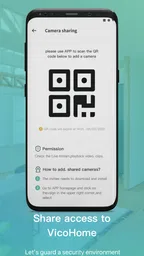
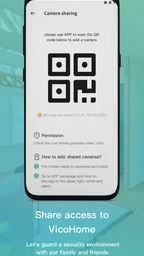
For households sharing responsibility, agree on who needs access and when. A camera can be useful for checking a delivery or keeping an eye on a familiar area, but unnecessary access can create privacy discomfort. Before inviting others into a camera routine, decide what they need to do and whether the app’s available sharing controls suit that arrangement. I would not assume that every household has the same access options or that a camera view should be shared broadly.
Finally, think about the job you want the camera to do before relying on it. A quick visual check is different from continuous security monitoring or keeping a formal record of events. If your needs are strict, test the exact workflow you depend on and keep a backup plan. That distinction helps prevent a convenient phone app from being mistaken for a guarantee that every important event will be captured or noticed.
Where the experience may fall short
The first limitation is ecosystem dependence. VicoHome is only compelling if it works with the devices you own or plan to buy. Before making a purchase decision around the app, confirm compatibility for the specific camera model through the product materials or app store. A polished phone interface cannot compensate for a camera that does not connect to it.
The second is that the app’s broad smart-device promise may not match every user’s definition of a complete smart home. Someone looking to manage lighting, heating, entertainment, and camera routines in one unified system may prefer a hub that clearly supports those wider needs. VicoHome makes more sense when camera access is the priority, not when the goal is to consolidate every household device into one control center.
There is also a difference between checking a camera and editing its footage. The category label may lead some people to expect tools for cutting clips or applying visual effects, but that is not the central use case I would recommend it for. If your main task is editing recordings, choose an editor built specifically around timelines, trimming, captions, and exports instead of expecting a camera companion to do that job.
Potential buyers should also be thoughtful about purchases. Since optional items span a wide price range, I’d review each item’s description and cost before confirming anything, especially if more than one person uses the phone. Free installation is a low-friction way to explore the app, not a reason to skip checking what a purchase actually provides.
Who should try it—and who should pass
I’d suggest VicoHome to someone who already has, or is choosing, a compatible camera and wants a phone-based way to check it during ordinary life. It may be especially convenient for people who want to verify a delivery, look in on a familiar room, or keep camera access close without using a full desktop setup. Its 1M-plus installs and solid average rating make it a credible candidate to evaluate, but the final test is whether it works smoothly with your own devices and habits.
I’d skip it if you have no compatible smart device, need a dedicated video editor, or expect one app to coordinate a diverse collection of smart-home products. I’d also consider a different camera app if your current system already gives you dependable access and the household has no clear reason to change. In this category, staying with the app that reliably serves your camera is often better than chasing a new interface.
What I would check before relying on it
Before making VicoHome part of a daily routine, I’d confirm the camera model is supported, install the app on a phone meeting its Android requirement, and test the connection in the places where I expect to use it. I’d also inspect any paid options before purchasing and make a household decision about who should have camera access. These checks answer the most important practical questions without assuming that every setup behaves identically.
My overall view is that VicoHome is best understood as a camera-oriented smart-device companion, not a universal home-control platform or a video-editing tool. Its established presence and free download make it reasonable to try when it matches your equipment, while the purchase range and device dependence call for a little care. If you want convenient camera checks and your hardware fits, it is worth evaluating; if your needs center on editing, broad automation, or a camera system that already works well elsewhere, a more specialized alternative is likely the better fit.
Looking ahead, I’d watch how future versions affect the everyday basics: device setup, returning to a camera, and dependable access when away. The current version number shows an ongoing product line, but it is better to judge each update by the changes users can actually see than to assume what will arrive next. For existing users, that means keeping the app current while testing the routine they depend on; for newcomers, it means checking compatibility and costs before building a household workflow around it.
What we like
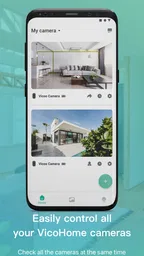
- Live viewing makes it easy to check a camera feed remotely.
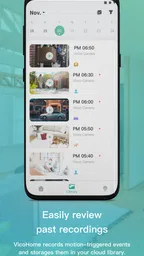
- Motion alerts can help you notice activity while away.
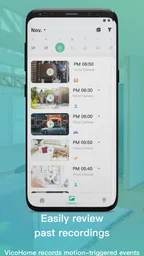
- Recorded clips make it easier to review events later.
- Two-way audio supports conversations through compatible cameras.
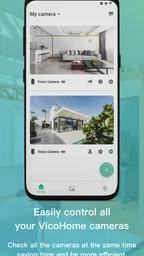
- The app can bring multiple compatible cameras into one place.
What could be better
- Some recording and cloud features may require a paid subscription.
- Camera compatibility can vary by device and model.
- Motion alerts may be delayed or triggered by irrelevant movement.
- Remote viewing depends on a reliable internet connection.
- Sharing camera access may require extra setup for other users.





