
Vibify-offline MP3 review
 Analysis by Appsdrops
I judge a music app less by a grand promise than by whether it earns a place in an ordinary day: while I’m getting ready, walking somewhere, or trying to make a quiet task feel less dull. Vibify, an Android music and audio app from Khan eCoding, is free to install, and its name suggests a focus on turning spare moments into listening time. That makes it an appealing idea, but the value of any music app ultimately depends on how well its actual listening experience fits your habits.
What the free price does—and does not—tell you
There is no upfront price to pay to try Vibify. That is a useful starting point if you are curious about it and do not want to commit money before deciding whether it belongs in your routine. The distinction matters: free access lowers the barrier to experimenting, but it does not, by itself, tell me what features are available, whether there are optional purchases, or how the app is supported. I would make a decision based on the experience you find in the app rather than assuming that free means every possible feature is included.
That cautious approach is particularly helpful for a music app. People often compare music players with subscription services, but those are not always direct substitutes. A paid streaming plan may be worth it if you want a large catalogue, recommendations, and a service that follows you across devices. A free music app can make more sense when you want a low-cost way to explore a particular listening routine. Before relying on Vibify for a specific need, I would check how its available music and playback options match that need.
Vibify is listed as a Music & Audio app and is rated for Everyone. Its audience figures suggest it has attracted broad interest: it has passed five million installs, with an average rating of 4.2 from around 4,800 ratings. Those figures are helpful context, not a promise that the app will suit every listener. I read them as a reason to give it a fair look, while still testing the details that matter to me, such as whether it fits the way I choose and play music.
Assess the experience before building a habit
The current version is 1.3.7, and the stated minimum Android requirement is version 7.0. If your device meets that requirement, compatibility is a sensible first check, but it does not tell you how the app will feel on your particular phone. I would install it when I have a few minutes to explore, rather than waiting until I need music immediately. That gives me time to see whether the basic controls are comfortable and whether the app’s approach fits my expectations.
It is also worth separating “free to download” from “good value for my own use.” If the app covers the listening situation you actually have, it may be useful without requiring a purchase. If you need a feature that is not available to you in the app, the zero upfront cost does not make it a replacement for a more suitable service. I would treat the free entry point as a chance to evaluate, not as evidence of a particular catalogue, offline policy, or premium arrangement.
Where a music app can earn its place
The clearest potential value for me is convenience. A music app becomes useful when opening it and getting to the sound I want feels easy enough to do repeatedly. If Vibify makes that process suit your routine, it could be a straightforward companion for brief listening sessions rather than another service you open only when you have time to browse. That distinction can matter more than a long feature list: in everyday use, small points of friction determine whether an app becomes part of a habit.
For example, imagine getting ready for work with only a few minutes to spare. You want something to listen to while packing a bag, not a long search through recommendations. In that situation, I would judge Vibify by how quickly I can reach a suitable listening choice and whether its controls are clear when I am moving around. The practical test is not whether the app sounds appealing in a short description; it is whether I can use it without interrupting the task I’m doing.
Another useful test is to try it during a walk or a short break. A good fit here depends on whether the app supports the way you like to listen and whether its interface stays easy to handle when your attention is elsewhere. I would begin with a familiar, low-stakes session rather than making it my only option for a long trip. That gives you a realistic sense of whether Vibify is comfortable for casual listening before you depend on it in a situation where you need uninterrupted audio.
There is also a quieter kind of value in having an alternative to the large streaming platforms. If your current service feels like too much browsing, Vibify may be worth trying as a different place to organize or start a listening session, depending on the options it presents. I would not assume that it offers the same breadth or tools as a subscription service. Instead, compare the actual task you care about: getting music playing, finding something suitable, or listening in the way you prefer.
How it compares with familiar alternatives
The usual alternatives fall into a few broad groups. Subscription streaming apps are often the stronger choice for people who want expansive catalogues, tailored discovery, and a polished ecosystem across devices. A device’s built-in player may be simpler if you already manage your own music and just need basic playback. Vibify makes most sense to evaluate between those expectations: does its own approach give you a convenient listening option without asking you to pay upfront?
I would not choose any app solely because it is free if I already have a dependable setup that meets my needs. Switching has a cost in attention: you may need to learn a new interface, adjust routines, and decide whether the app’s available choices are enough. On the other hand, if you are dissatisfied with your current way of listening, trying a free alternative can be a reasonable experiment. The key is to compare what you actually use rather than counting features you are unlikely to touch.
One practical way to make that comparison is to keep the same listening task in mind for both apps. Try starting music for a short chore, then repeat the task with the other player. Notice how many decisions you have to make and whether you can return to listening quickly after a pause. This is a more useful test than judging an app by its first screen alone, because everyday ease is what determines whether a music tool gets used.
Tradeoffs to consider before relying on it
Vibify’s free entry point is a clear advantage, but it does not remove the need to check whether the app matches your expectations. If you rely on a particular collection, detailed controls, or a consistent setup across several devices, verify those needs in practice before moving away from an app that already handles them well. I would be especially careful not to assume that the word “offline” in the requested app name guarantees a particular download method or listening policy; the sensible choice is to confirm the available behavior inside the app.
That is not a reason to dismiss it. It is a reason to test the exact feature you care about before building a routine around it. For instance, if you plan to use it where connectivity is unreliable, check how your music behaves in that situation before leaving home. If you mainly listen in places with a stable connection, that concern may be much less important. The right evaluation depends on your own use case, not on a general label.
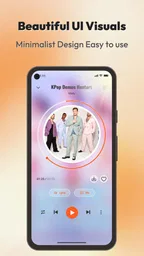
There can also be a tradeoff between simplicity and depth. An app that feels quick to use may be preferable for casual listening, while someone who likes fine-grained library management or extensive discovery tools may prefer a more established player. I would pay attention to whether Vibify’s layout helps you get to music or instead makes you work around a structure that does not suit you. If you find yourself repeatedly switching back to another app for basic tasks, that is a strong sign it is not the right replacement.
Finally, ratings are a rough signal rather than a personal guarantee. An average of 4.2 across thousands of ratings suggests many people have found something to like, but a rating cannot tell you whether their priorities match yours. I would use the app long enough to test a normal session, not just open it once and decide from appearance. If the central listening task feels smooth, that is more relevant than a popularity figure; if it does not, broad adoption should not persuade you to keep it.
Who is most likely to get value
I can see Vibify being worth a try for someone who wants a free music-and-audio app and is open to a different way of fitting music into short everyday moments. It may suit casual listeners who would rather test an option directly than pay first, as well as people who are not fully satisfied with their current listening routine. The Everyone age rating also makes clear that it is intended for a broad audience, though individual listening preferences still matter more than that label.
It is less compelling for someone who already has a music service that reliably provides everything they want, especially if they depend on a particular catalogue or advanced listening tools. It may also be a poor fit if you expect a particular offline workflow without checking how the app handles it. In those cases, your existing player or a service built around those specific needs is likely the safer choice. A free download is not a reason to add another app that creates more friction than it removes.
For a fair trial, I would give it three concrete checks. First, see whether you can start the kind of listening session you actually want without fuss. Second, try it during a normal activity, such as a short walk or getting ready, and notice whether you can operate it comfortably while your attention is divided. Third, check any must-have requirement—especially the way it handles the music you intend to play—before relying on it away from home. Those tests give you a useful answer without assuming features that may not matter to you.
My verdict: try it, but let your routine decide
Vibify is easiest to recommend as a no-upfront-cost experiment, not as an automatic replacement for every music service. Its 4.2 average rating and more than five million installs make it a credible app to consider, while Khan eCoding is the developer behind it. The current version is 1.3.7, and Android 7.0 is the stated minimum requirement. Those are useful reference points, but your decision should come down to whether the app makes your own listening easier.
I would try it if you want to explore a free music option for casual sessions and are willing to check how it works for your needs. I would skip it if your current player already feels effortless or if you need a specific capability that you have not confirmed in Vibify. For the right listener, its value is the chance to test a fresh listening routine without paying upfront. For everyone else, a familiar player that already does the job may be the better value.
My practical recommendation is simple: install it when you have time to evaluate it, use it in one ordinary situation, and decide based on the experience rather than the promise of an alternative. If it gets you to music more comfortably, keep it in your rotation. If it adds steps or leaves a must-have need unmet, there is little reason to force the switch. That is the fairest way to judge Vibify—by the small moments it improves, not by assuming it has to replace the way you already listen.
What we like
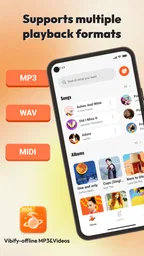
- Plays MP3 files without an internet connection.
- A useful choice for listening during travel or outages.
- Keeps playback available without mobile data use.
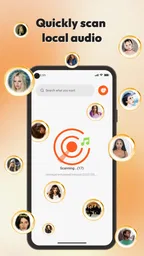
- Can make locally stored music easier to enjoy offline.
- Avoids interruptions caused by streaming connectivity.
What could be better
- You need to provide your own audio files.
- It cannot stream music from online services.
- Available tracks depend on what is stored on your device.
- MP3 support may not cover every audio format.
- Offline playback offers no access to online music catalogs.





