


viagogo Tickets review
 Analysis by Appsdrops
When I am deciding whether to go to a concert, match, or other live event, the ticket search can be as important as the event itself. viagogo Tickets is a free events app from Viagogo that puts ticket browsing on a phone, which is handy when I want to check what is available without sitting down at a computer. Its main appeal is convenience and breadth of choice; the trade-off is that buying tickets depends on a reliable connection and careful attention to the details of each offer.
Browsing and buying depend on a steady connection
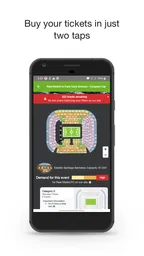
The app is most useful when I have internet access and a clear idea of what I want to see. I can search for an event, compare available options, and make a decision while I am out rather than waiting until I get home. That makes it a practical companion for spontaneous plans, especially when friends are discussing an event and want to see whether tickets are still available.
Connectivity matters at several points, not just when the app first opens. Event results and ticket availability are online information, so a weak signal can make browsing feel slow or interrupt a purchase flow. I would avoid leaving a decision until the last moment in a crowded venue, station, or other place where mobile service may be unreliable. Search and comparison are much less stressful when I can pause and check the details at my own pace.
The app presents a large selection, but a broad marketplace is not the same as a guarantee that every event or seat will suit me. I still need to read the offer carefully and compare the location, ticket type, and total cost shown before committing. My useful habit is to open a couple of plausible options, check their details, and only then decide. That reduces the chance of choosing quickly just because one result appeared first.
How it fits into event planning
I find this kind of app most valuable early in planning, when I am weighing dates or trying to turn a vague idea into a real outing. For example, if a friend mentions a weekend show while we are arranging dinner, I can look for the event then and there, see what choices are presented, and decide whether it is worth coordinating schedules. A phone makes that quick check easier than switching to a laptop, while a good connection lets me follow through rather than merely browse.
It is less suitable as a substitute for planning when the details matter a lot. If I need a specific seating area, have a strict budget, or am coordinating tickets for several people, I would take time to compare options rather than treating the first available listing as the answer. The app can help surface choices, but the final decision still benefits from patience and a careful read.
Using it on the move
A mobile ticket marketplace makes sense in everyday situations: checking an event during a commute, looking up options during a break, or discussing a possible night out with someone beside me. The smaller screen is convenient for quick decisions, but it also makes it easier to skim past important wording. I try to slow down at the point where an offer becomes a purchase, reviewing the event and ticket information rather than relying on a glance at the headline.
There is a useful distinction between browsing while mobile and relying on the phone at the event itself. Searching at home or somewhere with stable Wi-Fi gives me time to compare; searching in a busy crowd may add pressure and connection uncertainty. If I am already on my way, I would check my purchase and event details in advance while I have a dependable signal, rather than assuming that everything will load smoothly at the entrance.
For people who prefer a larger screen, a computer may be the better place to compare multiple listings or discuss choices with a group. The app is strongest when speed and portability matter more than having lots of screen space. I would use it for discovery and convenient checking, but I would not mistake a compact interface for a reason to rush a high-stakes purchase.
When a connection falters
Any interruption during an online purchase can leave a person unsure whether a step completed. If the app stops responding or the signal drops, I would first regain a stable connection and check the account or purchase information before trying the same transaction again. Repeating a payment action immediately without checking can create avoidable confusion, so a brief pause is the more sensible recovery step.
That same approach helps when results do not load as expected. I would try again after moving to a better-signal location or switching to a reliable Wi-Fi network, then confirm that I am looking at the right event and date. If the problem persists, I would use the app’s available help or account channels rather than guessing about the status of a transaction.
The important limitation is practical: an app that relies on online access is only as convenient as the connection available at the moment I need it. I would not plan around being able to complete a purchase from a dead zone, nor would I wait until a busy event entrance to resolve an account or ticket question. Checking relevant details ahead of time is a simple way to reduce the impact of a network hiccup.
Keeping mobile data use sensible
If I am watching my mobile data, I would do the broad search and comparison on Wi-Fi when that is convenient, then use mobile service for a quick check while out. I would also avoid repeatedly refreshing the same results just because availability is changing or I am uncertain; it is better to review the offer and refresh when there is a clear reason. This is a sensible general habit for an online marketplace, not a promise about a particular data-saving mode.
Travel planning is another moment to be deliberate. Before leaving home, I would note the event details and make sure I can access the relevant account information, rather than assuming a strong connection will be available en route. That preparation does not replace checking current details when needed, but it can stop a small network problem from becoming a last-minute scramble.
For a group outing, I would share the decision-making before anyone begins buying. Agreeing on the event, budget, and acceptable seating range in advance reduces the amount of back-and-forth on mobile data and helps avoid rushed choices when everyone is using different networks. It also makes clear who is responsible for checking the final purchase details.
Who will get the most from it
The app is a good fit for people who like to browse live events on their phone and value being able to check ticket options while away from a computer. It may also suit someone who has flexible plans and is willing to compare the available choices rather than expecting one fixed price or seat type. Viagogo has a 4.4 average from around fourteen thousand ratings, and the app has more than a million installs; those figures show that it has found a substantial audience, though they cannot tell me whether a particular listing is right for my needs.
It is less compelling for anyone who dislikes online marketplaces, has very limited connectivity, or wants a highly controlled purchase with extensive comparison on a large display. In those cases, I would consider checking the event organizer’s own ticket channel or another established ticket seller as well. The usual alternatives can be better when I already know the official seller, want to compare the same event across sources, or need to make a decision with a group looking at one screen.
For an event-focused app, the basics are clear: it is free, rated for Everyone, and developed by Viagogo. It first appeared on May 14, 2015, and version 106.9.18 lists Android 10 as its minimum operating system. Those details make it easier to judge whether the app fits a device, but they do not change the practical advice: check the offer carefully and use a connection you trust when making a purchase.
My connectivity verdict
I would recommend viagogo Tickets to a friend who wants a convenient way to browse event tickets on the go and is comfortable making decisions through an online marketplace. Its strongest use is finding and comparing possibilities at the moment plans take shape. The main drawback is not a complicated feature set so much as the dependence on a good connection and the need to inspect each offer instead of purchasing on impulse.
For me, the best workflow is straightforward: browse when the network is stable, narrow the choices before involving friends, read the ticket details carefully, and check purchase information before heading to the event. If that matches how you plan nights out, this is a useful option to keep on your phone. If you need dependable access in low-signal places or prefer to buy directly from an event organizer, another route may be the better choice.
What we like
- Compare ticket prices across multiple sellers in one place.
- Mobile tickets can be accessed directly from the app.
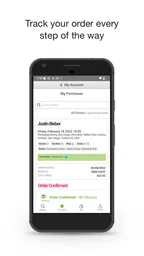
- Order tracking helps you monitor ticket delivery.
- Event listings cover concerts sports and theater.
- Customer support is available for order-related issues.
What could be better
- Prices can include substantial service fees at checkout.
- Ticket availability and prices may change quickly.
- Some orders rely on delivery close to the event date.
- Refunds may be limited when plans change.
- The app depends on a stable internet connection for browsing.





