
µTorrent®- Torrent Downloader review
 Analysis by Appsdrops
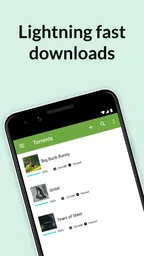
I find µTorrent® most useful when I want to manage torrent downloads directly on an Android phone, rather than leave that job to a desktop computer. It combines downloading with the ability to play files, which makes it practical for legitimate content I’m entitled to access. That combination is convenient, but it also asks me to be deliberate: torrenting can use substantial mobile data and storage, and the app’s usefulness depends on the sources I choose.
A torrent tool, not a general-purpose video library
µTorrent® is a free Android app from bittorrent.com in the video players and editors category. Its central purpose is clear: handle torrent downloads and let me play the resulting media. I wouldn’t choose it as my everyday streaming service or as a replacement for a full-featured video editor. It is for people who already have a lawful torrent file or magnet link and want a phone-based way to manage the transfer.
The app has been available since September 5, 2012, and its current version is 8.3.20. It is rated for Everyone and requires Android 7.0 or later. Its 4.6 average from around 5.4 million ratings, alongside more than 100 million installs, suggests it has reached a very large audience. Those figures may help set expectations for how established it is, but they don’t tell me whether a particular torrent is safe, legal, or worth downloading.
Trust starts with the source, not the download button
My main trust question with a torrent app is not simply whether the app is familiar. It is whether I trust the file and the people sharing it. A torrent can come from many sources, so I treat the app as a transfer tool rather than a guarantee about the content. I stick to material distributed by its creator, a recognized archive, or another source I have a good reason to trust.
That distinction matters especially on a phone. A download may be a video, but it may also be an archive or an unfamiliar file type. I don’t open something just because the transfer completed. I check the name and type first, and I avoid torrents that bundle files I didn’t expect. The app can make obtaining a file easier; it cannot make an untrusted file trustworthy.
I also keep the legal side simple: I use torrents for material I have permission to download or that is openly shared. The peer-to-peer method itself doesn’t establish permission. If a reader wants a curated catalog with clear viewing rights and no download management, a licensed streaming app is a better fit.
Controls that matter during a real download
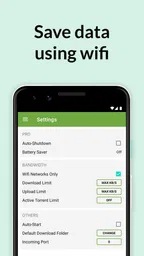
My practical advice is to treat a torrent as a task to supervise, not as a tap-and-forget stream. Before starting a large transfer, I check whether I’m on Wi-Fi and whether the phone has room for the complete file. If I’m using mobile data, I consider the size and my plan first. A download that runs in the background can be convenient, but it can also use more data or battery than expected.
For a multi-file torrent, I look carefully at what I’m choosing to retrieve. If the torrent contains several episodes, extras, or differently sized versions, downloading everything can waste storage. Selecting only what I need—when the available controls allow it—is a useful way to keep a phone manageable. I also avoid starting several large transfers at once when I need the device for calls, navigation, or other time-sensitive tasks.
One small workflow improvement is to make space before the transfer rather than after it. I check the phone’s available storage, remove files I no longer need, and decide where I’ll keep the finished media. This is more reliable than assuming a nearly full phone will cope. If a download stalls or takes longer than expected, I check the connection and the source before repeatedly restarting it; peer-to-peer availability can affect progress, and the app cannot compensate for a source that is no longer sharing.
Playing downloaded media without confusing it with streaming
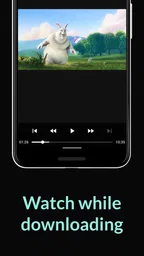
The built-in playback angle is the app’s most convenient feature for my everyday use. For example, if I’m preparing a permitted video for a long trip, I can start the download while connected to Wi-Fi and watch it later without relying on a live stream. That is a different experience from opening a streaming service: I’m responsible for the file, its storage footprint, and making sure the download has actually finished before I leave.
I would test playback with a short, ordinary file before relying on the app for a long viewing session. That gives me a chance to see whether the particular file works well on my device and whether the phone has enough space. If playback is awkward or the media format doesn’t suit my needs, a dedicated Android video player may offer a better viewing experience. The value here is having downloading and playback together, not necessarily having the best playback controls in every situation.
There is also a useful distinction between downloading and watching while a transfer is underway. I don’t assume that every torrent can be watched immediately or smoothly before it is complete. File order, transfer progress, and the source can affect that experience. When I need a guaranteed start time—say, for a meeting or a flight—I finish the download and check the file beforehand instead of relying on a partial transfer.
Privacy and data-sensitive moments
Torrenting is a network activity, so I think about the connection I’m using and the source I’m contacting. On a shared or metered connection, I’m particularly cautious about starting a large download. I also avoid treating a public Wi-Fi connection as a reason to skip ordinary care: I use sources I trust and pay attention to what I’m downloading.
I don’t make assumptions about an app’s permissions or data practices based on its purpose or popularity. When I install any Android app, I review the permission prompts shown on my device and use the available Android settings to inspect or change access where offered. If a prompt doesn’t make sense for what I’m trying to do, I pause and consider whether I need that access before continuing. This is a practical habit, not a claim about a specific permission being requested.
For sensitive files, I consider the whole path: the source, the network, the phone’s storage, and who can access the device. I avoid downloading private material onto a shared phone unless I’m comfortable with it being stored there. After watching, I can remove files I no longer need and reclaim storage. That simple cleanup step is easy to overlook when the download itself feels like the main event.
Where it fits among the alternatives
Compared with a browser download manager, µTorrent® is aimed at torrent transfers rather than ordinary downloads from a single website. Compared with a desktop torrent client, it puts the task on Android, which is handy when I want to manage a file away from my computer. The trade-off is that a phone has tighter limits on battery, storage, connectivity, and multitasking, so I’m more selective about what I start.
Against conventional video players, its advantage is the download workflow alongside playback. A dedicated player is the better choice if I already have media files and mainly care about viewing controls or library organization. A streaming app is better when I want a ready-made catalog and don’t want to manage files. And if my goal is to create or edit video, the category label can be misleading: this app’s practical focus is torrents and playing downloaded media, not video production.
There are also cases where I would skip it. I wouldn’t recommend it to someone who wants one-tap access to licensed films, has little free storage, relies on a limited mobile-data allowance, or feels uncomfortable checking the legitimacy of individual files. It is also a poor match for anyone expecting a torrent app to verify every download’s safety or availability. Those are decisions and conditions the user still has to manage.
Costs, choices, and day-to-day control
The app is free to install, with in-app purchases listed at $2.99 per item. I would decide whether the free experience meets my needs before spending anything, rather than assuming a purchase is necessary for basic use. The important point for a cautious user is to read the purchase screen and make an intentional choice; I don’t treat an optional in-app purchase as a reason to buy before trying the app.
My sense of control comes from small habits: choose a trusted source, check the files before starting, use Wi-Fi for large transfers when appropriate, keep an eye on storage, and remove downloads when they’re no longer useful. I also make time to review Android’s app settings after installation instead of assuming every choice is permanent. These steps matter more than tapping through a setup quickly, particularly for someone new to torrents.
For a realistic routine, I might queue a permitted documentary at home, confirm that the file is the one I intended to get, and let the transfer finish while the phone is on Wi-Fi. Before leaving, I check that the media opens and that I have enough battery and storage for the trip. If any of those checks fail, I postpone the plan rather than count on an incomplete download. It is a little less effortless than streaming, but much more dependable than discovering the problem offline.
My cautious recommendation
I’d recommend µTorrent® to an Android user who already understands peer-to-peer downloads and wants a straightforward way to manage permitted torrents and play the results on the same device. Its long-running presence and broad adoption are reassuring context, while its free entry point makes it easy to try. Still, neither popularity nor a polished transfer workflow removes the need to choose sources carefully.
I would skip it if I wanted a hands-off media subscription, a dedicated editor, or a tool that made privacy and file legitimacy automatic. For everyone else, the best experience comes from using it intentionally: start with a trusted, modest download, check Android’s visible permission choices, and see how playback works on your phone before relying on it for a large file. That is the balance I’d suggest to a friend—useful when the job is specifically torrenting, but not a substitute for good judgment.
In short, this is a focused option for downloading and playing torrents on Android, not a universal answer to media access. I like the convenience of keeping those steps together, but I treat data use, storage, and source selection as part of the task. If those trade-offs suit you, it can earn a place in your toolkit; if they don’t, a conventional video player or licensed streaming service will likely feel simpler.
What we like
- Supports magnet links for starting downloads without torrent files.
- Offers selective file downloads within a torrent.
- Includes a built-in media player for supported files.
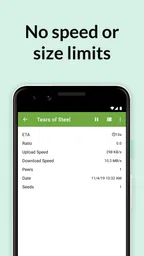
- Lets users set download and upload speed limits.
- Provides Wi-Fi-only download settings to help manage mobile data.
What could be better
- Contains ads in the free version.
- Downloading copyrighted content without permission may be illegal.
- Torrent files can expose users to malware or misleading content.
- Battery use can rise during long downloads.
- Some features require a paid upgrade.





