




Unbiased Headlines review
 Analysis by Appsdrops
When a news app promises a less slanted reading experience, I want to know what that means in practice—and what choices I actually get as a reader. Unbiased Headlines is a free news and magazines app from Unbiased Headlines, aimed at people who want to read, listen to, or watch news without feeling pushed toward one particular viewpoint. That is an appealing goal, but a promise of impartiality is a starting point for scrutiny, not proof that every story is neutral.
A useful idea, with trust still to be earned
I would approach this app as a way to explore news, not as a substitute for checking important claims. The name sets an ambitious expectation: that headlines and coverage can be presented without bias. In my view, the practical test is whether the range and framing of stories help me understand an issue, and whether the app gives me enough control to shape my experience. Readers should judge the coverage they see rather than treating a label as a guarantee.
The app’s focus on multiple ways to follow news is a sensible fit for different routines. Reading works for close attention, while listening or watching can suit a commute or a short break. I would choose a format based on the moment, then return to written coverage when I need to inspect details or compare how a story is framed. That simple habit makes the format options more useful than treating audio or video as a complete replacement for reading.
Its developer is Unbiased Headlines, and the app sits in the news and magazines category. It is free and marked for everyone, so the initial decision to try it is straightforward. The displayed average is 4.5 from 37 ratings, with 13 written reviews and over 10,000 installs. Those figures suggest some early interest, but they are not enough on their own to establish how consistently the app handles a wide range of topics.
What “unbiased” should mean to a careful reader
News selection itself involves choices: which events appear, which details lead a story, and how much context accompanies a headline. Even if an article’s wording is measured, the overall selection can shape what a reader notices. I would therefore pay attention not only to whether a headline sounds calm, but also to whether the coverage helps me distinguish reporting, interpretation, and missing context.
A practical way to use the app is to treat a headline as a prompt rather than a conclusion. If a story affects a decision, I would read beyond the summary and check whether the account gives enough background to understand what happened. For contentious subjects, comparing the app’s presentation with another reputable source can reveal differences in emphasis. This is not a reason to dismiss the app; it is a sensible safeguard for any news source.
That approach also clarifies who may appreciate it. Someone who wants a convenient place to encounter news in more than one format may find the premise useful. A reader who expects a platform to settle disputes or remove the need to compare reporting should be more cautious. No single app can make the reader’s judgement unnecessary, especially on complex or fast-moving stories.
Controls matter as much as the promise
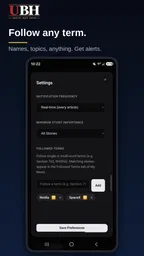
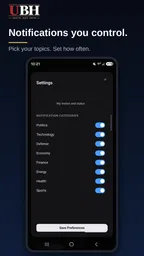
Trust depends partly on visible controls: whether I can see what choices are available, understand what they affect, and change my mind without friction. I would look for those options in the app itself and in the device’s system settings, rather than assuming that a general claim about impartiality tells me how personalization or data use works. The information available about this app does not establish particular account controls, privacy settings, or permissions, so I would not assume that a specific control exists.
That distinction is important. A reader may be comfortable choosing topics or formats while wanting to limit notifications, personalization, or account-linked activity. Before making the app part of a daily routine, I would inspect any settings it presents and consider whether their wording is clear. If a choice is absent or hard to understand, I would avoid treating that silence as evidence either of strong privacy protection or of intrusive tracking.
On a phone, a useful practical check is to review the permissions the operating system shows for the app and grant only those that make sense for the features I actually use. I would also notice whether the app asks me to create an account and what the screens say before I enter personal details. These are general steps for evaluating a news app; they are not claims that Unbiased Headlines requests any particular permission or account information.
Everyday use without surrendering judgement
Imagine checking the news before work. I might use a short reading session to scan what is happening, then listen to coverage while getting ready if that format is available in the moment. Later, for a story that could affect a family decision, I would return to the written account and compare it with another source. This workflow uses the app as a convenient first stop while keeping consequential decisions grounded in more than one presentation.
A less obvious benefit of separating those moments is that it helps prevent a fast headline scan from becoming the whole news habit. I would reserve audio or video for orientation and use reading for closer examination. If I notice that one issue appears repeatedly or that a headline feels unusually decisive, I would pause before sharing it and look for the supporting context. That is a simple way to make a news feed more useful without assuming its framing is complete.
There is a trade-off, though: following news through several formats can make it easier to stay informed, but it can also make a person feel caught up without having checked the underlying details. The app’s stated combination of reading, listening, and watching is most valuable when I choose deliberately rather than letting convenience decide how much attention a story gets. For a quick update, a brief scan may be enough; for a disputed claim, it is not.
People who prefer a highly customizable feed, detailed source comparisons, or explicit privacy and account controls should verify that those needs are met before relying on the app. I would not assume those capabilities from its general purpose. If a reader’s main priority is to examine original reporting from a particular publication, going directly to that publisher may be a better fit. If the goal is to compare competing interpretations, using more than one news source remains the safer approach.
Getting started and setting expectations
The app is listed at version 0.1.144 and requires Android 7.0 or later. For a prospective user, that gives a basic compatibility check, but it does not tell me how the app behaves on a particular device or how its controls are arranged. I would install it, explore the available settings before settling into a routine, and check whether the formats and presentation suit the way I actually consume news.
Because it is free, trying it does not require a purchase, but I would still make a considered choice about notifications and any personal information requested during setup. If I use it regularly, I would revisit those choices rather than assuming my first setup remains right. The age classification is Everyone, which indicates broad suitability in the store’s labeling; it does not change the need to assess whether the news content is appropriate for a particular reader.
When deciding whether to keep it, I would ask three practical questions: Do I find coverage that helps me understand events? Can I control the experience in ways that matter to me? And do I still feel the need to check important stories elsewhere? If the app works as a convenient route into news while leaving room for those checks, it can earn a place in a reader’s routine. If its presentation feels too limited or its choices are not clear enough for your comfort, there is no reason to make it your main source.
A cautious recommendation
Unbiased Headlines has a worthwhile premise and a useful range of news formats, and I can see it suiting readers who want an accessible starting point for following current events. I would recommend trying it with a curious but measured mindset: notice how stories are framed, inspect the choices the app actually offers, and compare consequential coverage rather than relying on a claim of neutrality alone.
My verdict is positive but deliberately cautious. The free entry point and straightforward news focus make it easy to consider, while the app’s promise should be judged through what a reader sees and can control in use. It is most compelling as one part of a broader news routine, not as an unquestioned authority. If that distinction matches how you like to stay informed, it may be worth exploring; if you need proven privacy controls or extensive source-comparison tools, choose a service that clearly meets those needs.
What we like
- It helps readers spot emotionally loaded wording in news headlines.
- The focused format makes it quick to use during a news-reading session.
- It can encourage users to compare claims with the full article.
- The topic supports stronger media literacy habits.
- It offers a simple way to reflect on how headlines shape reactions.
What could be better
- Its usefulness depends on the headlines and sources it covers.
- A headline alone may not provide enough context to judge a story.
- Users may need to verify its assessments against other sources.
- It may not suit readers looking for broader news coverage.
- Headline analysis cannot by itself confirm whether an article is accurate.





