


Ultimate Guitar: Chords & Tabs review
 Analysis by Appsdrops
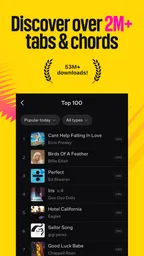
I reach for Ultimate Guitar: Chords & Tabs when I want to get from “I know that song” to actually playing it, without stopping to search through scattered chord pages. It is a music-learning app built around tabs and chords for guitar, ukulele, bass, and other instruments. In practice, its main appeal is the breadth of its song library; its main challenge is that a large collection can still require patience to find the arrangement and level that suit you.
A big song library is useful only when you can make it work for you
Ultimate Guitar is a free Music & Audio app from Ultimate Guitar USA LLC. It has an average rating of 4.2 from around 640,000 ratings, and more than 10 million installs. Those figures suggest it has become a familiar option for players, but they don’t guarantee that every tab is accurate or that every song will have a version you like. I’d treat it as a practical repertoire tool, not a substitute for listening carefully and checking what you play.
The first useful distinction is between finding a song and learning it. A result may get you close to the right title, but then you need to judge whether the tab matches the recording, whether the chords are manageable, and whether the arrangement fits your instrument. I recommend listening to a passage before practising it, then checking the tab against the rhythm and notes you hear. This small habit prevents a common frustration: memorising an arrangement that turns out to be a poor fit for the version you wanted to play.
The app’s range across instruments is a genuine advantage. If you play guitar but sometimes pick up a ukulele, or you want to compare a bass part with the guitar harmony, you can use one place to explore those different approaches. That does not mean every song will have equally useful material for every instrument. I’d search with a specific instrument and learning goal in mind rather than assuming the first result will cover everything.
Picking the right version matters more than scrolling quickly
For a beginner, the most playable result is not always the closest transcription of the original recording. A simplified chord arrangement can make a song approachable, while a more detailed tab may better capture a riff or picking pattern but demand cleaner technique. I find it helpful to decide which outcome matters before settling in: singing along with basic chords, learning a recognisable hook, or working toward a closer recreation.
Try a short section before committing to a full song. If a chord change feels awkward, slow down and isolate the transition rather than repeatedly running the whole progression. If the notes sound wrong, compare the tab with the recording instead of assuming the problem is your playing. These are simple steps, but they make a library app more useful as a practice companion and less like a pile of search results.
In an everyday situation, I might have fifteen minutes before meeting friends and want to refresh a song I used to play. I’d find a chord version, check the opening progression, and practise the transitions that are easy to forget. For a planned practice session, I’d take a different route: choose one riff, compare its tab with the recording, and work on it in small sections. The same collection can serve both needs, but the second approach benefits from more deliberate checking.
Where it fits beside other ways of learning
Compared with a general chord-reference app, Ultimate Guitar is better suited to searching for a particular song and exploring arrangements rather than simply looking up an unfamiliar chord shape. Compared with video lessons, tabs put the written notes and chord sequence closer to the centre of the experience. That can be faster when you already understand tab notation, but a video teacher may be clearer when you need to see a strumming motion, finger placement, or how a difficult transition is physically performed.
It also differs from learning entirely by ear. A tab can give you a useful starting point, especially when you are trying to work out a song quickly. But following notation without listening can leave you with the right-looking symbols and the wrong feel. I’d use the app to support your ear, not replace it: listen for the groove, notice where the changes happen, and treat the written arrangement as something to test rather than unquestioningly copy.
The app is most compelling for players who enjoy learning songs independently, can read at least basic chord charts or tablature, and want one collection that spans several instruments. It is less ideal if you need a structured course that takes you from fundamentals to advanced technique, or if you learn best through a teacher giving immediate feedback. In those cases, lessons or a focused instructional app may help more than a searchable catalogue.
What the current release tells existing users
The current version is 7.3.38, while the app’s release date is October 13, 2010. That long history gives the product a sense of continuity, but a version number and release date alone do not explain what has changed between releases. I would not infer a particular redesign, feature addition, or improvement from those details. What matters to someone already using it is whether the current app still supports their routine: finding songs, selecting a workable arrangement, and returning to material they want to practise.
If you have used an older version, the safest way to judge the present experience is to try your usual searches and practice habits rather than expecting a specific change. Look for a song you know well, check whether the available arrangement makes sense to you, and see how easily you can move from browsing to playing. That gives you a practical comparison with your own experience without assuming that every update has altered the same parts of the app.
For a new user, the long-running presence and broad adoption are reassuring in a limited way: this is not an obscure one-purpose tool. But popularity is not an accuracy check. I’d still compare important parts against the recording, particularly for songs where a wrong bass note, unusual tuning, or awkward chord interpretation would derail practice.
Free to start, with a paid layer to consider
The app is free to download, but it includes in-app purchases ranging from $0.99 to $109.99 per item. That is a wide span, so I’d avoid buying anything until I had tried the free experience and understood which part of my routine actually needs more. If you are only looking up a few chords now and then, you may not need to spend anything. If you use it frequently, decide whether a paid option solves a concrete inconvenience for you rather than treating an upgrade as a requirement for learning.
The age rating is Teen. That is useful context for families deciding whether the app suits a younger musician, though it is still sensible for a parent or guardian to review the app’s content and purchasing setup before a child uses it. For anyone concerned about accidental spending, checking purchase controls on the device is a practical precaution.
Its minimum operating-system requirement is 7.1. Before installing, I’d check that the device meets that requirement and has enough room for a comfortable practice session. The version number is useful when asking for help or comparing notes with another user, but it is not, by itself, a reason to update or avoid the app.
Where friction can interrupt a practice session
The greatest strength—having a large number of possible arrangements—also creates a selection problem. A beginner can encounter material that looks relevant but is too demanding, while an experienced player may have to inspect several options before finding one that captures the part they care about. Rather than judging the app by how quickly the first search result appears, judge it by whether you can find a usable version and make steady progress with it.
Another limitation is that written notation does not explain every musical decision. Tabs can show where to put your fingers, but they may not teach you the phrasing, dynamics, or feel that make a performance convincing. If a passage remains confusing after repeated attempts, a demonstration or lesson can be a better next step than continuing to stare at the same line. That is not a failure of the app; it is a reminder that songs are more than their notes.
I would also avoid treating a chord sheet as a complete arrangement. A few chords can be enough to accompany singing, but they may omit a signature riff or instrumental detail. Decide whether your goal is a playable accompaniment or a close match to the recording. That distinction keeps expectations realistic and makes it easier to choose an arrangement that feels satisfying instead of needlessly difficult.
Who I’d recommend it to—and what I’d watch for
I’d recommend Ultimate Guitar to someone who wants a song-first way to practise and is comfortable doing some quality checking. It can be especially handy for keeping a casual repertoire moving: find a familiar track, refresh its chords, and spend the session playing rather than building an entire lesson plan. It also makes sense for players who switch between guitar, ukulele, and bass and want to explore song material across those instruments.
I’d suggest a different option if you need a carefully sequenced curriculum, personal correction, or visual demonstrations for every technique. A teacher or video-based course can address those needs more directly. And if you are learning from scratch, do not let a huge catalogue push you into choosing songs solely because they appear in search. A handful of well-chosen, manageable arrangements will teach more than a long list you never practise.
For what to watch as you keep using it, focus on your own results rather than guessing what a future release might bring. Does the arrangement you choose sound right when played along with the recording? Can you return to useful songs without losing time to browsing? Are you practising a specific skill, or just collecting tabs? Those questions give you a clearer measure of value than an assumed feature roadmap.
My overall view is that this is a useful, broad song-learning app with a clear role: helping players find written material and turn songs they enjoy into practice. Its free starting point lowers the barrier, while its purchase options mean it is worth checking your needs before paying. The best way to get value from it is to treat each tab as a starting point, verify it by ear, and practise one manageable section at a time. If that matches how you like to learn, it is easy to see why so many players keep it close; if you need structured teaching or hands-on feedback, pair it with another learning method or choose that method instead.
What we like
- Offers a large catalog of guitar tabs and chord sheets.
- Includes tools for transposing songs to a different key.
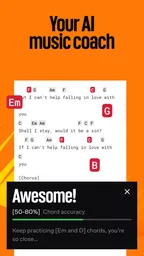
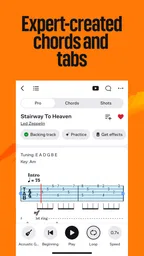
- Provides interactive tabs with playback for guided practice.
- Lets users save songs for convenient access later.
- Supports guitar tuning and basic practice features.
What could be better
- Many advanced features require a paid subscription.
- Tab accuracy can vary because much content is user submitted.
- Some songs have limited or no free tab options.
- The large catalog can make it hard to find reliable versions.
- Interactive playback may not match every arrangement exactly.





