


U.S. Bank Mobile Banking review
 Analysis by Appsdrops
When I want to check a bank account, I usually want a quick answer: what came in, what went out, and whether I need to do something next. U.S. Bank Mobile Banking is built around that everyday job. It is a free finance app from U.S. Bank Mobile, and its strongest appeal is straightforward: it gives existing U.S. Bank customers a mobile route to manage their banking without making the phone experience feel like a separate product from the bank itself.
A mobile companion for U.S. Bank customers
This is not a general budgeting tool or a way to compare banks. It is the mobile banking app for people who already use U.S. Bank, so its usefulness depends first on having a relationship with the bank. If you do, it can be a practical place to handle routine account checks and banking tasks while away from a computer. If you do not, there is little reason to install it just to browse: its purpose is account access, not financial education or shopping for services.
The app sits in the finance category and is developed by U.S. Bank Mobile. Its store page describes it briefly, but the more useful way to think about it is as a day-to-day control point for your existing banking. I would reach for it to check an account before making a purchase, review a recent transaction, or deal with a simple banking task while out. I would not treat it as a replacement for careful monthly budgeting or as a complete picture of money held at several different institutions.
Its broad adoption is notable: it has more than 10 million installs, a 4.7 average rating from around 516,000 ratings, and about 220,000 written reviews. Those figures suggest that many people find it useful, but they do not guarantee that every task or device will feel equally smooth. Banking apps are especially personal: the account types you hold, how often you use mobile banking, and whether you prefer a branch or a desktop all affect the experience.
What the current version tells me
The current version is 3.83.65, and the app first appeared on October 4, 2011. That long history matters in a modest but practical way: this is an established mobile banking product, not a newly launched experiment. Still, a version number by itself does not tell me which screens changed or how a particular task works. I would judge the current release by whether it supports the banking routine I actually need, rather than assuming that a later number means every part of the app has been redesigned.
The app is listed for Android devices running version 10 or later, and its content rating is Everyone. It is free to download. That makes trying it relatively simple for eligible Android users, although the app’s real value comes from being a U.S. Bank customer and being comfortable doing financial tasks on a phone. I would check device compatibility before planning to rely on it, especially if I use an older phone.
Its clearest strength is convenience for existing customers, not breadth for everyone. A bank’s own app can be more directly relevant than a third-party money manager when the task is tied to that bank account. At the same time, a single-bank app naturally has a narrower view than a tool designed to combine accounts across multiple providers. That distinction is important: convenience within one banking relationship is not the same thing as a whole-household financial dashboard.
How I would fit it into an ordinary week
Imagine I am at a grocery checkout and want to confirm that a recent deposit has arrived before moving money or making another purchase. A bank app is useful in that moment because the question is immediate and account-specific. I can check from my phone instead of waiting until I get home and open a computer. For routine decisions like this, speed and clear account context matter more than elaborate charts.
Another sensible workflow is to use the app as a short review stop after a card purchase or bill payment. Rather than trying to remember every transaction at the end of the month, I can check activity when the event is still fresh in my mind. If something looks unfamiliar, noticing it promptly gives me a better chance to investigate while I can still recall where I was and what I bought. That is a practical habit, not a reason to assume the app itself will identify every unusual transaction for me.
I would also separate quick checks from more involved financial work. A phone is convenient for confirming a balance or looking over recent activity, but comparing several months of spending, organizing shared household finances, or planning a long-term budget is often easier on a larger screen or in a dedicated budgeting service. Using the bank app for access and another tool for broader analysis can be a better fit than expecting one app to do both jobs.
Evolution without guessing at the changes
The product’s release history shows that U.S. Bank has maintained a mobile banking app over many years, and version 3.83.65 is the current version identified here. That is enough to say the app is an ongoing product rather than a one-off launch. It is not enough to claim that a particular feature was added, that a redesign improved a task, or that an update fixed a specific problem. I would rather keep those conclusions separate from what the release information actually establishes.
For an existing user, a current version can matter because mobile operating systems and banking needs change over time. Keeping an app current is a sensible part of maintaining access, but I would still make sure I know how to reach the bank through another route if the phone is unavailable or an update causes a temporary snag. A banking app should make routine access easier; it should not be the only way I know how to manage an important account.
Long-running apps can also carry familiarity. If I already use U.S. Bank, I may value having a recognizable mobile channel for regular checks more than a new visual style or a large collection of extra tools. The trade-off is that an established product can still have friction in a particular workflow, and I should test the tasks I rely on rather than assuming that age or popularity makes every screen intuitive.
Where a bank app can feel limiting
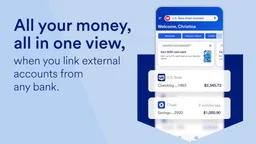
The main limitation is its bank-specific focus. If I keep money at several institutions and want one combined balance, spending picture, or household budget, this app alone is unlikely to be the best center for that job. A cross-bank financial manager may be more useful for aggregation, while U.S. Bank Mobile Banking remains the more direct choice for tasks connected to U.S. Bank. These tools solve different problems, so choosing one does not necessarily mean the other has failed.
There is also a reasonable privacy and comfort question. Some people simply prefer not to handle financial accounts on a phone, particularly when sharing a device or using it in public. I would use a secure personal device and avoid checking sensitive information where someone nearby can see the screen. If I am uncomfortable with mobile banking, a computer or in-person banking may suit me better; the app’s convenience is not worth ignoring my own security habits.
Another friction point is that a phone interface is not always ideal for careful review. Small screens can make it harder to compare transactions, read a long account history, or work through a complicated financial decision. I would use the app for the quick question it answers well, then switch to a larger screen or another appropriate channel when I need more context. That boundary keeps the app useful without asking it to replace every part of banking.
Who is likely to get the most from it
I would recommend it to someone who already banks with U.S. Bank, uses an eligible Android device, and wants a convenient mobile way to stay connected to that banking relationship. It is especially sensible for people who make frequent small checks throughout the week or who want to handle routine account activity while away from home. The best reason to install it is not its popularity alone; it is that it puts the bank you already use within reach.
I would suggest looking elsewhere if the main goal is to connect accounts from many banks, build a detailed spending plan, or find a new institution. A budgeting app can offer a broader view, and a bank’s website or another banking channel may be preferable for people who avoid financial activity on phones. Those alternatives are not necessarily substitutes for this app’s direct connection to U.S. Bank; they simply match different priorities.
Before depending on it, I would check that my phone meets the Android requirement, install the app through the app store, and confirm that I can sign in and reach the account information I need. I would then try a low-stakes routine, such as checking an account after a purchase, before making the app my only familiar route to banking. This small test is more useful than judging the experience from a rating, because it reveals whether the actual account workflow works for me.
What I would keep an eye on
For current users, the practical things to watch are whether the app remains compatible with their device, whether the routine tasks they depend on remain easy to find, and whether updates make those tasks clearer or introduce extra steps. The version number can help identify the installed release, but it does not explain the quality of a change on its own. I would pay attention to the experience after updating and keep a backup way to contact or access the bank.
For someone deciding whether to install it, I would focus on fit rather than promises: do you bank with U.S. Bank, do you want account access on Android, and are you comfortable handling banking from a phone? If those answers are yes, the app is a sensible place to start. If you need multi-bank planning or prefer a desktop-first routine, a different tool or channel may serve you better.
Overall, I see U.S. Bank Mobile Banking as a focused companion for customers who want everyday banking close at hand. It is free, established, and widely used, but those qualities do not turn it into an all-purpose money manager. I would recommend it to an existing customer who values mobile access and is willing to keep broader budgeting or multi-bank tracking in a separate tool. That is the honest appeal: it can make one banking relationship easier to manage without pretending to solve every financial task.
What we like
- Biometric sign-in makes account access quick on supported devices.
- Card controls let you lock a misplaced card from the app.
- Custom alerts help you monitor account activity and balances.
- Mobile check deposit saves a trip to a branch.
- Bill pay keeps recurring payments organized in one place.
What could be better
- Some features may require an eligible U.S. Bank account.
- Mobile deposit limits can restrict large check deposits.
- Transfers to external banks may take several business days.
- App availability and features can vary by device and account.
- Some account changes may still require contacting customer support.





