
TuneCarry: Offline Music review
 Analysis by Appsdrops
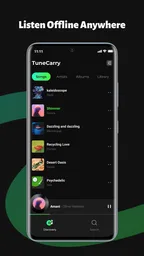
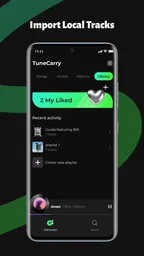
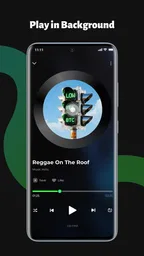
I like the idea behind a music player that keeps the focus on songs already stored on your device. TuneCarry: Offline Music is built around that simple use: carry local tracks offline, organize them with playlists and folders, and use lock screen controls. That makes it a practical option for anyone who wants personal music close at hand without making streaming the center of the experience. Its appeal is easy to understand, though how comfortable it feels will depend on how well its basic controls fit your routines and needs.
A straightforward approach to local music
TuneCarry is a free music and audio app from Photos & Videos Download Tools. It has a 3.6 average from around 530 ratings, with over 1 million installs. The current version is 1.0.4, and it is intended for devices running Android 8.0 or later. The app is rated for Everyone, so its audience is broad; in practice, its usefulness comes down to whether you want an uncomplicated way to listen to music kept locally on your phone.
Readability and navigation
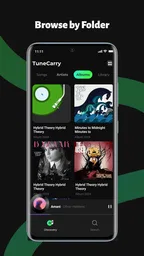
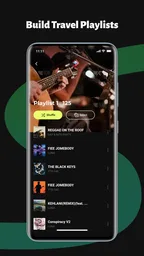
The clearest thing about TuneCarry is its organizing model. Playlists and folders give listeners two familiar ways to arrange local songs: group tracks by mood or occasion in a playlist, or keep a folder-based collection in line with how music is already stored. I find that choice helpful because people do not all think about their libraries in the same way. A listener who prefers purposeful mixes can lean on playlists, while someone who already sorts albums or collections into folders can keep that structure in view.
That said, knowing the app supports these tools is not the same as knowing how every screen is laid out. I would not assume that navigation is effortless for everyone simply because the features are familiar. The real test is whether the labels are clear, the library is easy to scan, and moving between songs, playlists, and folders feels predictable. If the interface makes those common tasks easy to recognize, the app’s restrained purpose could be a real advantage: fewer competing activities can mean less to learn before getting to the music.
For readability, the essentials are consistency and legibility. Song lists can become tiring when titles, artists, or controls are hard to distinguish, especially for people who prefer larger text or need stronger visual separation. A clear hierarchy would help listeners spot what they want without having to inspect every row. Since I can only recommend the app on the basis of its known features rather than assume particular display options, I’d suggest trying a small collection first and checking whether the text and controls are comfortable on your own device.
Search and sorting can also shape how accessible a library feels, but I would not count on particular tools beyond the playlists and folders that define the app’s stated approach. If your collection is large, spend a little time organizing it in a way that makes sense to you. That small effort may make repeat listening more straightforward, whether you are choosing a folder for an album or returning to a playlist you have made for a particular part of the day.
Motor and sensory considerations
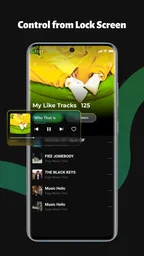
Listening often involves using a phone while doing something else, so lock screen controls are one of TuneCarry’s most relevant conveniences. They can make everyday playback interactions easier to reach without reopening the app. For a listener with limited dexterity, reducing the need to navigate through several screens may be useful, although the practical benefit still depends on the size, spacing, and clarity of the controls on the device in use. I would treat this as a helpful design direction, not a guarantee that every interaction will suit every motor ability.
Physical comfort is personal. Some people can tap small controls accurately; others find repeated or precise touches frustrating. A simple player can reduce the number of decisions involved, but it cannot automatically solve issues such as difficult target sizes, awkward placement, or a need for alternative input. If touch interaction is a concern, try the core actions you expect to use most: starting a track, changing songs, and returning to a preferred playlist. That is a more useful check than judging the app by its feature list alone.
Sensory needs vary just as much. A music player is an audio-focused product, but people may listen at different volumes, in different surroundings, or with different preferences for visual stimulation. A quiet, focused interface can be welcome for someone who wants fewer distractions, while someone who relies on strong visual cues may prefer more obvious feedback when playback changes. I would avoid assuming that an offline player is inherently calming or accessible; the right fit depends on how its presentation and controls feel to the individual.
There is also a practical distinction between controlling playback and understanding the interface. Lock screen controls address the first in a useful way, while readable labels and predictable navigation matter for the second. Both count when considering inclusive design. If one part works well but the other is difficult to use, the overall listening experience can still feel demanding. TuneCarry’s core idea is uncomplicated, but its value for people with sensory or motor differences will ultimately be shaped by the clarity and comfort of the actual interaction.
Listening across different situations
The offline focus is the feature that gives TuneCarry its clearest situational role. Local songs can be useful when a listener wants to take a personal collection along and keep the listening experience centered on those files. That may suit a commute, a trip, or a place where a person prefers not to rely on an online music service. I’m careful not to turn that into a promise about battery use, data consumption, or operation in every environment; the straightforward point is that the app is designed to carry local songs offline.
That approach can also matter for people who choose music as part of a familiar routine. A playlist can be prepared around a specific activity, and folders can preserve a collection’s existing organization. When a listener has a preferred set of tracks, being able to return to that structure can make music easier to fit into the day. The same simplicity may appeal to someone who wants to avoid a crowded discovery experience and get directly to songs they already know.
Lock screen controls add another layer of situational convenience. If the phone is in a pocket or resting nearby, playback controls on the lock screen can make common adjustments more accessible than reopening the full player. This can be useful when attention is divided, but listeners should still use controls safely in contexts where handling a phone would be distracting or inappropriate. Convenience does not replace awareness of the surroundings.
Local music also suits people who have already invested time in keeping files in folders. Rather than requiring a listener to rethink their whole collection, TuneCarry’s folder support offers a familiar organizing idea. Playlists provide a different kind of flexibility, allowing a person to gather tracks for a particular mood or routine. Those two options are modest, but they address real differences in how people manage music and can make the app feel less prescriptive.
Where the experience may still fall short
A focused feature set is not automatically an inclusive one. A listener who needs larger text, stronger contrast, spoken feedback, keyboard operation, or a particular assistive technology should check how the app behaves on their own device rather than assume those needs are covered. I’m not claiming that TuneCarry lacks these options; they simply should not be treated as guaranteed based on its core description. For many people, the practical question is whether their usual device settings and input methods work smoothly with the player.
There can also be a learning curve when bringing a local collection into any music app. People may have tracks saved in different folders, use inconsistent file names, or prefer albums to playlists. TuneCarry’s folder and playlist approach gives a useful starting point, but the listener may still need to decide how to arrange music so it is easy to find later. Anyone who wants an app to manage a collection automatically should make sure the available workflow matches that expectation before relying on it as their main player.
Another possible barrier is the gap between a feature being present and being easy to operate. A lock screen control is useful only if it is straightforward to locate and activate; a playlist is helpful only if creating and revisiting it feels manageable. People with limited vision, reduced dexterity, or difficulty processing busy screens may notice friction that other listeners do not. My advice is to test the specific tasks that matter to you, rather than expecting the app’s simple purpose to guarantee a simple experience for every person.
Finally, a local-music player is naturally best suited to someone who already has songs available on the device. If your listening habits revolve around online catalogs or recommendations, TuneCarry’s offline-centered concept may not be the match you want. That is less a flaw than a matter of fit: the app is built for carrying local music, organizing it, and controlling playback, not for replacing every kind of music service.
Who may enjoy TuneCarry?
I’d consider TuneCarry if you want a focused way to listen to local songs and value having both playlists and folders available. Its lock screen controls make the concept more practical for everyday use, while the offline emphasis keeps the experience centered on a personal collection. The app is free and has broad availability on compatible Android devices, making it easy for interested listeners to try the core idea for themselves.
It may be less compelling if you expect a highly customizable interface, a streaming catalog, or advanced organizational tools. Those expectations go beyond what defines the app. For accessibility in particular, I would assess the actual text, control placement, and compatibility with your preferred device settings before making it a regular part of your routine. That is sensible for any player, and especially important when small details determine whether listening feels relaxed or tiring.
A measured inclusive verdict
Overall, TuneCarry makes a clear promise: local songs, offline listening, playlists, folders, and lock screen controls. I like that those features address several ordinary needs without turning the app into a complicated music hub. The combination gives different listeners room to organize a collection in a way that feels familiar, and the lock screen option can make playback more convenient when the phone is not actively in hand.
For an inclusive verdict, I’d call it a promising, straightforward option rather than an app that can be assumed to fit every ability. Its basic concept has practical advantages for different routines, but readability, touch comfort, and compatibility with personal access needs still deserve a hands-on check. If the interface works comfortably on your device, TuneCarry could be a useful home for music you already keep locally. If it does not, its simple feature set may not be enough to overcome that barrier.
The best reason to try TuneCarry is its uncomplicated focus on offline music and familiar library organization. I’d start with a few songs, create a playlist or browse a folder, and see whether the controls feel natural in the situations where you actually listen. That gives you a grounded sense of its accessibility and everyday value, without expecting more than the app’s core purpose promises.
What we like
- Keeps music available when you are without an internet connection.
- A straightforward interface makes playback easy to navigate.
- Useful for listening while traveling or commuting.
- Offline playback can help reduce mobile data use.
- Lets you enjoy saved tracks in areas with poor reception.
What could be better
- You need to add music files before you can listen offline.
- The available music depends on the files stored on your device.
- Your library may take time to organize if you have many tracks.
- Offline listening does not provide access to online streaming catalogs.
- Some audio formats may not be supported.





