
Capital One Mobile review
 Analysis by Appsdrops
I judge a banking app less by how impressive it feels on the first day than by whether I still want to open it months later, when a payment is due or I need to check a purchase. Capital One Mobile is built for those recurring moments: it brings everyday card and account tasks into a phone-friendly place, with tools such as bill payment, card locking, and check deposit. Its appeal is practical rather than flashy, and that is a good fit for an app meant to become part of a routine.
What the first week gets right
In the first few days, the main benefit is having common account actions close at hand instead of treating every small task as a reason to sit down at a computer. I can see why cardholders would appreciate the ability to handle a bill, deposit a check, or lock a card from the same app. Those are useful tasks precisely because they arise at inconvenient times.
The initial experience is most convincing when I treat the app as a companion to an existing Capital One relationship, not as a general-purpose financial dashboard. Its tools are oriented around managing Capital One accounts. That focus can make routine actions easier to find, but it also means people looking for one place to manage accounts from several unrelated banks may prefer a broader financial organizer.
There is a reassuringly direct quality to the core idea: check what is happening, take an action, and get back to the day. I would start by learning where the payment and card controls sit rather than trying to explore every screen at once. That small bit of orientation pays off later, especially when a card needs attention quickly.
The app is free and is made by Capital One Services, LLC. It is a finance app rated for Everyone, and its long history in the app stores suggests that it has become a familiar option for many customers. It has a 4.5 average from around 1.7 million ratings, with more than 50 million installs. Those figures indicate broad use, though they do not guarantee that every account holder will find the same features or workflow equally useful.
Useful when the task is small but time-sensitive
A realistic example is getting ready to pay a bill while away from home. Rather than waiting until I have access to a laptop, I can use the phone app to take care of the payment. The same convenience matters if I notice a card is missing: being able to lock it from the app gives me a concrete first step while I work out what happened. That is more valuable than a polished home screen that does not help with the immediate problem.
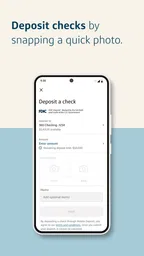
Check deposit is another feature that can reduce errands for people who still receive paper checks. I would treat it as a practical option for occasional deposits, while taking care to follow the in-app capture instructions and review the resulting account activity afterward. A phone camera makes the process convenient, but it does not remove the need to confirm that the deposit has been recorded as expected.
Why it can earn a place month after month
The strongest case for keeping this app installed is repetition. Bills recur, card activity changes, and account questions rarely arrive on a convenient schedule. When the app handles the tasks I actually perform, its value is not tied to a novelty effect; it comes from shaving friction off ordinary financial upkeep.
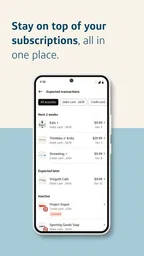
I find it helpful to give the app a simple role in a monthly routine: check recent activity, look ahead at upcoming bills, and deal with anything that needs attention. The point is not to stare at account screens every day. A short, purposeful check can help me catch an unfamiliar transaction or notice a payment that needs action without turning money management into a constant distraction.
One non-obvious habit is to separate “checking” from “acting.” I might open the app to review a purchase, then return later to make a payment once I have verified the amount and timing. That pause helps avoid rushed decisions on a small screen. For card security, I would also learn the lock control before I need it; searching for an unfamiliar setting during a stressful moment is exactly when a useful feature becomes harder to use.
Compared with visiting a bank website in a mobile browser, a dedicated app can feel more immediate for repeated account tasks. Compared with a budgeting app that connects several institutions, though, this is a narrower tool: it is better suited to managing Capital One accounts than building a complete picture of household finances across providers. If my priority is one overview of spending from multiple banks, I would use a cross-account service alongside it, or choose that kind of tool instead.
Another practical trade-off concerns check deposits. They are convenient for someone who receives checks now and then, but a person who rarely handles paper checks may barely notice the feature after setup. Likewise, card locking matters most to someone who wants a quick response to a misplaced card. The app’s recurring value depends on whether its particular account tools match the chores I face, not simply on how many options appear in the interface.
Keeping the routine manageable
I would avoid turning notifications into a substitute for judgment. Alerts can help bring account activity to my attention, but too many prompts can make it easier to tune them all out. A better approach is to keep only the notices that help me act promptly and use a deliberate account review for everything else. The right balance depends on how closely I already monitor my finances.
For bill payments, I would make a habit of checking the payment details before confirming anything and then reviewing the account activity afterward. That is a sensible safeguard in any finance app, especially when paying from a phone where a quick tap can be easy to rush. The app can make the task more convenient, but the responsibility to verify the recipient, amount, and timing still belongs to me.
Maintenance and the points that can wear thin
The app itself is not the whole maintenance story. I still need to keep my sign-in details secure, update the app when a newer release is available, and make sure I can access the account if I change phones. Its current version is 6.55.5 and it requires iOS or Android 11 or later. That requirement is worth checking before relying on the app, particularly if I keep an older device in service.
There is also a broader maintenance cost: a mobile banking app is most useful when the account behind it is one I actively use. If I have only a rarely used Capital One account, opening another app may feel like unnecessary clutter. In that case, using the service occasionally through another available channel may suit me better than trying to build a daily habit around it.
The main source of fatigue is not necessarily a dramatic flaw; it is the ordinary burden of checking financial information on a small screen. Reviewing transactions and making payments on a phone can be convenient, but lengthy tasks may be more comfortable on a larger display. I would use the mobile app for quick checks and straightforward actions, then switch to a browser or another channel when I need more room to think through a complicated task.
Another limitation is the app’s natural focus on Capital One. It is not the right choice for someone who expects a neutral view of every account, a detailed household budget spanning institutions, or a replacement for all financial planning. That distinction matters: a focused account app can make its own jobs easier without being the best tool for every money question.
Who will keep using it—and who may not
I would recommend it to Capital One customers who want to handle routine account tasks away from a desk, especially people who pay bills from their phone, value a quick card-lock option, or still deposit checks. It also makes sense for someone who prefers to check one institution’s activity directly rather than relying on a third-party aggregator.
I would hesitate to recommend it as a primary finance app to someone who does not hold Capital One accounts, wants an all-bank spending picture, or dislikes managing money on a phone. It is also less compelling if I rarely need its core functions. Free access is welcome, but an app earns space through useful habits, not simply because it costs nothing.
The long-term verdict
After the first-week convenience fades, Capital One Mobile has a credible reason to stay installed: it can make repeat account chores easier and offer practical tools when something needs attention. I like it best as a focused extension of a Capital One relationship, used for brief checks and specific actions rather than as a complete financial command center.
My advice is to try it with a clear routine in mind. Learn the card controls, use payment and deposit tools when they genuinely save effort, and review activity at a pace that keeps you informed without making you compulsively check. If those tasks recur in your life, the app can justify its place long after the initial curiosity passes. If you need broad budgeting across several banks or only touch your Capital One account rarely, another option may fit better.
What we like
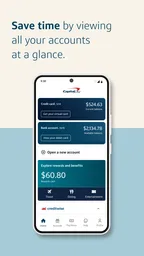
- View account balances and recent transactions in one place.
- Deposit eligible checks by taking photos in the app.
- Lock a misplaced credit card without calling support.
- Use alerts to keep track of account activity.
- Find nearby Capital One branches and ATMs.
What could be better
- Most features require a Capital One account.
- Some services may be unavailable during maintenance.
- Mobile check deposits have eligibility limits.
- App features can vary by account type.
- Access depends on a reliable internet connection.





