



TREBEL: Music, MP3 & Podcasts review
 Analysis by Appsdrops
I’d consider TREBEL if I wanted a music app that brings listening and offline access together, but I would approach it with realistic expectations: getting from a fresh install to a dependable listening routine can involve a few checks, and not every playback hiccup is necessarily the app’s fault. Its appeal is strongest for people who like finding music in the app and want the option to listen when a connection is inconvenient. It is less compelling if you already have a carefully organized personal library and expect every track to behave exactly as it does in a conventional file player.
Where setup and listening can feel less straightforward
TREBEL is a free music and audio app from M&M Media, Inc. The current version is 7.6.0, and it is intended for devices running Android 7.0 or later. It has a 4.7 average from around 1.7 million ratings, with more than 50 million installs. Those figures suggest a widely used app, but they don’t guarantee that it will fit every listener’s habits or work identically across devices.
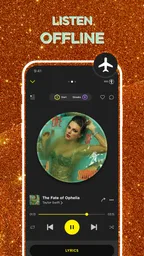
The first thing I’d keep in mind is that discovering a song, saving it for offline listening, and playing it later are related but distinct parts of the experience. If a track is not available offline when you expect it to be, check whether you actually completed the app’s download action rather than merely finding or playing the song. That simple distinction is easy to overlook when you are setting up a playlist in a hurry.
I’d also avoid judging the whole app from one failed search. Try a different spelling, search by artist, or browse a playlist if a particular result is hard to find. Music catalogs and search results can be sensitive to how a song is named, and a missing result does not necessarily mean that playback is broken. If a song is important to a commute or workout, test it before relying on it away from a connection.
Offline listening is most useful when it is planned rather than improvised. I’d prepare a small set of music before leaving home, open it once while still online, and confirm that the tracks play as expected. This gives you a chance to catch an incomplete download or an unfamiliar control before you are on a train with poor reception. It is a more reliable habit than assuming that anything recently played will automatically be available later.
Check the basics before blaming playback
After installing, I’d first confirm that the device meets the minimum operating-system requirement and that the app has finished setting up before testing a longer listening session. If playback stalls, close and reopen the app, then try another track. If only one song fails while others work, that points toward a track-specific issue rather than a general problem with the player.
It is also worth checking whether the phone itself is in a state that can interrupt audio. A low battery, an unstable connection during discovery, or another audio app taking over playback can all make the experience seem inconsistent. I would test with a short session in a stable connection before assuming that a longer playlist or offline setup is ready for a full trip.
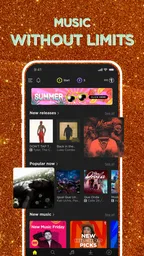
Because TREBEL includes both music discovery and an MP3-player role, it can attract people with different expectations. Someone arriving for trending playlists may be happy to browse and play what is easy to find. Someone who expects it to behave like a strictly local library should take time to understand how the app presents and handles the music they intend to keep available. That distinction matters more than the broad label of “music player.”
A practical way to recover a disrupted routine
When a playlist does not work as expected, I’d troubleshoot in a sequence rather than repeatedly tapping the same control. First, test one known track. Next, check whether the problem occurs only on a connection or also during offline playback. Then return to the playlist and confirm that its contents are the ones you meant to prepare. This narrows down whether the issue is discovery, the selected music, or the listening conditions.
A useful workflow is to separate browsing from preparation. When you have time, use TREBEL to explore music and decide what you want to hear. Later, before going offline, revisit those choices and deliberately prepare the tracks you care about. That keeps an impulsive discovery session from becoming your only plan for a long journey. It also makes it easier to notice when a favorite has not been made ready for offline listening.
If the app behaves oddly after an update or a restart, I’d give it a fresh launch and try a different track before rebuilding an entire playlist. Avoid making several changes at once: if you change the connection, restart the phone, and alter the playlist all together, you will not know which step helped. A small, controlled check is less frustrating and makes it easier to decide whether to keep using the app that day.
Storage planning is another practical consideration for anyone preparing music in advance. I’d choose a focused travel or workout selection instead of trying to make every discovery available offline at once. That approach keeps the routine manageable and avoids turning setup into a long session of collecting music you may never play. It is especially helpful if you share a device or regularly make room for photos and other files.
When the app may not be the cause
Not every interruption points to TREBEL. If audio stops when you switch apps, check whether the phone’s battery-saving or background-app settings are affecting playback. If music cuts out only in one location, the connection may be the weak link. And if a wired or wireless audio accessory drops sound across several apps, test the accessory separately before changing your music setup.
Similarly, if a song is absent from a search or playlist, it may be a catalog or naming issue rather than a player failure. Try another search term and see whether other music loads. If the rest of the app works normally, repeatedly reinstalling it is unlikely to be the most useful first response. I’d reserve more drastic troubleshooting for a problem that affects the app consistently, not one isolated track.
These checks also help set expectations for offline use. Offline listening can remove dependence on a live connection for music that has been prepared, but it does not solve every device-level interruption. A phone that is restarting, an audio output that disconnects, or a playlist that was never set up for offline use can still spoil the session. For an important journey, I would test the exact listening routine beforehand and keep another option available if uninterrupted music is essential.
How it compares with familiar music options
Compared with a basic local MP3 player, TREBEL puts more emphasis on finding and exploring music within the app rather than simply browsing files already stored on a phone. That can be a better fit when I want to move from discovery to listening without building a library manually. The trade-off is that listeners who carefully manage folders, tags, and a personal collection may prefer a dedicated file player with controls designed around those habits.
Compared with a subscription-first streaming service, TREBEL’s free positioning and offline-listening focus may appeal to someone trying to keep music access simple. The experience is not automatically interchangeable with every paid service, though: people attached to a particular catalog, account-based collection, or highly refined listening setup should compare their actual needs before switching. I would test the artists and playlists I use most rather than deciding based on the app’s general promise.
The app is free to download, while in-app purchases range from $0.49 to $99.99 per item. I’d treat those purchases as optional and check what an item offers before spending; the free price alone does not tell you whether a paid option is useful for your routine. Its Teen content rating is another sensible point to consider for families choosing audio apps for younger listeners.
Who I’d recommend it to, and my verdict
I’d recommend TREBEL to someone who enjoys discovering music, wants an app that can also serve as an MP3 audio player, and is willing to prepare listening selections before going offline. It can suit a student moving between classes, a commuter planning music ahead of a patchy train ride, or anyone who wants to explore playlists and then keep a focused selection ready. In each case, the key is to test the chosen tracks before depending on them.
I’d be more cautious if you need a meticulously managed local collection, expect every obscure track to appear instantly, or want a completely hands-off offline setup. A conventional local player may be better for a library you already own and organize. A different streaming service may suit you more if its catalog and account features are central to your listening. TREBEL’s strengths matter most when its discovery and offline workflow match the way you actually listen.
Overall, I find TREBEL worth trying as a free music and audio app, particularly if you like exploring playlists and can spend a little time checking your offline choices. Its popularity is reassuring but not a substitute for testing it on your own device. My practical advice is to start with a few familiar tracks, confirm that the app behaves as you expect on and off a connection, and only then build it into a daily routine. That small setup check can make the difference between a useful listening companion and an app you blame for problems caused elsewhere.
What we like
- Free music downloads let you listen offline without using mobile data.
- The app offers podcasts alongside its music catalog.
- Personalized recommendations can help surface new tracks.
- A built-in player makes it easy to manage music in one place.
- It supports background playback while you use other apps.
What could be better
- Music availability can vary by country and licensing rights.
- Offline listening may require occasional ad-supported access.
- Some tracks may not be available for download.
- The free experience includes advertising.
- Catalog depth may be less consistent than paid streaming services.





