

TouchTunes: Bar Jukebox review
 Analysis by Appsdrops
When I want to influence the music in a bar without heading over to the jukebox, TouchTunes: Bar Jukebox puts that interaction on my phone. The idea is simple: use the app to control music at a participating TouchTunes jukebox and play songs I like. That makes it less of a conventional music player and more of a remote control for a shared, public listening experience.
Music requests and the role of a connection
The app’s central appeal is closely tied to connectivity. Its store summary describes it as a way to control bar music and play favorite songs through the TouchTunes jukebox app. In practice, the phone is a way to interact with the jukebox rather than a replacement for it: the music is part of the venue, and the app’s usefulness depends on being able to reach that shared system.
That setup can feel pleasantly direct when everything is working. I can think about what I want the room to hear, make a selection through the app, and then enjoy the fact that the music belongs to the space rather than to my headphones alone. It turns choosing a song into a small social gesture. Friends can hear the result, and the selection becomes part of the atmosphere around the table.
It also means a network-dependent moment is built into the experience. A request made on a phone needs to connect with the jukebox system to matter. If the connection is slow or unavailable, the app’s main purpose is naturally harder to use. I would treat it as a convenient way to interact with music in a venue, not as an independent player that guarantees a song will start regardless of connectivity.
A different kind of music app
Many music apps are designed around private listening: find a track, press play, and keep it to yourself. TouchTunes: Bar Jukebox has a more public focus. The point is to affect the music in a bar, so the setting matters just as much as the phone. That distinction gives the app a clear identity and makes it most interesting when I am somewhere with a compatible jukebox.
I like that the concept is easy to understand. There is no need to frame it as a full library or streaming service; it is about choosing songs for a shared environment. That focus can make the app feel purposeful instead of overloaded. At the same time, it naturally limits when I would reach for it. If I am at home or in a place without the relevant jukebox, the central interaction is not the reason to open it.
Using it in real-world settings
The mobile setting is part of the appeal. A phone is already close at hand during a night out, so using it to influence bar music can be more convenient than walking over to the jukebox every time. I can stay with the conversation and still make a musical choice. That convenience is especially appealing when the jukebox is across the room or when the group is settled in and does not want to interrupt the moment.
But a bar is not always the easiest place for a connected app. People move around, pay attention to friends, and may be using mobile data or a venue’s wireless network. Network quality can vary from one place to another, so I would keep expectations practical: the experience is smoothest when the phone can connect reliably and the jukebox is available to interact with.
The app is also inherently tied to location in a broad, everyday sense. It is designed for controlling bar music, so it makes the most sense in the environment it serves. That gives it a more situational role than a general audio app. I see that as a sensible trade-off rather than a flaw: it is built around a particular occasion, and that occasion is what makes its music-control concept distinctive.
When a request does not go smoothly
Any app that depends on communication between a phone and a venue system can have moments when the interaction takes longer than expected. A weak connection, a temporary service interruption, or a change in the room’s network conditions can make the process feel less immediate. I would not assume that every tap will produce an instant result, especially in a busy public setting where connectivity may be inconsistent.
When something seems stuck, a calm first step is to check whether the phone itself has a working connection and whether the app is responsive. Giving the interaction a moment to complete is often more sensible than repeatedly making the same selection. If the issue continues, reopening the app or trying again later may help, though the experience still depends on the connection and the jukebox system being reachable.
This is a point where expectations matter. The app is a controller for venue music, not a guarantee that a selected track will play under every circumstance. I find that framing useful because it keeps the experience in perspective: when everything connects, the app can make a night out more interactive; when it does not, the limitation is closely tied to the connected environment it relies on.
Keeping mobile use in perspective
Because the app is used on a phone, it is reasonable to think about mobile data and battery as part of a night out. I would use a connection that is dependable in the venue and avoid leaving the app open longer than I need to. Those are ordinary habits rather than special requirements, but they help keep a connection-based tool from becoming a distraction.
I would also be mindful of the setting when making song choices. A jukebox is shared, and the music affects everyone nearby. That social context is part of what makes the app fun, but it also encourages a little consideration: choose music that suits the group and the room, rather than treating the experience as a private playlist. The app’s strongest quality is that it connects an individual choice with a communal result.
For people who are cautious about mobile data, the practical approach is to use the app when they actually want to make a selection and to keep an eye on their usual phone settings. I would not treat the app as a substitute for an offline music collection. Its purpose is to interact with a jukebox, and that purpose depends on being connected to the relevant system.
Who is likely to enjoy it?
I can see the app appealing to people who enjoy having a say in the soundtrack during a night out. It is also a natural fit for groups that like turning song choices into part of the evening. Instead of one person controlling music from a personal device, the jukebox makes the result audible to the room, giving a request a more social feel.
It is less compelling for someone looking only for a standalone music library or a way to listen privately wherever they go. The app’s focus is specific, and that is worth understanding before installing it. If controlling bar music sounds useful, the concept is straightforward. If the goal is simply to play songs on a phone independently of a venue, this is not the role the app is designed to fill.
The app is free, and its audience is reflected in a 4.7 average rating from around 142,000 ratings, with over 5 million installs. Those figures suggest that the idea has found plenty of users, though my main reason to consider it would still be practical: whether I want to interact with music at a bar that uses the TouchTunes jukebox system.
What the app does well
The clearest strength is its focused purpose. There is a simple connection between the action on my phone and the intended result: choose music for a bar jukebox. That can make the app feel more engaging than passively listening to whatever is already playing. It gives users a way to participate in the room’s soundtrack without making the phone itself the center of attention.
The experience also has a pleasing social quality. A song selection can spark a reaction, bring a group together, or shift the mood in a familiar place. That is a small feature of a night out, but it is exactly the kind of small interaction that gives a jukebox its charm. The app brings that interaction to a mobile device while keeping the music part of the public environment.
Its limitations are closely connected to those strengths. Since it is built around a venue jukebox, its usefulness depends on being in the right context and having a working connection. For me, that is a fair exchange. I would not judge it by how well it works as an everyday music player; I would judge it by whether it makes controlling bar music easier and more enjoyable when the opportunity is there.
Final thoughts on connectivity
TouchTunes: Bar Jukebox is a focused music-and-audio app for people who want to control bar music from a phone. Its best moments come when the phone and jukebox can communicate smoothly, turning a song request into part of a shared night out. That connected design is also the main thing to keep in mind: the app’s core purpose depends on reaching the venue’s system, so a reliable connection matters.
I would recommend it to anyone who regularly visits places with TouchTunes jukeboxes and likes choosing music for the room. It is less suited to someone seeking a general-purpose player, but it does not need to be one. The concept is clear, the social angle gives it personality, and the mobile control can be convenient when the network cooperates. Overall, I see it as a useful, occasion-specific way to take part in the soundtrack of a night out.
What we like
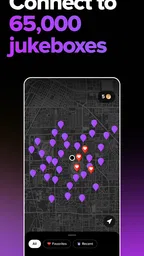
- Browse nearby venues before choosing where to play music
- Queue songs remotely without leaving your table
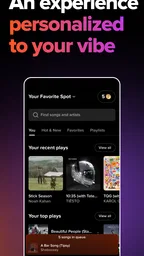
- Discover tracks through artist and song search
- A shared queue lets groups contribute to the music
- Available on both Android and iOS
What could be better
- Song availability varies by venue and licensing
- Some venues may not appear in the location search
- Remote controls depend on a compatible TouchTunes jukebox
- Popular tracks can have a long wait in the queue
- Payments and credits may differ between venues





