
TopDeck.gg review
 Analysis by Appsdrops
I judge an event app less by how much information it promises than by how quickly it helps me answer a practical question: what is happening, and can I follow it comfortably? TopDeck.gg is an events app from TopDeck.gg, focused on tournaments. That gives it a narrower purpose than a general calendar or community chat app, which can be a real advantage when I want tournament information rather than a stream of unrelated posts. It is free, rated for Everyone, and has a 4.7 average from around 255 ratings, with over 10K installs. Those figures suggest a well-liked niche tool, though the more important question is whether its tournament focus suits the way you take part.
Finding your way through tournament information
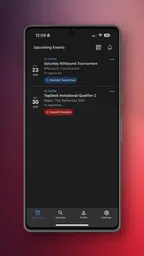
The app’s identity is easy to understand: it is built around tournament events, not broad social networking. In my view, that focus is helpful for someone who already knows they want to keep up with competitive events. It also means the experience may feel less self-explanatory to a newcomer who opens it without knowing what kind of tournament or event they are looking for. A focused tool can reduce distractions, but it cannot replace familiarity with the scene itself.
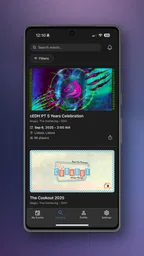
When assessing navigation, I would start with the task rather than the screen: can I locate an event I care about, understand its relevance, and return to it later? That is a useful way to approach any tournament hub, especially when event details change the value of the information. If you are comparing several events, take a moment to check that you have the right one before relying on it for your plans. The app’s role is most convincing when it serves as a dedicated place to consult tournament information, rather than as a complete personal organizer.
A practical habit is to use it as one step in a broader routine: check the tournament app when you are exploring events, then put any commitment you need to remember into the calendar or reminder tool you already trust. This avoids treating a discovery app as though it automatically handles every part of attendance. It is a small distinction, but it can prevent a missed event if you depend on reminders, travel planning, or a schedule shared with other people.
TopDeck.gg is at version 2.2.0 and was released on August 5, 2024. It supports Android 7.0 and later. For someone choosing an app, these details are useful when checking whether an older device can run it; they do not, by themselves, tell me how the interface behaves on every screen size or with every system setting. I would install it on the device I actually use and judge the readability there, rather than assuming that a version number guarantees a particular experience.
Readability is more than a clean screen
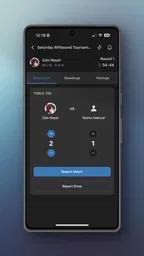
Tournament information can be demanding to scan because event names, dates, formats, and other details compete for attention. I find it helpful to read an event entry in two passes: first decide whether the event is relevant, then inspect the details that affect participation. That approach is especially useful on a phone, where long descriptions and dense lists can make quick comparisons tiring.
If small text or crowded layouts are difficult for you, the safest test is not a quick glance at the first screen. Open an event you might genuinely follow and see whether you can identify the information you need without repeatedly zooming, scrolling back, or losing your place. System text-size settings can improve many apps, but the result depends on how each screen responds. I would not assume that every element will scale equally; the real-world check matters more than a general expectation.
For people who process information better in stages, it may help to avoid browsing while also trying to make a time-sensitive decision. Explore events when you have a calm moment, note the ones worth revisiting, and confirm the relevant details before acting. This is not a special feature claim; it is a way to reduce the cognitive load of comparing tournament information on a small display.
Motor and sensory considerations in everyday use
Using a tournament app can involve repeated taps, scrolling, and switching between event details and other tools. If precise touch targets are a challenge, I would test the main actions with the phone held in the position you normally use. A screen that feels easy while seated at home may be harder to operate one-handed on a train or while carrying something. That context matters more than a broad claim that an app is comfortable for everyone.
People who rely on assistive technologies should check the actual controls with their preferred setup before making the app part of an important routine. I cannot infer from the app’s purpose or age rating that every label, control, or screen is exposed in a way that works equally well with screen readers, switch access, or voice control. A brief trial can reveal whether the tasks you care about are manageable, and it is sensible to keep another way to confirm event information until you know.
Sensory comfort also depends on when and where you browse. Looking through event details in a quiet room is different from trying to read a bright screen in a noisy venue or under strong sunlight. If visual strain is an issue, you may prefer to check the information ahead of time and rely on a short note or calendar entry during the event itself. That workflow reduces the need to repeatedly inspect a phone in a distracting setting, without assuming the app offers particular display or notification controls.
Where it fits in a busy day
Imagine a player who has a spare moment between classes and wants to see whether a tournament is worth planning around. A focused events app makes sense for that quick discovery step: open it, look for relevant tournament information, and decide whether to investigate further. The useful move is to separate browsing from commitment. Before arranging travel, changing plans, or telling friends you will attend, confirm the details you need and place the decision in the tools you already use to manage time.
For a friend group, one person can use the app to find an event and then share the useful details through the group’s usual channel. That is often more inclusive than expecting everybody to install the same app and navigate it independently. It also leaves room for different needs: one person may prefer a larger screen, another may use a calendar, and someone else may need information read aloud or sent in a simpler format.
The same approach works for someone who follows tournaments casually. Rather than checking constantly, browse when you have a specific reason, such as deciding what to watch or which event to follow. A dedicated tournament tool can be more relevant than general social feeds, where event information may be mixed with unrelated conversation. But if you mainly want broad community discussion, a chat or social platform may suit you better.
What it does not replace
The main trade-off is specialization. Because TopDeck.gg is an events app centered on tournaments, it is not automatically the right choice for keeping every personal commitment, coordinating a group, or receiving all the context you might want about a competition. I would treat it as a focused discovery and reference point, then use a calendar for scheduling and a communication app for coordination. That division of labor is less glamorous than expecting one app to do everything, but it is often more dependable.
There is also a difference between finding information and being able to act on it. Someone who needs an event’s details in a particular format, who depends on assistance to navigate screens, or who has unreliable access to a phone may need another person or a second source as part of the plan. That is not a reason to dismiss the app; it is a reminder not to make a single mobile interface the only route to information when the consequences of missing it matter.
Compared with a general events calendar, a tournament-focused app is likely to be a better starting point for people who want competitive event discovery rather than birthdays, appointments, and local activities. Compared with a group chat, it offers a more purpose-specific place to look, while a chat remains better for asking friends questions and agreeing on plans. Neither alternative is a full substitute for the other. I would choose based on the task instead of expecting TopDeck.gg to become a universal event manager.
Who is likely to benefit—and who may prefer another route
I would recommend giving it a try if tournaments are already part of your interests and you want an app dedicated to that corner of events. The free price makes experimentation straightforward, and the Everyone content rating makes it broadly approachable from an age-rating standpoint. TopDeck.gg has 17 written reviews alongside its ratings, so I would treat the overall response as encouraging rather than as proof that every user’s device, needs, or event preferences will be served equally well.
It is less likely to be a good fit if you rarely follow tournaments, want one place for every kind of event, or need a highly predictable accessibility experience before you can rely on an app. In those cases, a calendar, a familiar event platform, or information shared by an organizer may be more useful. Someone with visual, motor, or sensory needs should evaluate the specific actions they will perform, not just whether the app installs successfully.
TopDeck.gg earns its place when its narrow focus matches your reason for opening it. I like the idea of separating tournament discovery from general social noise, while keeping planning and communication in tools designed for those jobs. The most inclusive way to use it is to test the important tasks on your own device, check details in a calm setting, and share information in the format that works for the people joining you. That makes it a promising tournament companion, not a one-size-fits-all solution.
What we like
- Players can find tournaments for a range of supported games.
- The site helps organize events and track match results.
- Tournament listings make it easier to discover competitive play.
- Teams can use the platform to coordinate their event participation.
- A browser-based service works across desktop and mobile devices.
What could be better
- Tournament availability depends on the games and regions supported.
- Some events may require an entry fee or a specific skill level.
- New users may need time to learn the tournament setup process.
- Match schedules can be inconvenient for players in different time zones.
- The experience depends on a stable internet connection.





