







TinyNest - Family Album review
 Analysis by Appsdrops
I like the idea behind TinyNest - Family Album: a dedicated place for sharing baby photos with family, rather than letting precious pictures get scattered across chats and social feeds. Its appeal is less about bells and whistles than about making a private family album the default. The important question is whether that focused approach fits the way your relatives actually share and revisit photos.
A calmer home for family photos
TinyNest is a parenting app from Tiny Nest AI LLC, built around a private album for baby pictures. I see the strongest case for it in families who want to share updates with a close circle without posting publicly or repeatedly forwarding images through separate conversations. A grandparent can follow along in the album, while parents keep the everyday snapshots in one place intended for family viewing.
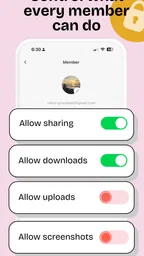
The app’s promise to block screenshots is a meaningful distinction from ordinary photo-sharing tools, though it should not be treated as a guarantee that an image can never be copied. A recipient might still photograph a screen with another device, for example. I’d think of screenshot blocking as a useful privacy barrier, not a substitute for deciding carefully who belongs in the album and what you share.
Another notable choice is the absence of ads and AI. That makes the experience feel purpose-built rather than like a general social feed competing for attention or automatically processing family images. If you specifically want automatic photo sorting or AI-generated descriptions, this is not the app’s pitch. If you prefer a simpler, more personal space, that restraint may be a plus.
What to expect from everyday use
A photo album is not a demanding task by itself, so I would expect the basic experience to feel straightforward on a compatible device. But there is no reason to assume every upload will be instant: connection quality, photo size, and the phone’s available resources can all affect how quickly an image is ready to view. For a smoother routine, I’d add and review photos when I have a dependable connection rather than relying on a hurried upload while juggling errands.
That modest expectation matters because family sharing often happens in small gaps: a parent captures a sleepy grin, a first spoonful of food, or a funny outfit, then wants relatives to see it. The useful test is not a benchmark number but whether adding a photo fits naturally into that moment. A focused album can reduce the mental overhead of deciding which group chat to use, but it still depends on the people invited checking the album.
With a 4.8 average from around 1,800 ratings, TinyNest has a strong overall user response. That’s encouraging context, not a promise that the app will feel equally quick on every phone or that every family will find the sharing routine convenient. I’d judge the fit by trying the actual path from taking a picture to letting a relative see it, especially if your family is used to instant messaging.
When the album gets busy
The busiest moments are likely to be the ones with many photos to share: a family visit, a birthday, or a stretch when a baby changes quickly and everyone wants frequent updates. In those situations, a dedicated album can be easier to manage than a long chat where photos are mixed with questions, reactions, and unrelated messages. It also gives relatives a single place to look back instead of asking a parent to resend an older picture.
One practical habit I’d use is to be selective rather than treating the album as a dump for every near-identical shot. A small set of the best pictures is easier for relatives to browse, particularly for family members who are less comfortable navigating apps. This is a workflow choice, not a special feature: the app’s value depends partly on parents setting a manageable pace and relatives knowing where to find new posts.
There is a trade-off if your family already shares everything through a familiar messaging app. That route is immediate and requires no new habit, while a dedicated album can keep baby photos from disappearing into conversation history. But asking relatives to use another app may create friction, especially if they rarely install apps or prefer not to maintain another account. For a small family that is already happy with a group chat, the change may not be worth it.
For a wider circle, the album approach can make more sense: parents can share one collection with the intended family audience instead of juggling several copies of the same photo. Still, privacy depends on sensible sharing choices. I’d keep the invited group limited to people I trust, and I would avoid assuming that screenshot blocking removes the need to discuss boundaries with relatives.
Reliability is also about the sharing routine
A family album is only useful if people can return to it and understand what they are seeing. TinyNest’s focused purpose helps: there is less reason to sift through unrelated posts than on a broad social platform. On the other hand, a dedicated space can feel quiet if relatives expect updates to arrive in the messaging app they already check. The app cannot make a family’s habits line up automatically; someone may need to establish that this is where new baby photos will appear.
If an upload seems delayed, I’d first check whether the connection is stable and give the app another moment before repeatedly submitting the same picture. That simple approach avoids creating duplicates in any photo-sharing workflow. For important memories, I would also keep the original photos in the phone’s usual photo library rather than relying on a shared album as the only copy. That is sensible backup practice, not a claim about how TinyNest stores or recovers files.
Families should also agree on who is responsible for maintaining the album. If one parent posts regularly and the other assumes the app is updating automatically, relatives may see an incomplete stream. A simple routine—such as one parent adding a few selected pictures after a visit—can make the album feel dependable without turning photo sharing into another daily chore.
Age, cost, and device fit
TinyNest is free to install, with in-app purchases listed from $12.99 to $199.99 per item. I would check the purchase details in the app store before committing to anything, particularly if you only need a basic family album and are comparing it with tools you already have. The free entry point makes it easy to consider, but the range of optional purchases means it is worth understanding what a paid choice covers before tapping through.
The app is rated Teen, so it is not classified as an app for young children to use independently. That makes sense for a family photo space managed by adults: parents should handle the account and sharing decisions, rather than treating it as a child-facing activity. Its parenting focus is about helping adults share family memories, not replacing parental judgment about a child’s privacy.
The current version is 1.317.0, and the minimum operating-system requirement is version 8.0. That makes the stated system threshold broad, but an older phone can still feel less responsive than a newer one, especially when storage is tight or many apps are running. If a relative has an older device, I’d check that the app installs and behaves comfortably there before making it the family’s only sharing route. The app has 10K+ installs, which suggests it has found an audience, though that does not tell you how it performs on a particular device.
Who should choose it—and who should not
I’d recommend TinyNest to parents who want a more private-feeling destination for baby photos, value a no-ad experience, and are willing to invite relatives into a dedicated album. Its screenshot-blocking approach is an appealing extra for people who want a boundary beyond ordinary chat sharing, as long as they understand that digital privacy is never absolute. The no-AI stance may also suit anyone who would rather keep the experience centered on sharing than automated image tools.
I’d skip it if you need a public-facing profile, advanced photo editing, automatic organization, or a place where relatives already spend their time. A standard messaging group may be better for families who prize instant replies and do not want another app. A general cloud photo service may suit households that care more about broad photo-library management than a baby-focused sharing space. Those alternatives solve different problems; TinyNest’s advantage is its narrow focus, not an attempt to replace every photo tool.
As of its release on October 10, 2025, the app is a relatively new option for families building a shared photo habit. That makes it sensible to start with a few invited relatives and a handful of pictures, then see whether the workflow sticks before relying on it for every update. You will quickly learn whether family members can find the album, whether uploads fit your routine, and whether the privacy approach matches your expectations.
My verdict on performance and fit
My overall impression is that TinyNest is most convincing when its simple purpose solves a real family annoyance: baby photos getting lost across conversations or shared more widely than parents intended. The app’s focus, lack of ads and AI, and screenshot-blocking feature give it a distinct identity. I would not confuse those safeguards with complete control over every image once someone can view it, but they do make the privacy conversation more explicit.
For speed and reliability, I’d keep expectations practical rather than assuming a photo app can overcome a weak connection or an older, crowded phone. Share a few selected pictures, retain originals in your normal library, and make sure the relatives who matter are comfortable using a separate album. If that routine feels natural, TinyNest - Family Album is a thoughtful option for keeping baby memories in a more intentional place; if it becomes one more app your family forgets to open, the messaging tool everyone already uses may be the better choice.
What we like
- Keeps family photos together in one shared space
- Makes it easy for relatives to follow new family moments
- A private album can feel more personal than public social networks
- Helps distant family members stay connected through photos
- Simple album-focused design keeps the main purpose clear
What could be better
- Its usefulness depends on relatives also joining the app
- A shared album may become cluttered without regular organization
- Families may need another app for messaging and coordination
- Photo sharing can use substantial mobile data
- Some relatives may prefer not to store family pictures online





