



Pregnancy and Due Date Tracker review
 Analysis by Appsdrops
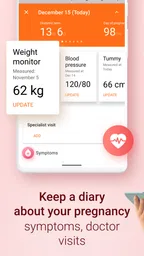
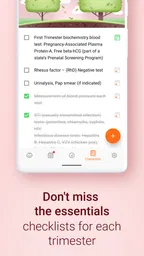
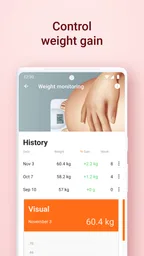
When I want a pregnancy app, I’m not looking for a wall of reassuring slogans. I want a practical place to orient myself, keep a few useful details together, and know what to do next without turning pregnancy into a stream of alerts. Pregnancy and Due Date Tracker is built around that everyday need: it brings pregnancy tracking together with tools for estimating a due date, timing contractions, and counting kicks. I see its strongest use as a personal organizer, not a substitute for a midwife, doctor, or medical advice.
From a positive test to a useful starting point
The first job for a pregnancy tracker is to give you a starting point you can make sense of. This app’s due-date calculator offers a way to establish a pregnancy timeline, while its broader tracking purpose gives you a reason to return as weeks pass. If you are early in pregnancy and mainly trying to get your bearings, that can be more useful than downloading several narrowly focused tools at once.
It is worth treating any calculated date as an estimate, not a promise. Pregnancy timing can depend on information you may not know precisely, and your clinician’s guidance should take priority if dates differ. I’d enter the details carefully, check that the resulting timeline makes sense for my situation, and ask my care team about anything that seems inconsistent rather than trying to resolve a medical question inside an app.
That distinction is important because pregnancy apps can make a date feel more definitive than it is. The practical value here is having a reference point for your own planning and conversations, not gaining a diagnosis or a guarantee about when birth will happen.
One place for different moments
The app’s combination of a due-date calculator, kick counter, and contraction timer points to a workflow that can change over time. Early on, the date estimate may be the main reason to open it. Later, a kick-counting tool may be more relevant, and when contractions begin, timing becomes a different task altogether. Having these functions under one roof may spare you from searching for a separate utility at a stressful moment.
That convenience is most valuable if you prefer a compact toolkit. If you already use a trusted pregnancy journal or a health app that covers the details you care about, the benefit of adding another tracker may be smaller. I would choose based on whether its tools fit my routine, rather than assuming that a single app automatically makes pregnancy management simpler.
Make tracking serve a purpose
A useful approach is to decide what you want to record before opening the app. If you are using the kick counter, choose a calm time when you can focus and follow the instructions given by your care team. If you are timing contractions, use the timer to keep track of what is happening, then share those observations with your clinician when appropriate. The app can help organize those moments; it cannot decide whether a change is medically significant.
This is a small but meaningful trade-off: tracking can make information easier to recall, yet it can also encourage checking too often. I would use the tools when they answer a real question or support a plan from my provider, not as a reason to monitor every sensation. That keeps the app in a helpful role instead of letting it add pressure.
A realistic day with the app
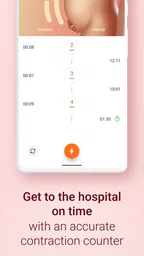
Imagine that I am at home, have a question about how long contractions are lasting, and do not want to rely on memory. I can open the contraction timer, record what happens, and use that record as a clearer account when I contact my care team. If the situation changes or I feel concerned, the next step is professional advice, not waiting for an app to interpret the pattern.
On another day, I might use the kick counter at a time that fits the guidance I have received. Keeping the task in one familiar place can make it easier to follow through. The practical tip is to make the app part of a routine you can actually maintain: a quiet moment, a clear purpose, and a plan for what you will do with the information afterward.
When information has to move beyond the phone
Pregnancy tracking is rarely a solo process. A partner may want to know how things are going, and a clinician may ask you to describe what you noticed. The most useful handoff is a plain-language account: when you used a tool, what you observed, and what concerns you have. I would not assume that an app’s record has been shared with anyone else; if another person needs the information, I would tell them directly.
For appointments, a short note of questions and observations can be more useful than scrolling through a phone together. The timer or counter can help you remember details, but the conversation is still the important part. This makes the app a support for communication rather than a replacement for it.
There is also a personal handoff between the version of you who records something and the version of you who needs to explain it later. A simple habit helps: after using a tool, note the question you still have or the detail you want to mention. That reduces the chance that a useful observation gets lost in the stress of an appointment or phone call.
What you get, and what you should not expect
As a parenting app from Wachanga, this is aimed at people who want pregnancy-related tools in an accessible, general-purpose package. It is free to install, rated for Everyone, and has an average rating of 4.5 from around 220,000 ratings. More than 10 million installs suggest that it has reached a broad audience, though popularity alone does not tell me whether its approach will suit a particular pregnancy or tracking style.
The app is currently at version 4.14.0 and has been available since August 16, 2016. It includes optional in-app purchases, with individual items ranging from $0.99 to $89.99. I would check the purchase details in the app store before paying for anything and decide whether an extra is genuinely useful to me. The core appeal is having its pregnancy tools together; I would not assume that every feature or piece of content is included without charge.
Its audience size and straightforward collection of tools make it a reasonable option to try, but the fit depends on how you like to track. Someone who wants a detailed clinical record, extensive provider integration, or a highly personalized care plan should look for a tool specifically designed around those needs, and confirm that it meets their expectations before relying on it.
Where the workflow can feel less smooth
The central limitation is not unique to this app: a tracker can record or organize information, but it cannot judge your health. A kick counter is not a substitute for the advice you have been given about fetal movement. A contraction timer does not determine whether labor has started or whether you need urgent care. If something feels worrying, contact your care provider rather than treating a recorded result as reassurance.
There is also a practical risk in trying to make every part of pregnancy measurable. A tool can be comforting when you need a record, but it can become another obligation if you feel you must constantly check it. I would skip the tracking that does not support a specific need and keep my routine as light as possible.
Finally, an all-in-one approach is not always better. If you only want a simple date estimate, a dedicated calculator may be enough. If your clinician has asked you to follow a particular method, use that method first and treat this app as a convenient companion only if it aligns. The best choice is the one that fits your care plan, not the one with the most tools.
Who I would recommend it to
I’d suggest trying Pregnancy and Due Date Tracker if you want a single, accessible place for a due-date estimate and practical tools such as kick counting and contraction timing. It is especially relevant if you value having a familiar app ready as your needs change during pregnancy, and if you are comfortable using it as an organizer rather than a medical authority.
I would be more cautious if tracking tends to increase your anxiety, if you need a formal record shared with a healthcare team, or if you expect an app to tell you whether a symptom is safe. In those situations, a clinician’s recommended process or a more specialized option may serve you better. My overall view is that this is a useful companion when used with clear boundaries: it can help you collect and communicate observations, while decisions about care remain with you and your healthcare professional.
What we like
- Tracks pregnancy progress with week-by-week updates.
- Includes a due date countdown for quick reference.
- Offers useful tips tailored to each stage of pregnancy.
- Provides a convenient place to record pregnancy milestones.
- Clear navigation makes key information easy to find.
What could be better
- Due date estimates may change as pregnancy details are updated.
- Some features may require an internet connection.
- Pregnancy information is not a substitute for medical advice.
- Notifications may feel frequent for some users.
- Personalized tracking requires sharing sensitive health details.





