



FlashGet Kids:parental control review
 Analysis by Appsdrops
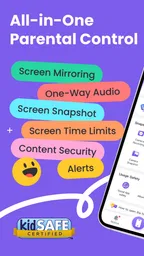
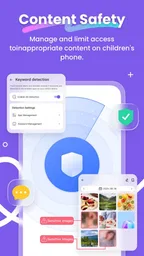
Keeping a child’s phone use in view can quickly turn into a juggling act: apps, screen habits, and the possibility of encountering unsuitable material all compete for a parent’s attention. FlashGet Kids is built around bringing app blocking and sensitive-content detection together in one parental-control app. I see its appeal in that straightforward idea: instead of treating every digital concern as a separate problem, it gives families a single place to start managing them.
A parental-control app with a clear starting point
When I look at a family’s needs, the first step is usually figuring out what kind of oversight feels useful without making everyday phone use unnecessarily complicated. FlashGet Kids positions itself as an all-in-one app for app blocking and sensitive-content detection. That makes it relevant to parents who want to set boundaries around apps and pay attention to content concerns, rather than simply search for a general-purpose phone utility.
The app’s focus is easy to understand from the moment you consider its purpose: parents want practical tools, while children need room to use their devices for ordinary activities. A parental-control app has to serve both sides of that relationship. Its value is not just in offering controls, but in helping a parent decide what to address, take action, and then judge whether the arrangement works for their household.
FlashGet Kids is free to install, and it includes in-app purchases. That makes it possible to begin with the app without an upfront purchase, while also signaling that some offerings may involve additional spending. I would treat the free starting point as a chance to explore the experience and check the available options carefully before deciding whether anything beyond it suits the family.
Getting oriented before setting boundaries
My preferred way to approach a parenting tool is to start with a specific concern. Perhaps a parent wants to limit access to certain apps, or they are more concerned about sensitive content. Starting with one clear goal makes it easier to evaluate whether the app’s central tools line up with the family’s priorities. FlashGet Kids gives those concerns a shared home in its core proposition, which is more approachable than beginning with a long list of controls and trying to guess what matters.
That first decision also helps keep expectations realistic. App blocking and sensitive-content detection address particular parts of a child’s digital life; they do not replace conversations about trust, boundaries, and responsible use. I would use the app as a support for those conversations, not as a substitute for them. A control can help a parent respond to a concern, but the best outcome still depends on explaining why the boundary exists and revisiting it as a child’s needs change.
Moving from concern to action
The workflow implied by FlashGet Kids is easy to picture: identify a concern, use the relevant type of tool, and see whether the result helps. If the issue is an app a parent does not want a child to use, app blocking is the natural part of the product to explore. If the concern is sensitive material, content detection is the part that fits. Keeping those tasks distinct makes the app’s purpose easier to understand and gives parents a sensible way to decide where to begin.
I would take a deliberate, step-by-step approach instead of trying to establish every possible boundary at once. First, talk through the concern and agree on what the parent is trying to change. Next, look at the relevant option in the app and consider whether it addresses that concern. Then, check in with the child and see how the arrangement affects ordinary device use. This kind of routine keeps a parental-control tool connected to real family life rather than turning it into a set-and-forget solution.
That process matters because a restriction can have practical consequences beyond the original concern. A parent may think about one app in isolation, while a child sees it as part of schoolwork, communication, or downtime. A calm explanation before a boundary is applied can reduce friction, and a follow-up conversation gives both sides a chance to say whether the arrangement is working. FlashGet Kids supplies the app-focused starting point; parents still shape how it fits their household.
How the handoffs work in family life
Parental controls involve several handoffs. The parent identifies what needs attention, the app provides a means of managing that concern, and the child experiences the resulting boundary on their device. After that, the parent has to decide whether the outcome is helpful and whether the family should keep, adjust, or discuss the rule. Thinking about these handoffs makes it easier to see why a tool can be useful without being the whole solution.
One important handoff is between a digital setting and a real conversation. If a parent blocks an app, a child may want to know why. If sensitive-content detection is part of the family’s approach, the parent may need to explain the goal in a way that feels supportive rather than accusatory. I think that distinction is central to using any parental-control app well: the tool can help put a boundary into practice, but the parent’s explanation gives that boundary meaning.
Another handoff is between setup and ongoing review. A rule that feels appropriate at first may become inconvenient or unnecessary later. Parents can make the experience more useful by checking whether a control still matches the child’s age, routines, and responsibilities. The app’s age rating is Everyone, but that store classification should not be confused with a recommendation about how a family should use parental controls. Each household still needs to make its own decisions.
What a useful result looks like
For me, a good result is not simply that a restriction exists. It is that the parent feels more prepared to address a concern and the child understands the boundary well enough to follow it. FlashGet Kids has a focused role in that process, bringing app blocking and sensitive-content detection together under a parenting-oriented purpose. Families who want to explore those areas from one app may find that focus appealing.
The app has attracted a substantial audience: it has more than ten million installs and an average rating of 4.5 from around 117,000 ratings. Those figures suggest that many users have tried it and that its overall reception is positive. They do not guarantee that it will match every family’s preferences, though. The most useful test is still whether its approach feels clear and manageable in the particular household where it will be used.
There is also a practical result in having a named starting point. Instead of approaching phone rules as a vague argument about screen time or online safety, a parent can focus on the concrete areas FlashGet Kids is designed to address. That can make a discussion more specific: what is the concern, which kind of control seems relevant, and how will the family review the outcome? A clear process tends to be easier to maintain than a rule nobody remembers to revisit.
Where the flow can feel less smooth
The first possible source of friction is expectation. The phrase “all-in-one” can sound broad, but the app’s stated focus is app blocking and sensitive-content detection. Parents should approach it with those needs in mind rather than assume that any parental-control app will automatically cover every family concern. A focused tool can still be valuable, but it works best when its role is clear from the outset.
A second friction point is the balance between oversight and trust. Children may see a control as restrictive, even when a parent is acting out of care. That is not a problem an app can solve on its own. I would pair any app-based boundary with a plain explanation, a chance for the child to ask questions, and a willingness to review the arrangement. That turns control from a silent surprise into a shared family rule.
Spending can be another consideration. FlashGet Kids is free, with in-app purchases ranging from $3.49 to $99.96 per item. Those prices make it worth checking what each purchase offers and whether it is relevant before spending. I would not assume that every family needs a paid option; the sensible approach is to explore the free experience first, compare the available choices, and decide based on actual needs rather than pressure to unlock everything.
Finally, any parental-control routine can become less effective if nobody checks in on it. A setting may be technically active while the family has stopped discussing whether it still makes sense. That is why I would build a brief review into the routine: ask whether the original concern remains, whether the boundary is causing unnecessary trouble, and whether the child is ready for a different level of independence. The process should adapt as family circumstances change.
Who may find it a good fit
FlashGet Kids is most appealing to parents looking for a dedicated parental-control app centered on app blocking and sensitive-content detection. Its free entry point makes it approachable to try, while optional purchases mean it is wise to check the in-app choices before committing to extra spending. The developer is HONGKONG FLASHGET NETWORK TECHNOLOGY, and the app is available for Android devices running version 7.0 or later.
Its release date is May 17, 2023, and the current version is 1.4.3.0. The app is rated for Everyone. These details are useful when checking compatibility and deciding whether the product fits a device and household, but the bigger question remains practical: does its core focus match the parenting task at hand?
I would start with one concern, explore the matching control, and then talk with the child about how the change affects everyday use. If that sequence feels manageable, the app’s focused approach may be a helpful addition to the family’s digital routine. If the household is looking for something beyond app blocking and sensitive-content detection, it is better to define those needs first and assess the app against them rather than expect one tool to solve every online-safety challenge.
A considered choice for digital boundaries
FlashGet Kids makes its purpose easy to grasp: it brings app blocking and sensitive-content detection into a parenting app that families can try for free. I like that its central idea gives parents a concrete place to begin, especially when the immediate goal is to set an app boundary or pay closer attention to sensitive material. Its broad adoption and strong average rating add context, while individual family needs remain the deciding factor.
In the end, I would see it as a tool for supporting an ongoing process, not a replacement for parenting judgment. Start with a clear concern, choose an appropriate boundary, explain it, and check whether the result is helping. With that kind of thoughtful routine, FlashGet Kids can play a useful part in managing a child’s digital environment without losing sight of the conversations and trust that make those boundaries work.
What we like
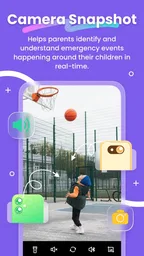
- Remote camera access can help parents check a child's surroundings.
- One-way audio offers a way to listen without starting a call.
- Screen mirroring can show what is happening on a child's device.
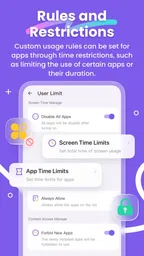
- App usage limits help manage time spent on selected apps.
- Location history can help review a child's recent movements.
What could be better
- Some features require a paid subscription.
- Monitoring tools need permissions on the child's device.
- Screen mirroring may use substantial mobile data.
- Location tracking can be less accurate indoors.
- Children may feel uncomfortable with extensive monitoring.





