




AirDroid Parental Control review
 Analysis by Appsdrops
When I consider a parenting app that can locate a child’s device and limit app use, I start with trust, not the feature count. Those tools can be useful, but they also make a family’s choices about privacy and independence more consequential. AirDroid Parental Control is aimed at parents who want location and device-use oversight in one place; it makes the most sense when both parent and child understand what is being monitored and why.
Trust starts with a clear family agreement
AirDroid Parental Control is a free parenting app from SAND STUDIO. Its focus is practical: help a parent keep track of a child’s device location and manage access to apps. That combination can reduce the need to switch between separate tools, but it also means the app belongs in a conversation about boundaries, not just a quick installation on a child’s phone.
I would explain the arrangement before turning on monitoring: what the parent expects to check, when location matters, and what happens if a device is unavailable. A child who knows why the app is there is less likely to experience it as secret surveillance. For younger children, that conversation may be brief; with an older child, it should include a chance to discuss privacy and agree on reasonable limits.
The app has a 4.3 average from around 161,000 ratings and has been installed over 10 million times. Those figures suggest broad use, but popularity cannot answer the most important household question: whether this level of oversight fits your child’s age and your family’s expectations. I would treat the rating as context, not as a substitute for deciding what you are comfortable sharing.
What it is useful for in ordinary family life
The location feature can be reassuring when a child is travelling independently, such as walking home from school or visiting a friend. In that situation, checking the device’s location may be more useful than repeatedly calling or texting. It is still a device-based signal, though, so I would not use it as proof that a child is safe or as a replacement for communication when something seems wrong.
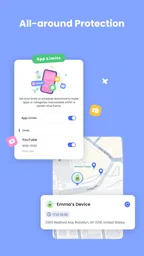
The app-blocking side addresses a different problem: keeping particular apps from distracting a child during homework, bedtime, or family time. A parent can use a limit to support a routine rather than turning every disagreement into an argument about handing over the phone. The key is to make restrictions predictable. If a child knows when access will be limited and when it will return, the control is easier to understand as a household rule.
A realistic example is a school night when a child needs the phone for messages but keeps drifting into an entertainment app while doing homework. Instead of taking the whole device away, a parent might use app controls to narrow access during the agreed study period, then review whether the arrangement is working. That is a more targeted use than blocking broadly and leaving a child unable to reach useful tools.
Controls work best when they are narrow and explained
App blocking is not automatically a good fit for every child or every situation. I would begin with the smallest restriction that solves the actual problem, then check whether it interferes with schoolwork, communication, or another ordinary need. If a child’s phone is also their main way to contact family, a blanket approach can create more friction than it removes.
A useful workflow is to discuss the rule first, apply the restriction for a defined routine, and revisit it after a few days. The parent can ask whether the limit helped the child focus and whether anything important became harder. This makes the app a support for a decision the family has made, rather than the decision-maker itself. It also gives parents a way to notice when a restriction is no longer appropriate.
Location sharing deserves the same restraint. I would reserve checks for practical reasons—such as confirming a journey is progressing as expected—instead of refreshing a map simply because it is available. Frequent checking can increase a parent’s anxiety without improving a child’s safety. The feature is most valuable when it supports a clear plan, such as agreeing to contact one another if a pickup changes.
Privacy questions deserve attention before setup
Because this app handles location and device restrictions, I would take a moment to review the permission requests and the choices shown during setup on both devices. Grant only the access needed for the functions your family intends to use, and read the explanations presented by the app and the operating system. I would not assume that every permission is necessary for every family’s chosen use.
Location is especially sensitive. Before relying on it, make sure the child understands that the device can be used to check where it is, and decide together who will look and in what circumstances. A child may leave the phone behind, turn it off, or be somewhere the parent did not expect; a location display cannot explain those circumstances. If the information appears inconsistent, contacting the child is a better next step than drawing a conclusion from the map alone.
I also recommend checking account access on the parent’s side. Keep the account credentials private, think carefully before sharing access with another adult, and review who in the household is authorized to make changes. Those are sensible precautions for any tool that connects a parent’s view with a child’s device. The important point is to use visible controls and choices rather than assume details about data handling that the app itself has not clearly explained to you.
For a family deciding whether to install it, the practical questions are straightforward: can the parent and child agree on the purpose, can the parent keep account access controlled, and can restrictions be limited to a specific need? If the answer is no, it may be better to begin with a direct conversation or a simpler household rule. Installing a monitoring tool before agreeing on boundaries can turn a useful safety measure into a source of mistrust.
Where it differs from simpler alternatives
Some parents rely on the phone’s built-in screen-time settings, while others use location sharing already available through their family devices. Those options may be enough if the only need is a basic time limit or occasional location check. AirDroid’s appeal is that it brings app blocking and location tracking together in a parenting-focused app, so a parent who needs both can manage them in one place rather than assembling separate approaches.
That convenience has a trade-off: a dedicated parental-control app asks the family to accept another account and another layer of oversight. If your child is old enough to manage their own device responsibly, or if you only need a one-off location share, the extra structure may feel unnecessary. Likewise, if a child’s school or family arrangement already provides clear device rules, adding overlapping restrictions could confuse them.
I would not choose this app as a substitute for teaching digital judgment. Blocking an app can interrupt a habit, but it cannot explain why sleep, focus, or privacy matters. A parent still needs to talk about online choices and adjust limits as a child becomes more independent. The strongest use is as a temporary scaffold: a way to make a family rule easier to follow while the child develops their own routines.
Cost, compatibility, and day-to-day expectations
The app is free to start, with in-app purchases ranging from $5.99 to $89.99 per item. I would check the purchase options inside the app before committing to a paid feature, and compare them with what your household actually needs. If all you want is a basic routine and occasional location checks, be careful not to pay for controls you will not use.
Its current version is 2.9.0.1, and it supports Android 8.0 and later. The age rating is Everyone. Those details help establish whether a device can run it, but they do not settle whether a particular child is ready for monitoring. A technically compatible phone does not make the family agreement optional.
Like any control that depends on a child’s device, the app is only useful when the device is available and the child knows how the arrangement works. Parents should avoid treating a missing or outdated location as a definitive answer. Agree on a backup plan—such as calling or sending a message—so a technology hiccup does not become a crisis or an accusation.
A cautious recommendation for the right household
AirDroid Parental Control is worth considering if you genuinely need both location awareness and app restrictions, and you are prepared to use them openly and proportionately. Its strongest practical advantage is bringing those two jobs into one parenting tool. I would recommend it to a parent of a younger child who is beginning to use a phone independently, particularly when the family can set clear limits and revisit them as circumstances change.
I would skip it if your main goal is covert tracking, if your child is likely to experience monitoring as a breach of trust, or if your needs are already covered by simpler device settings. It is also not a good answer to a disagreement that needs a conversation rather than a technical restriction. No app can replace agreed expectations, sound judgment, or checking in directly when a child’s safety is genuinely in question.
Overall, I see it as a useful but deliberately sensitive tool. The best result comes from choosing a narrow purpose, reviewing permissions and account access, and telling the child what the app is doing. Used that way, it can make everyday routines easier to manage without pretending that monitoring is the same as trust.
What we like
- Lets parents view a child’s device location in real time.
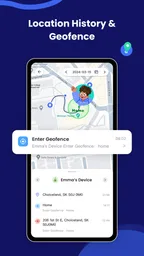
- Location history helps review where a child has been.
- Geofences can alert parents when a child enters or leaves an area.
- Remote camera and one-way audio can help check on a child.
- A web dashboard allows monitoring from a computer.
What could be better
- The child’s device needs an internet connection for remote checks.
- Some monitoring features require permissions on the child’s device.
- The child may notice monitoring through the companion app.
- Advanced features require a paid subscription.
- Location tracking can use extra battery power on the child’s device.





