


Kids360: Parental Control App review
 Analysis by Appsdrops
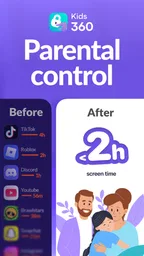
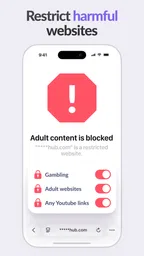
When a child’s phone starts competing with homework, bedtime, or family plans, it can be hard to know where to begin. Kids360: Parental Control App is designed to give parents a practical way to approach that situation, bringing child monitoring, screen-time control, and GPS tracking into one parenting app. I see the appeal: instead of treating device use and a child’s whereabouts as completely separate concerns, it offers a single place to manage both.
From a family concern to a daily routine
The starting point is a familiar one: a parent wants a clearer picture of how a child uses a phone and a reliable way to stay connected when the child is away. Kids360 frames parental control around those everyday needs. The app is free to download, while in-app purchases are available, so families can start by exploring it without an upfront app price and then decide whether paid options suit them.
Its core promise is easy to understand. Screen-time management can help parents bring more structure to device use, while child monitoring and GPS child tracking address the questions that come up outside the screen itself. That combination is the app’s strongest organizing idea. It gives a parent one destination for several related parts of digital parenting rather than asking them to piece together a routine across unrelated tools.
That convenience matters most when expectations are clear. Before making any control app part of family life, I’d suggest talking with the child about what the family is trying to improve: perhaps keeping phone use balanced, checking in during outings, or making screen habits easier to discuss. Framing the app as support rather than a secret surveillance tool can make the handoff more comfortable and the rules easier to follow.
Setting up the first steps
A sensible first pass is to work out which of the app’s main purposes matters most to your household. If screen time is the priority, start by discussing what a reasonable routine looks like. If location awareness is the concern, agree on when checking a child’s location is appropriate. A clear goal helps parents avoid turning every available control into a rule simply because it exists.
From there, the parent can explore the app’s monitoring, screen-time, and GPS functions and decide how each fits the family’s needs. I’d approach those controls gradually: establish the expectations first, then use the app to support them. That keeps the process focused on an outcome—healthier device habits or better coordination—rather than on monitoring for its own sake.
Kids360 is a parenting app, not a substitute for a family conversation. A screen-time tool can provide structure, but children still need to understand why the structure is there. Likewise, a location feature can help a parent feel informed, but it works best when everyone knows how it fits into a broader plan for safety and independence.
Turning controls into a workable flow
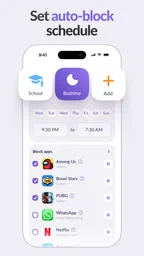
In everyday use, the intended flow is straightforward: a parent identifies a concern, uses the relevant part of the app, and then checks whether the arrangement is helping. For example, a family might begin with screen use that regularly interrupts an agreed routine. The parent can use the app’s screen-time-control focus to support a discussion about boundaries, then revisit those boundaries as the child’s schedule changes.
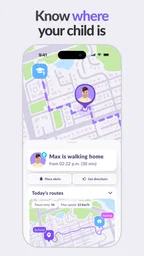
Another family might care more about keeping track of a child’s whereabouts during the day. In that case, GPS child tracking is the relevant part of the app’s stated purpose. It can form one piece of a check-in routine, alongside ordinary communication and clear expectations about when a child should contact a parent. The useful result is not simply seeing a location; it is having a shared plan that reduces uncertainty without replacing trust.
This is where a combined parental control app can feel convenient. Parents do not have to think of screen habits and location awareness as unrelated projects. They can start with the issue causing the most friction, build a routine around it, and bring in another part of the app if a separate need arises. I would still keep the rules limited and understandable so the child knows what to expect.
The handoff between parent and child
Any family-control app involves a handoff: the parent sets an expectation, the child uses a device within that arrangement, and the family checks in on whether the arrangement feels fair. Kids360’s value depends in part on how well that handoff works at home. If a child understands why screen limits or location awareness matter, the app can support an agreed routine. If the controls arrive without explanation, the same tools may feel intrusive and lead to arguments.
I’d make the conversation specific and calm. Explain what concern prompted the change, which parts of the app the family plans to use, and when the rules might be reviewed. Keep the discussion open to reasonable adjustments. A school day, a weekend, and a family outing can call for different expectations, and a routine that worked a month ago may need revisiting.
Parents also need to treat app-based monitoring as one input, not the whole relationship. A location indicator or a screen-time arrangement does not explain every choice a child makes. Checking in directly remains important, especially when a setting causes confusion or a child feels a rule is not working. In that sense, the app’s best role is to make a family plan easier to carry out, not to make decisions on a parent’s behalf.
What the routine can deliver
When the family’s goals are realistic, Kids360 can help make digital parenting feel more organized. The parent has a dedicated place for child monitoring, screen-time control, and GPS tracking, while the child can have a clearer understanding of the household’s expectations. For me, that joined-up approach is the most persuasive reason to consider it: it addresses practical concerns that often overlap in day-to-day family life.
The app has an average rating of 4.3 from around 311,000 ratings and more than 10 million installs. Those figures suggest that it has reached a broad audience, although popularity alone cannot tell you whether its approach will suit your family. The more useful test is whether the controls align with your needs and whether the child can participate in a fair, understandable routine.
It is also worth separating what the app is intended to support from what a family must provide itself. Technology can help with structure and awareness, but it cannot settle disagreements about boundaries or decide how much independence is appropriate. A successful outcome depends on choosing a small number of useful rules, explaining them clearly, and being willing to review them rather than letting the app dictate family life.
Where the flow can become difficult
The most likely friction is not the idea of parental controls itself; it is how the controls are introduced. A child who feels watched without explanation may resist the arrangement, even if the parent’s concern is reasonable. That is why I would treat communication as part of setup, not as an optional extra after the app is installed.
Another challenge is keeping expectations consistent. If a family uses screen-time rules one day and ignores them the next, the app may become a source of negotiation instead of support. Parents should decide what they want the routine to accomplish and avoid adding restrictions that do not serve that purpose. A simpler plan is often easier for everyone to understand and maintain.
Location tracking can also raise questions about privacy and independence. Families differ in how they balance reassurance with a child’s growing autonomy, so it helps to agree on the purpose and limits of location checks. A feature should support a specific family need, not become a reason to check constantly. That distinction can make the difference between a useful safety routine and a strained relationship.
There is also a cost consideration beyond the free download: in-app purchases range from $0.99 to $99.99 per item. Families should look at the purchase choices inside the app and decide whether any paid option is worthwhile before committing. The free starting point makes it accessible to try, but it is still sensible to keep spending expectations clear, particularly if a child is involved in using the device.
Who may find it useful
Kids360 may suit parents who want one parenting app focused on screen habits and child monitoring, especially when a family is ready to agree on how those tools will be used. It can also be a useful starting point for households that need a more deliberate conversation about phone routines. The app is available for devices running Android 7.0 or later, and its content rating is Everyone.
The app was released on December 10, 2020, and its current version is 2.89.0. Those details help identify the product, but the everyday experience will still depend on how well its approach fits a particular family. I would not install it expecting technology alone to solve conflict around phones; I would use it as one part of a broader agreement between parent and child.
With 979 written reviews alongside its large rating base, there is plenty of public feedback for prospective users to consider in the app store. I’d read that feedback with the same care I’d bring to any parenting tool: look for comments that reflect needs like yours, and remember that family routines differ. What feels reassuring to one household may feel too restrictive to another.
A considered choice for family phone habits
Overall, Kids360: Parental Control App makes a clear case for combining screen-time control, child monitoring, and GPS child tracking in a single parenting-focused experience. I like that its purpose maps to real questions parents face, and that the free app offers a straightforward way to begin exploring it. Its strongest results are likely to come when families use it to support a conversation and a shared routine, rather than treating monitoring as a replacement for trust.
Before making it part of your household, identify the concern you want to address, talk through the intended rules, and consider whether any in-app purchase is worth the cost. If the app’s approach fits your family, it can provide a useful framework for managing phone use and staying informed. If the rules create more tension than clarity, revisit the plan and adjust how the tool is being used. That practical flexibility is what makes a parental control app genuinely helpful in the long run.
What we like
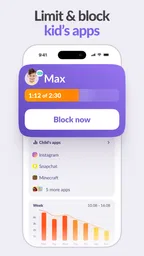
- Clear screen-time limits help families set consistent routines.
- Parents can approve extra screen time when needed.
- App usage reports make device habits easier to understand.
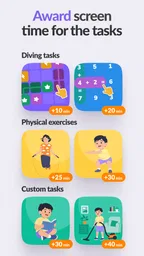
- Task rewards can encourage children to complete daily responsibilities.
- The child app supports location checks on compatible devices.
What could be better
- Both parent and child devices need setup for full functionality.
- Some features may require a paid subscription.
- Children may dislike limits on their favorite apps.
- Location features depend on device settings and connectivity.
- Setup can take time when configuring multiple devices.





