

Pregnancy App & Baby Tracker review
 Analysis by Appsdrops
I’d recommend BabyCenter as a reassuring companion for someone who wants pregnancy guidance organized around the stage they are actually in, rather than a pile of articles to search through. Its main strength is the week-by-week rhythm: it gives you a reason to check in, learn what may be changing, and keep track of the journey as it unfolds. That structure can make a big, unfamiliar experience feel a little easier to navigate. It is still an informational app, though, not a substitute for your care team or a personalized medical record, and that distinction matters.
Why the week-by-week approach works
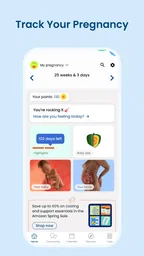
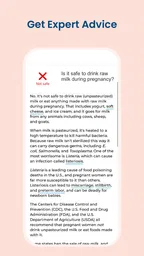
Made by BabyCenter, this free parenting app is focused on pregnancy and baby development. The central idea is simple: follow your pregnancy by week and use that point in the timeline to explore growth and related guidance. I find that more useful than browsing a general parenting library when a question is tied to a particular stage. Instead of wondering which of dozens of topics applies now, you have a natural starting point.
The format is especially helpful for first-time parents who are still learning the vocabulary and sequence of pregnancy. A short, regular check-in can prompt useful questions for a midwife or doctor without making every moment feel like a research project. I’d use it to build context, then bring anything worrying or unclear to a qualified professional. The best role for BabyCenter is a steady explainer, not a diagnostic tool.
Its popularity suggests that many people find this kind of support worth keeping close: it has a 4.9 average from around 1.5 million ratings, with over 10 million installs. Those figures are reassuring as a sign of broad use, but they don’t tell you whether its tone or approach will suit you personally. I’d treat them as a reason to consider trying it, not as proof that every article will answer every concern.
A useful routine, not another source of pressure
A practical way to use a pregnancy tracker is to make it part of a calm weekly routine. For example, you might check the current stage on a quiet morning, read about development, and jot down one or two questions to raise at your next appointment. That is more productive than repeatedly opening the app whenever a new worry appears. It also helps keep general information in perspective: a description of what may happen in a week is not a promise that your own experience will match it exactly.
There is a subtle benefit to the timeline beyond convenience. Pregnancy can feel abstract between appointments, and a weekly reference gives you a sense of progression without requiring you to keep a detailed journal. At the same time, people differ widely in symptoms, health history, and circumstances. If the app’s general account does not resemble your experience, that alone does not mean anything is wrong. Use the material as background, not as a yardstick for comparing yourself with an idealized schedule.
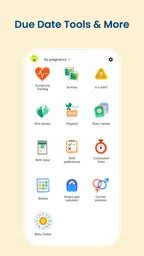
BabyCenter is also positioned as a baby tracker, so it can make sense for someone who wants the pregnancy period and early parenting information to feel connected. That continuity is appealing if you prefer returning to one familiar resource rather than starting from scratch with a new app after birth. Still, anyone who wants a highly structured personal log of appointments, medication, symptoms, or measurements should check that the app’s available tools match those needs before relying on it as their main record.
Where it can fall short
The same weekly structure that makes the app approachable can make it feel less relevant when you want an answer that cuts across the timeline. A question about a specific symptom, a complicated pregnancy, or an individual treatment decision may need a clinician’s advice or a more focused medical resource. General pregnancy content can explain common themes, but it cannot account for your complete history. I would not use an article or tracker entry to decide whether a symptom is urgent or to change care instructions.
There is also a risk of information overload. Pregnancy brings plenty of decisions and emotions already, and frequent updates can turn a helpful check-in into one more stream of things to monitor. If you notice that reading about each stage increases anxiety, it is reasonable to limit your visits or use the app only when you have a specific question. A tracker should make the experience feel more manageable; it should not become a scorecard for whether you are progressing “correctly.”
Another trade-off is that a broad audience often means broad guidance. That can be a strength for straightforward explanations, but it may not satisfy readers who want highly technical detail or advice tailored to a particular medical situation. In those cases, a clinician’s handout, a specialist resource, or a direct conversation with your care team is likely to be more useful. I’d keep BabyCenter as a companion to those sources, not a replacement for them.
Who is likely to get the most from it
I think the app is best suited to expectant parents who want an easy, repeatable way to follow pregnancy week by week and learn as they go. It is particularly useful if you prefer guided browsing to searching the open web, where results can be difficult to judge and may not be organized around your current stage. The fact that it is free lowers the barrier to trying it, while its Teen content rating is a reminder that it is intended for a broad audience rather than being an adult-only medical service.
It can also help a partner or family member who wants a clearer picture of what the pregnant person may be learning about. A good shared routine is to read the same stage overview and then talk about which parts are relevant, rather than assuming the app describes exactly what the pregnant person is feeling. That small distinction avoids turning general guidance into pressure or unwanted advice.
On the other hand, I’d skip it as a primary resource if you mainly need clinical decision support, a detailed health record, or a specialized plan for a high-risk pregnancy. I’d also be cautious if notifications or frequent pregnancy content make you more anxious. A simpler calendar, notes app, or direct guidance from your care team may suit you better in those circumstances. The right alternative depends on whether your priority is general education, personal record-keeping, or medical care; one app does not have to cover all three.
Small choices that make it more useful
To get practical value without letting the app take over, I’d choose a specific purpose before opening it. One week, that might be understanding a development topic; another, it could be finding language for a question you want to ask at an appointment. Keeping a brief note outside the reading flow can help separate “something I want to learn more about” from “something I need to ask a professional.” That is a simple but important boundary when using any pregnancy information app.
I’d also avoid treating the weekly view as a prediction engine. If a description does not match your symptoms or circumstances, don’t force your experience to fit it. Save the parts that are useful, ignore what is not relevant, and raise personal concerns with your clinician. This approach lets the app provide orientation while protecting you from the common trap of comparing a real pregnancy with a general guide.
Before settling into a routine, it is worth checking whether the current version works on your device. BabyCenter’s current version is 6.17.0, and it requires Android 8.0 or later. That makes compatibility a practical first check for Android users. If you use another platform, look for the app in its app store and confirm that it suits your device and needs before building a tracking habit around it.
A measured recommendation
BabyCenter has been available since March 11, 2011, and its standing as a widely used pregnancy app reflects the appeal of dependable, stage-based guidance. Its 94,000 reviews add another signal that people have spent time with it, though reviews are still personal experiences rather than a guarantee of a perfect fit. I’d judge it by whether its weekly approach helps you feel informed without increasing stress.
For someone who wants approachable pregnancy education and a simple way to follow development over time, I think it is worth trying. Its strongest quality is not that it can answer every question; it is that it gives you a sensible place to begin. Its main limitation is equally clear: general information cannot replace tailored care, and a tracker is only useful if its pace and content feel supportive to you.
My verdict is positive, with a boundary. BabyCenter is a good companion for curious, first-time parents and anyone who appreciates learning in weekly steps, especially when they use it alongside professional care. If you need individualized medical guidance, extensive personal logging, or less pregnancy-focused content, choose a more specialized resource instead. Used for what it does well—orientation, context, and a gentle routine—it can make the long stretch of pregnancy easier to follow without pretending to manage it for you.
What we like
- Provides week-by-week pregnancy updates in an easy-to-follow format.
- Baby tracking tools help organize feeding and diaper records.
- Appointment reminders can help keep prenatal care on schedule.
- The interface makes common pregnancy resources quick to find.
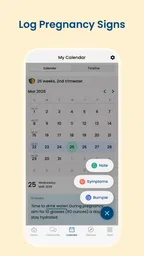
- Useful for keeping pregnancy notes together in one place.
What could be better
- Some features may require a paid subscription.
- Health information is not a substitute for advice from a clinician.
- Frequent notifications may feel distracting.
- Tracking data requires regular manual updates.
- Personal health details may raise privacy concerns.





