

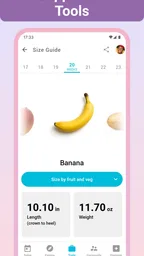


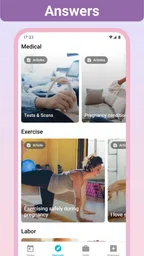


Pregnancy + | Tracker App review
 Analysis by Appsdrops
I can see why a pregnancy tracker gets opened eagerly at first: there is a new question almost every day, and it helps to have a place to collect useful tools instead of juggling separate timers and notes. My impression of Pregnancy + is that its best chance of earning a lasting place on your phone comes from practical moments, not from checking it out of habit. It is a free parenting app from Philips Electronics UK Limited, with a 4.8 average from around 3.7 million ratings and over 50 million installs. Those figures suggest broad appeal, but the more important question is whether its mix of pregnancy support tools suits the way you actually want to keep track.
What feels useful in the first week
The app’s core appeal is its concentration of pregnancy-related utilities. Its store summary points to a kick counter, contraction timer and baby-name tools, which cover very different needs: recording movement, timing a pattern, and making a decision that can involve both parents. I like that combination because it gives a new user several clear reasons to return, rather than relying only on general reading or a daily reminder.
In an ordinary first week, I would start by deciding which one or two tools solve a real problem for me. If I am comparing names with my partner, I can use the name feature as a shared conversation starter. Later, if I want to keep track of movement or time contractions, those tools have a more immediate purpose. The useful habit is to open the app when there is something to do, rather than treating every available feature as homework.
That distinction matters. Pregnancy information can be reassuring, but an app is not a clinician and a timer is not a diagnosis. I would use the kick counter and contraction timer as recording aids, then follow the guidance from my care team if something concerns me. If I am unsure what a change means, I would contact a qualified professional rather than letting a screen decide whether it matters.
Compared with the usual alternative of keeping a note on paper or using a general-purpose timer, a pregnancy-focused app makes the relevant tools easier to find in one place. A notebook may be better if I want complete control over what I record, while a standalone timer can be simpler for someone who only needs to time contractions. Pregnancy + makes more sense when I want those pregnancy-specific functions together and expect to use more than one of them.
Choose a small routine, not a new obligation
My practical tip would be to set a simple routine around an existing moment: review or record something when it naturally fits into the day, rather than creating several extra check-ins. If the app becomes another task to complete, its usefulness can disappear quickly. The strongest first-week experience is not necessarily using every tool; it is finding the one that answers a question I would otherwise keep in my head.
The app is free to download, with in-app purchases priced from $0.99 to $39.99 per item. That makes it easy to try the basic experience, but I would look carefully at any paid option before buying it. A pregnancy app can feel especially compelling when someone is anxious or overwhelmed, so I would pay only for something I already know I need, not because I feel pressured to unlock every available extra.
Does it stay useful month to month?
The recurring value depends on how your needs change. A baby-name tool may be useful early on and then become irrelevant once you have made a choice. Movement tracking or contraction timing may matter at different points, so the app’s utility can rise and fall rather than forming one uninterrupted daily habit. I see that as a reasonable pattern for a pregnancy companion: it should be available when the moment calls for it, not demand attention every day.
This is where the app differs from a simple pregnancy diary. A diary is valuable when you want a personal record and are willing to maintain one. Pregnancy + is more compelling if you prefer specific tools that support particular tasks. I would not assume that a collection of utilities automatically replaces a written record, however. If I want to remember a question for an appointment, note how I felt, or capture a detail that does not fit a counter or timer, a separate note may still be the better place.
A useful workflow is to keep the app for structured actions and use a small note for context. For example, if I record a concern or a pattern, I can also jot down what was happening and what I want to ask my care team. That avoids expecting a counter or timer to explain the whole situation. It also makes it easier to bring a clear question to an appointment without treating the app as a medical record or source of personalized advice.
Another trade-off is that convenience can encourage over-checking. If I am already worried, repeatedly opening a tracker may make me more focused on every change without giving me better answers. I would set a boundary: use the relevant tool for the purpose it serves, and switch to professional advice when the concern is about health or urgency. That is a healthier way to get value from the app than looking for reassurance from repeated checks.
When a different option is a better fit
If all I need is one reliable way to time contractions, a basic timer may involve less setup and fewer distractions. If I want a highly personal log, a notebook or notes app offers more freedom. If I am mainly looking for medical decisions, neither a consumer pregnancy tracker nor a general web search should take the place of a midwife, doctor or other qualified professional. Pregnancy + suits people who want a convenient bundle of pregnancy-focused tools, not people who expect one app to cover every emotional, clinical and organizational need.
It is also worth remembering that a pregnancy app is most useful when its tools match your preferences. Some people enjoy tracking; others find frequent recording tiring or anxiety-provoking. I would not force myself to use the kick counter just because it is available. If tracking feels uncomfortable, ask your care team what approach is appropriate for you and rely on their guidance.
Keeping it helpful without letting it take over
Maintenance is fairly straightforward in principle: keep the app available for the tasks you use, update it when your device offers an update, and periodically decide whether its tools still earn space on your home screen. The current version is 7.9.1, and the stated minimum operating system is version 8.0. The app is rated Everyone 10+, so I would still treat the content as pregnancy-focused support for the intended user rather than as a general children’s app.
The burden is less about elaborate upkeep and more about attention. A tracker can create a sense that every feature should be filled in or checked. I would resist that. Use a tool when it answers a specific need; ignore the rest without guilt. That small choice is what can keep a pregnancy app from becoming one more source of notifications, unfinished tasks or self-imposed rules.
There is also a practical distinction between a useful reminder and a habit that no longer serves you. If a feature helps me prepare a question, compare names or record something I have been asked to monitor, I would keep using it. If I am opening the app only because I feel I ought to, I would step back and see whether the information is helping. The app’s long-term value is personal, and it does not have to mean daily use.
Where fatigue can set in
The same breadth that makes the app appealing can also make it feel less focused. A name tool, a kick counter and a contraction timer are not all relevant at once, so some users may find that much of the app has little value for them at a given stage. That is not necessarily a flaw, but it means I would judge it by the tools I genuinely use rather than by how many options it appears to offer.
Another limitation is that tracking can give an impression of certainty that the app cannot provide. A counter records an action; a timer measures intervals. Neither can tell me what a symptom means or whether a particular pattern is safe. I would use the app to organize observations, not to reassure myself against professional advice. This is especially important if I am feeling worried, because a neat record can look more authoritative than it really is.
Pregnancy + has been available since January 28, 2013, and its broad use is reflected in around 21,000 written reviews as well as its large rating base. I take that as a sign that many people find a reason to use it, not as proof that it is right for every pregnancy or every personality. Its developer is Philips Electronics UK Limited, and the app remains a free download with optional purchases. I would treat the purchase range as a reason to check what is included before spending, rather than assuming every useful tool requires payment.
My long-term verdict
I would recommend Pregnancy + to someone who wants a pregnancy-specific set of practical tools and is comfortable choosing only the ones that matter. It has a clear path from early name discussions to later tracking needs, which gives it more staying power than an app built around a single novelty. For me, the key is to let its usefulness be occasional and purposeful instead of expecting it to become a daily ritual.
I would skip it, or keep it only as a secondary tool, if I wanted a completely private paper log, needed only a basic timer, or found tracking stressful. I would also avoid using it as a substitute for medical guidance. Those are not reasons the app is poor; they are signs that a different tool or a conversation with a care professional may be more appropriate.
Overall, I think it can earn a place on a phone after the initial curiosity fades, but only when its focused tools keep solving real, changing needs. Start with one feature, see whether it makes a task easier, and ignore anything that adds pressure. That approach gives the app a fair chance to be useful without asking it to do more than a pregnancy companion should.
What we like
- Daily updates explain how pregnancy may affect your body and baby.
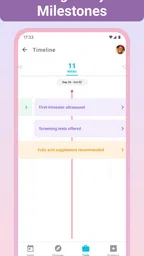
- The timeline makes it easy to follow progress by week.
- Appointment reminders can help you stay on top of prenatal visits.
- A kick counter lets you record your baby's movements.
- The contraction timer can be useful as labor approaches.
What could be better
- Some features require a paid subscription.
- The app's content is not a substitute for medical advice.
- Notifications may feel frequent if you prefer a quieter app.
- Pregnancy estimates may not match your individual experience.
- Some tools may be less useful before later pregnancy stages.





