



Qustodio Parental Control App review
 Analysis by Appsdrops
When I look at a parental-control app, I care less about a long feature checklist than about whether it behaves predictably when a family is in a hurry. Qustodio Parental Control App is aimed at parents who want a central way to manage children’s screen habits, app and web access, and location checks. My overall impression is that it makes most sense as a family tool for setting boundaries and having better conversations—not as a substitute for paying attention to what a child is doing.
What to expect from its day-to-day pace
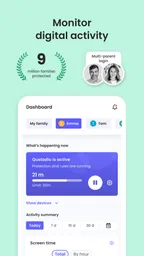
Qustodio is a parenting app from Qustodio LLC, and its core appeal is bringing several kinds of oversight into one place. Instead of switching between a browser filter, a screen-time control and a separate location tool, a parent can use one service to approach those needs together. That can make routine checks simpler, especially in a household where children use devices for school, entertainment and messaging throughout the day.
I would set expectations around management rather than instant response. A parental-control app depends on both the parent’s device and the child’s device, so an action such as changing a boundary is only useful if the setup is working on both ends. I would not treat any such tool as a guaranteed emergency channel or assume that a location view replaces calling a child directly.
The app is free to install, while in-app purchases range from $34.99 to $137.95 per item. That makes it sensible to inspect the available plan and its terms in the app store before building a family routine around paid controls. The free entry point lowers the barrier to trying it, but I would decide whether the full service fits the household before relying on it as the only way to manage device rules.
Why the combined approach can save time
The useful speed gain is organizational: one parent-facing routine can cover screen time, app and web blocking, and location checks rather than requiring a different place for each. This is most valuable when a parent needs a quick overview before school, after practice or during a busy evening. It is less compelling for someone who only wants a basic timer and is already satisfied with the controls built into a phone or tablet.
For a practical setup, I would begin with a small number of clear rules, then test them on the child’s device while everyone is available. A short test is more helpful than assuming every restriction will behave exactly as expected in a real day. It also gives a child a chance to understand what is restricted and why, which can reduce disputes later.
What happens during a busy family day
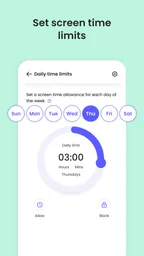
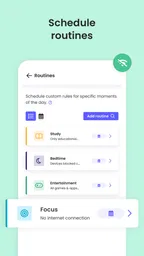
Consider a child who uses a device for homework, then wants to watch videos while a parent is making dinner. The parent’s challenge is not merely switching entertainment off; it is deciding when leisure time begins, whether a particular app is appropriate, and how to avoid turning every reminder into an argument. Qustodio’s combination of time management and access controls is relevant here because the parent can think about the boundary as a routine rather than a one-off confrontation.
A useful, less obvious habit is to treat location checks as context, not surveillance for its own sake. If a child is late coming home, a location tool may help a parent decide whether to wait, call or make another plan. If the child is already where expected, repeatedly checking the map can add stress without adding much safety. I would agree as a family on when location is useful and explain that use openly.
Heavy-use periods can expose the limits of any layered control system. A child may move between schoolwork, games, browsers and shared devices, while the parent is trying to make a quick change. Rather than assuming the app can resolve every edge case instantly, I would keep the rules understandable and have a simple fallback: talk to the child, check the relevant device, and adjust the routine if a legitimate activity is being blocked.
Reliability is partly about how you set it up
For a tool that can limit access, reliability means more than opening without a problem. The rules need to match how the family actually uses devices, and parents need a way to recognize when a restriction is causing unnecessary friction. I would test the controls with ordinary activities—school sites, a familiar app and the household’s usual evening routine—before treating them as settled policy.
One practical trade-off is that stronger oversight can make a child feel watched or can interrupt something legitimate. For that reason, I would explain the purpose of each boundary, especially when web or app access is blocked. A rule that a child understands is easier to maintain than a surprise restriction that appears in the middle of homework. When a block seems wrong, checking the exact activity and adjusting the rule is better than broadly relaxing every limit.
Qustodio has an average rating of 3.6 from around 25,000 ratings, alongside about 1,400 written reviews. That suggests a mixed reception rather than universal satisfaction, which is worth keeping in mind for an app that must fit different devices and parenting styles. I would use the rating as a prompt to test the setup carefully, not as proof that it will or will not work for a particular family.
Device fit and the cost of extra oversight
The listed minimum operating-system requirement is version 7.0, and the current version is 182.41.0. Before choosing it, I would check that the parent’s device and each child’s device meet the requirements shown in the relevant app store. In a household with older hardware, compatibility is a more useful first question than the size of the feature list: a control app is only practical if it can be installed and maintained on the devices that matter.
More oversight also brings a human cost. A child may see restrictions as unfair if parents use them without a conversation, while parents can end up spending too much time policing every click. I would use the app to support a few agreed boundaries—such as a bedtime routine or age-appropriate browsing—rather than trying to monitor every ordinary choice. If a family’s main need is a simple daily time limit, built-in device settings may be less involved and easier to explain.
The app is rated for Everyone and has been available since September 30, 2020. It has more than 10 million installs, which indicates that it is used widely, but broad adoption does not make it the right fit for every family. A parent who wants a compact set of controls may prefer native screen-time settings; someone who wants web filtering, app restrictions and location tools together may find Qustodio’s broader approach more useful.
Who should choose it—and who may be happier elsewhere
I see Qustodio as a stronger match for parents who want several kinds of control in one family routine and are willing to spend time explaining and tuning those controls. It can be particularly useful when a child has access to a personal device and the parent wants a consistent way to set expectations around screen use and online access. The combined approach may also help parents who otherwise juggle separate tools and struggle to remember where each setting lives.
I would hesitate to recommend it to a family that wants invisible monitoring, instant certainty or a replacement for direct communication. It is also probably more than necessary if the only concern is a basic bedtime limit that a phone’s built-in settings already handle well. Families with children using several kinds of devices should confirm compatibility and test their specific rules rather than assuming that one setup will behave identically everywhere.
Compared with the usual alternatives, the main distinction is breadth. Built-in controls can be a straightforward choice for time limits on a single platform, while dedicated web filters may suit a household focused mainly on browsing. Qustodio’s value is in bringing screen-time management, app and web access, and location checks into a broader parenting workflow. That breadth is helpful only if the family actually needs those pieces; otherwise it can mean extra setup and another subscription decision.
My performance verdict
In performance terms, I would judge Qustodio by whether it becomes a dependable part of a routine, not by expecting it to remove every parenting decision. Its all-in-one focus can reduce the effort of moving between separate controls, but the family still needs to configure sensible rules, confirm how they affect everyday use and revisit them when a child’s needs change. Keeping the initial setup modest is a good way to avoid unnecessary friction.
The most useful approach is to use Qustodio as a clear boundary-setting tool, then pair its controls with honest conversation. That balance matters more than turning on every available restriction. If a child understands the reason for a limit and knows how to ask for an exception when schoolwork or another legitimate task is affected, the app is more likely to support a workable routine rather than become another source of conflict.
Overall, I would recommend Qustodio Parental Control App to parents who want screen-time, access and location controls gathered under one roof and are prepared to test the setup on their family’s devices. I would choose a simpler built-in option for a single, narrow need, and I would not rely on any app as a substitute for direct contact or judgment. Its performance value is practical: it can help make household rules easier to manage, provided those rules are realistic, transparent and checked in everyday use.
What we like
- Location tracking helps families check where a child is.
- Parents can set daily screen-time limits for each child.
- Web filtering can block unsuitable content across supported browsers.
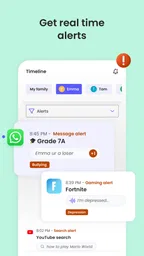
- Activity reports make it easier to spot changing device habits.
- A panic button lets children alert trusted contacts in an emergency.
What could be better
- Some features require a paid subscription.
- Children may find ways around restrictions on certain devices.
- Web filtering can occasionally block legitimate pages.
- Location updates may be delayed or less accurate indoors.
- Setup and rule management can take time across multiple devices.





