

Findmykids: Parental Control review
 Analysis by Appsdrops
I find family-location apps most useful when they reduce uncertainty without turning every trip into a conversation about surveillance. Findmykids: Parental Control is built around that balance: it gives parents a way to check where family members are, while its value depends on agreeing together about when and why location checks are appropriate. I’d consider it for a household that wants a shared safety routine, not as a substitute for trust or a way to monitor someone secretly.
Making a location check part of the routine
My preferred starting point is deliberately simple: set up the family connection, make sure everyone understands what the app is for, and use it for a specific practical question. Is a child on the usual route home? Has a family member reached the agreed meeting point? That is a clearer use than repeatedly opening a map just because it is available.
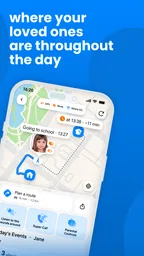
Findmykids is a parenting app from LETEM LTD, focused on family location and parental control. Its central appeal is straightforward: a parent can check a connected family member’s location instead of relying on a missed call or a string of messages. That can be reassuring when plans involve school, activities, or a trip across town, especially when a child is not yet ready for a phone conversation at every transition.
A realistic example is an after-school pickup. Rather than texting several times while travelling, a parent can check the app before leaving and decide whether the child appears to be following the expected plan. The useful part is not that a map answers every question; it is that it can help the parent choose whether a call is actually needed. I’d still agree on a fallback, such as calling if the app’s information does not match the plan.
The app is free to install, and its content rating is Everyone. It has a 4.6 average from around 2.1 million ratings, with over 50 million installs. Those figures suggest a widely used product, but they do not tell me whether its approach suits an individual family. The more important question is whether everyone involved is comfortable with location sharing and whether the parent can use it proportionately.
Set expectations before relying on the map
I would explain the purpose of the app before making it part of daily life. For a younger child, that might mean saying that a parent checks it during the trip home or when pickup plans change. For an older child, the conversation should include what counts as a reasonable check and when a direct message or call is preferable. A tool that is introduced openly is more likely to feel like a safety arrangement than a secret test.
It also helps to distinguish a location check from proof of what someone is doing. A map can answer where a connected device appears to be, but it cannot explain why a person has stopped, whether they have changed plans, or whether they are safe in every other sense. If a location looks unexpected, I’d use it as a prompt to ask calmly, not as grounds for an accusation.
That distinction matters because location technology can create false confidence. If the app does not show what you expect, the right next step is not to assume the worst or to keep refreshing indefinitely. Try the agreed contact method, check the plan, and treat the app as one source of context. For urgent concerns, a location-sharing app is not a replacement for contacting the person or appropriate local help.
Settings that deserve a deliberate check
Before depending on any family tracker, I’d review the app’s available settings with the actual family routine in mind. Confirm who is connected and who can see location, then check that each person understands the arrangement. I would also review the phone’s location and battery-related settings if updates seem inconsistent; operating-system controls can affect how location apps behave, and a parent should not assume that installing the app alone guarantees uninterrupted updates.
I can’t recommend a particular setting without knowing the device and the family’s needs, so I’d avoid changing controls at random. Instead, test the setup during an ordinary trip when there is no pressure: have the child follow a familiar route and agree to check in at a known point. If the app does not behave as expected, troubleshoot together before treating it as dependable for a more complicated journey.
Another useful habit is to keep the circle of access small and intentional. Family safety does not require sharing someone’s whereabouts with every relative or acquaintance. If more than one adult needs access, agree on who is responsible for responding to an alert or an unexpected location. Clear responsibility prevents the awkward situation where several people assume someone else has checked in.
Parents should also consider the child’s age and growing independence. A level of oversight that feels appropriate for a young child may feel intrusive to a teenager. I’d revisit the agreement as routines change: a new school route, more independent travel, or a different pickup arrangement can all alter what information is useful. The app works best when its use evolves with the family, rather than quietly becoming a permanent, unexplained demand.
Faster patterns that avoid constant checking
The most helpful improvement is often a routine, not a clever setting. Decide in advance which journeys matter, when a parent will check, and what to do if the plan changes. For example, a family might agree that the parent checks once around the expected arrival window and calls only if the child has not arrived or the location seems inconsistent with the route. This reduces unnecessary monitoring while preserving a clear next step.
I’d also make the app a backup to communication rather than the default way to communicate. If a child needs a different pickup, they should tell the parent directly whenever possible. The map can help confirm the general situation, but it does not replace the useful details in a message: “I’m waiting inside” or “I’m going with the agreed adult.” This is a small distinction, but it prevents the family from treating a location dot as a complete conversation.
For recurring activities, use a repeatable check-in plan rather than improvising every time. Before a regular class or visit, agree on the expected destination and who will collect the child. Afterward, the parent can consult the app if timing becomes uncertain. That makes the tool easier to use under stress because the family has already decided what normal looks like.
There is a trade-off here: frequent checking can feel reassuring to the parent while making a child feel watched. I’d pay attention to how the routine affects both sides. If location checks are prompting arguments or repeated demands to explain every pause, scale back and talk about the underlying concern. The aim is practical reassurance, not a running audit of someone’s day.
Where it differs from simpler alternatives
The usual alternative is a phone call, a text, or the location-sharing tools already available on a device. Those options may be enough for families who only need an occasional check or who prefer not to add a dedicated parenting app. A call can clarify a situation in a way a map cannot, and built-in sharing may be a better fit for a household that wants fewer apps and fewer settings to manage.
Findmykids makes more sense when a parent wants a dedicated family-focused place to check location and parental-control tools, rather than treating each check as a separate message exchange. That focus can be useful for families with regular school and activity journeys. But it also means parents should be comfortable maintaining another app and discussing its role with the people being tracked. If everyone already has a simple, trusted check-in routine, adding a tracker may solve no meaningful problem.
I would not choose it for covert monitoring, nor would I use it to settle disagreements about a child’s behaviour. It is also not the right answer for a family that needs guaranteed, uninterrupted tracking in every circumstance. Phones can be unavailable, settings can change, and a person may not be able to respond. When dependable communication is the priority, direct contact and a clear plan matter more than any app.
Costs, upkeep, and practical friction
The app is free, with in-app purchases listed from $0.39 to $999.99 per item. That is a wide range, so I’d check the purchase details inside the app before committing to anything and decide whether the free experience already covers the family’s intended use. I would not treat a paid option as necessary without first identifying a specific need it solves.
Keeping the app useful also involves small bits of upkeep. If a child changes devices, a parent changes phones, or the family’s sharing arrangement changes, take time to confirm that the right people still have access. After an operating-system update or a change to location settings, test the usual route again rather than discovering a problem during a rushed pickup. A quick, calm check of the setup is more useful than assuming an old configuration still works.
The current version is 2.13.10-google, and the stated minimum operating-system requirement is Android 8.0. The app was released on June 17, 2015, and its scale is reflected in roughly 13,000 written reviews as well as its large rating base. I’d still judge it by how it works on the family’s own phones and by whether its routines feel fair, not by popularity alone.
Who will get the most from it
I’d recommend considering Findmykids to parents whose children travel independently on familiar routes and whose family would benefit from a shared location check. It can be especially practical when schedules involve school, clubs, or separate pickups, because it gives parents another way to orient themselves before deciding whether to call. It is also a better fit when adults are willing to agree on boundaries and explain the arrangement openly.
I’d skip it if the family only needs occasional coordination, if built-in phone sharing already works well, or if location tracking would undermine trust more than it would reduce worry. It is not a substitute for teaching children how to contact a trusted adult, recognise a changed plan, and ask for help. Those skills remain important even when a parent can check a map.
Overall, I see this as a practical support tool whose quality depends as much on the family’s habits as on the app itself. The strongest setup is modest: agree on why sharing is enabled, check the settings, test the ordinary route, and use the map to guide a sensible conversation rather than replace one. That is the approach I’d recommend: make location sharing a transparent backup, not the whole safety plan.
What we like
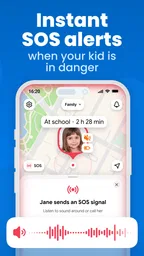
- A child can send an SOS alert from the app.
- Parents can review the child's location history.
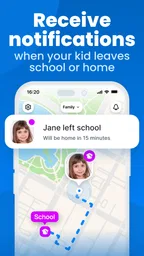
- The app can notify you when a child arrives or leaves a place.
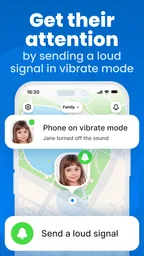
- A loud signal can help locate a misplaced phone.
- Location sharing can work across Android and iOS devices.
What could be better
- Accurate tracking depends on the child's phone having a connection.
- Background location access can increase battery use.
- Some features require a paid subscription.
- Children may feel uncomfortable with constant location monitoring.
- Setup requires installing the app on both the parent's and child's devices.





