




Tin Can review
 Analysis by Appsdrops
I would think about Tin Can as a companion for a particular kind of family communication, not as another general-purpose parenting organizer. It is a free iOS and Android app from TinCan, made to accompany Tin Can phone hardware. That distinction matters: the app’s purpose is tied to a separate phone experience, so it makes the most sense for families already interested in that setup rather than anyone simply seeking a messaging app for parents.
My main takeaway is that Tin Can is about making a child’s conversations feel more like a familiar household phone call than another screen-based chat. That can be appealing if you want children to connect with friends in a more intentional way. It is less compelling if your family needs a complete digital-safety dashboard, a shared calendar, or a messaging service that works independently of its companion device.
What free access does—and does not—tell you
The app is free to download, which makes trying the companion software a low-cost first step. I would not treat that as proof that the complete Tin Can experience costs nothing, though: the app is designed to accompany a Tin Can phone, and the phone is a separate part of the arrangement. If you are comparing the total cost with a conventional phone or a messaging service, check the current hardware terms in the app store before making a decision. The free app alone does not tell you what owning the full setup will involve.
That separation is useful to keep in mind when judging value. A free app can be worthwhile if it supports a family routine you actually want, but downloading it is not the same as getting a standalone way for your child to call friends. I would first decide whether the companion-phone idea fits your household, then assess the app as one piece of that choice.
The app is rated for Everyone, which makes its intended audience broad in the store, but that label is not a substitute for a parent’s own judgment about a child’s readiness for independent communication. I would talk through who the child should contact, when calls are welcome, and what to do if a conversation feels uncomfortable. Those simple expectations matter regardless of the device or service.
A more deliberate way to help children stay in touch
The appeal here is the shape of the interaction. Many children’s connections now run through general messaging apps, where conversation sits alongside notifications, feeds, games, and other distractions. Tin Can’s landline-inspired premise points toward a narrower activity: reaching a friend by phone. For a family that wants to encourage direct conversation without making a child’s first communication tool feel like a miniature adult smartphone, that is a meaningful distinction.
In an everyday situation, imagine a child wanting to speak with a friend after school. With an ordinary phone, the call can be one item among a stream of apps and alerts. A dedicated phone routine can make the purpose clearer: the child asks to call, the family agrees on a suitable time, and the conversation has a natural beginning and end. The app is relevant because it accompanies that phone experience; it is not simply a replacement for every other way a family communicates.
One practical advantage of this approach is that parents can frame calling as a shared household habit rather than handing over unrestricted access to a broad communication platform. I would agree on a few basics before the first call: which friends are appropriate to contact, whether calls should happen in a common area, and how the child can ask for help. This is not a special setting I am claiming the app provides; it is a useful family workflow for any child using a phone-oriented service.
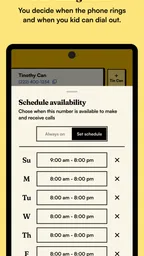
Another less obvious consideration is scheduling. A phone call depends on both children being available, unlike a message that can wait for a reply. That can be a positive trade-off: it encourages a real-time conversation and can reduce the expectation of instant responses. It can also take more coordination, especially when families have busy afternoons. If your child’s friends are usually free at different times, a flexible messaging tool may be more practical.
There is also a social adjustment to consider. Children who are used to sending short texts may need a little encouragement to start and sustain a conversation by voice. I would help a younger child think of a simple opening—asking about a game, a class, or a weekend plan—rather than expecting every call to flow effortlessly. This makes the phone format more approachable without turning the parent into a constant mediator.
Where the companion approach has limits
The biggest trade-off is dependence on the wider Tin Can setup. If you do not have, or do not intend to use, the companion phone, the app may not serve the need you had in mind. That makes it different from a standard family messaging app, which is generally chosen for its own communication features and the devices people already use. Before downloading, I would ask a straightforward question: am I interested in the Tin Can phone experience, or am I only looking for a free way to message?
Another limitation is that a phone-centered routine is not automatically a complete parental-control strategy. A family may still need to set expectations outside the app, supervise younger children, and decide how communication fits around schoolwork and bedtime. Parents looking for a broader toolkit—such as device-wide screen-time management or a family schedule—should compare dedicated tools designed for those jobs rather than assuming this companion app covers them.
The format can also be inconvenient when a child needs to share something visual, such as a drawing or a photo, or when friends are not available for a live conversation. A call is strong for voice and attention; it is not necessarily the most convenient way to coordinate a quick change of plans. I would keep another suitable family communication method available for practical messages, rather than forcing every interaction into one channel.
For parents, the key question is how much independence they want to give. A child who is ready to initiate conversations may benefit from having a predictable way to reach friends. A child who still needs close help with boundaries may need an adult nearby, whatever the technology. The app’s Everyone age classification does not answer that family-specific question, and I would not use an age label as the only reason to hand over access.
Who is most likely to find it worthwhile?
I can see Tin Can suiting families who value voice conversations, want a child’s communication to feel distinct from a full smartphone, and are comfortable with the companion-phone model. It may be especially appealing if the household already has a clear routine around calls and wants to help a child build confidence speaking directly with friends.
It is a weaker fit for families who mainly need asynchronous messages, frequent group coordination, or one app that works as a broad communication hub. It may also be the wrong starting point if you are shopping for a free standalone service and do not want to consider separate hardware. In those cases, a conventional messaging option or a child-focused phone solution that matches your existing devices may be a better comparison.
The app has an average rating of 3.8 from 79 ratings, alongside 59 written reviews. I would treat those figures as a modest snapshot rather than a guarantee of how it will work for your family. The more useful question is whether its specific companion role matches your needs. TinCan has recorded over 10,000 installs, suggesting that it has reached families beyond a tiny test audience, but that alone does not establish that the service is right for every child.
A practical verdict before you commit
The app was released on May 1, 2025, and its current version is 3.1.4. It requires Android 7.0 or later, so I would check device compatibility before setting it up on an older phone. TinCan is the developer, and the release details place it among relatively recent family communication options rather than long-established general messaging services.
My advice is to begin with the use case, not the download button. If your goal is to help a child call friends through a purpose-built phone experience, the free companion app is a reasonable place to explore that idea. If you need a standalone messenger, advanced device management, or a no-cost communication solution whose full value is clear without separate hardware, I would compare alternatives first.
In the end, Tin Can’s value is not that it replaces every family app; it is that it offers a particular approach to children’s social calls. I like the idea of making a call feel intentional and less tangled with the distractions of a general smartphone. I would recommend it to parents drawn to that approach, while being careful to distinguish the free app from the broader phone setup and to establish household rules before a child starts calling independently.
What we like
- The simple controls make it easy to start playing.
- Short rounds suit quick breaks.
- The retro presentation gives the game a distinctive feel.
- Its lightweight design should work well on older devices.
- The core gameplay is easy to understand without a tutorial.
What could be better
- The gameplay may feel repetitive after extended play.
- There may be little variety in objectives.
- The simple visuals may not appeal to every player.
- Progress can depend heavily on timing and quick reactions.
- Limited depth may leave experienced players wanting more.





