
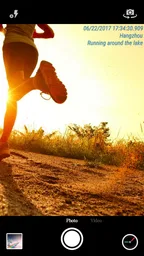
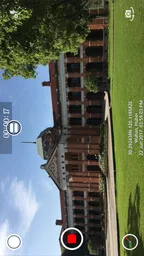
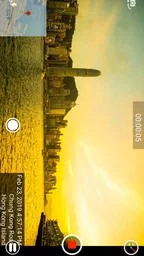
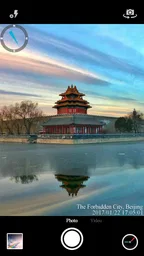

Timestamp Camera review
 Analysis by Appsdrops
I like the idea behind Timestamp Camera: a photo can be more useful when it records not just what was there, but when it happened. This photography app is built around adding a date and time mark to photos and videos. That makes it a practical tool for documenting work, keeping a visual record, or sharing an image whose timing matters. It is less about polishing a picture and more about making its context visible.
For a first-time user, the appeal is easy to understand. Instead of taking a picture with the phone’s regular camera and later trying to remember when it was made, you can capture it with the time information already on the image. The app is free, rated for Everyone, and developed by Bian Di. Its broad audience is reflected in an average rating of 4.6 from around 436,000 ratings, though popularity alone does not tell you whether its particular workflow fits your needs.
What to expect from a camera with a timestamp
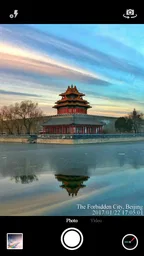
The defining difference from a standard camera app is the visible timestamp. A normal camera usually keeps capture details with the file, but those details can be easy to overlook or lose when an image is copied, edited, or shared. A mark that appears directly on the picture is immediately readable to anyone who sees it. That is useful when the image itself needs to communicate its timing without extra explanation.
I would think of this as a documentation camera rather than a general-purpose photography studio. It suits quick records: the condition of a room before a repair, a delivery left at a door, a progress photo from a project, or a scene you want to remember in sequence. It can also make short video records easier to place in time. If your main goal is creative editing, portrait effects, or careful composition, a more feature-focused camera or editing app may be a better fit.
The app has been available since March 26, 2015, and has passed 50 million installs. That long-running presence suggests that the basic need it serves is familiar and durable. Still, the most important question is not how many people have tried it; it is whether a visible date and time mark helps with the specific photos you take.
Who gets the most from it
I can see it being especially useful for people who take repeated photos of changing conditions. A renter might document the state of a space at move-in; a small business owner might keep a visual record of a completed task; a gardener might capture the same bed over time. In each case, the timestamp helps distinguish one image from another when the photos are reviewed later.
It is also handy for anyone who sends evidence or updates to another person and wants the timing to be obvious at a glance. The trade-off is that the mark becomes part of the visible image. That can make a record clearer, but it also makes the photo less clean and may cover a small part of the scene. For a personal album or a carefully framed travel shot, I would usually prefer an unmarked original.
Starting carefully, without overthinking setup
When opening a camera app for the first time, I recommend making one low-stakes test image before relying on it for anything important. Choose a scene with open space near an edge, take a photo, and check where the date and time appear. This simple test answers the practical question that matters most: does the mark sit somewhere that leaves the important subject visible?
Then try a short test video if moving footage is part of your reason for installing it. A timestamp that looks unobtrusive in a still image may feel more distracting across a video, especially when the subject moves near that area. Reviewing a small sample first lets you decide whether the mark suits your intended use before you record a whole event or work session.
For a first meaningful success, keep the workflow simple: photograph something whose timing will matter later, open the resulting image, and check that both the subject and the timestamp are easy to understand. A photo of a completed repair or a package at a particular moment is a better test than a random snapshot because it shows whether the app solves a real problem for you.
Make the timestamp useful, not merely visible
A date mark is only helpful if the image remains legible. When documenting a room or object, leave some relatively plain area near the edges rather than filling the entire frame with detail. This gives the timestamp a better chance of standing out without competing with the subject. If the important detail is close to an edge, shift your framing before taking the picture instead of assuming the mark will avoid it.
For ongoing records, consistency matters more than making every shot look different. I would choose a repeatable viewpoint and distance, then take the next image in roughly the same way. The timestamp then adds chronology while the framing makes changes easier to compare. This is particularly useful for a repair, a plant’s growth, or a workspace being reorganized: the app supplies visible timing, while your steady camera position supplies a fair visual comparison.
There is also a useful distinction between a timestamp as a reminder and a timestamp as proof. A visible mark can help someone understand when a photo was made, but it does not by itself establish the full history or authenticity of an image. If a record has legal, workplace, or contractual importance, follow the relevant documentation process as well. I would use this app to make everyday records clearer, not treat the mark as a substitute for a formal recordkeeping system.
Common points of confusion
The first possible misunderstanding is expecting the timestamp to behave like a private note. It is visible on the image, so anyone receiving that image can see it. That is the point for documentation, but it may be unwanted for personal or polished pictures. Before sharing, look at the actual image rather than assuming the mark will remain separate from the photo.
Another distinction is between a visible timestamp and the camera’s stored capture information. People often use “date on a photo” to mean either one. This app’s purpose is the visible version: the time can be read directly from the picture. If you simply need to sort pictures by capture date in a gallery, a regular camera’s file information may already be enough, and adding a printed mark could be unnecessary.
It is also worth separating a quick timestamp record from a full editing workflow. This is not the choice I would make when the main task is retouching, combining images, or building a designed layout. A dedicated photo editor is better for that. Likewise, if you need a clean image for a presentation, take or keep a version without a visible mark whenever possible; a timestamp is useful context, but it can be distracting in a carefully composed image.
If you plan to photograph the same subject repeatedly, do not rely on the timestamp alone to make the sequence easy to follow. Keep your pictures organized in a way that makes sense to you, and use a consistent subject or viewpoint. The mark can help identify when each capture happened, but it cannot explain what changed or why. A brief note alongside the image may still be valuable for a longer project.
Where it differs from the usual alternatives
The usual alternative is to use the phone’s built-in camera and rely on the photo library’s date sorting. That is cleaner and is often the right choice for ordinary snapshots. Timestamp Camera makes more sense when you expect to send, print, or revisit an image outside the context of your library and want its timing to remain obvious. In that situation, the visible mark saves the recipient from having to inspect file details or ask when the photo was taken.
A second alternative is adding a date later with an editor. That can give you more control over the final look and lets you decide which images need a mark, but it adds a step and depends on remembering to do it. Capturing with the timestamp workflow is more direct for repeated documentation. The trade-off is flexibility: later editing gives you a chance to choose placement and presentation, while a camera-first approach is better for speed and consistency.
The app’s 3.7 thousand written reviews and strong rating offer a useful signal that many people find this simple job worthwhile. I would not use those figures as a promise that it will suit every camera habit. If you rarely need the time printed on an image, the extra visual element may feel like clutter; if you regularly make progress records or time-sensitive snapshots, it can remove a small but recurring annoyance.
Taking the next step
After your first test, decide which kinds of images should carry the mark and which should stay clean. I would use the timestamp for practical records and keep a regular camera workflow for photos meant mainly for sharing as memories or for aesthetic reasons. That distinction prevents the app from turning every picture into documentation and makes the marked images more meaningful when you look back at them.
My overall view is that Timestamp Camera is a focused, approachable choice for people who want the timing to travel visibly with a photo or video. It is not a replacement for a full camera suite, an image editor, or a formal evidence process. Its value is more modest and more concrete: it can make a useful record easier to interpret later. With a quick test, careful framing, and a clear idea of when the mark helps, a first-time user can get a practical result without much fuss.
What we like
- Adds date and time stamps directly to photos and videos.
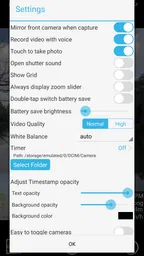
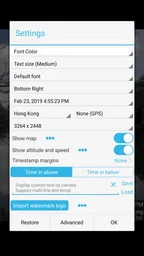
- Offers multiple timestamp layouts and position options.
- Can stamp location details when location access is enabled.
- Supports adjustable text size and color.
- Useful for documenting visits or recording work on site.
What could be better
- Timestamps may be difficult to read against busy backgrounds.
- Location stamping requires granting access to location data.
- A visible stamp cannot be removed easily after saving.
- Camera quality and controls may vary by device.
- Some features or layouts may require in-app purchases.





