






Remini - AI Photo Enhancer review
 Analysis by Appsdrops
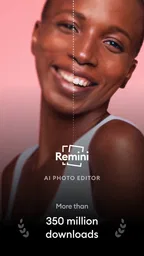
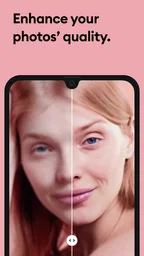
When I open an old portrait and can barely make out the eyes, I want a quick way to see whether it can be made clearer—not a full editing lesson. That is the problem Remini is built around. It is a photography app from Bending Spoons that uses AI to enhance images, and I find it most useful as a practical rescue tool: a way to give a blurry, faded, or damaged picture a more legible, polished appearance. It is less compelling when I want careful, hands-on control over every detail.
Decide what you want from photo enhancement
The first question I ask before using Remini is whether I want restoration or faithful preservation. Those goals overlap, but they are not identical. An AI enhancer tries to make an image look clearer; it may also interpret missing detail rather than recover information that was truly captured. For a casual family photo, that trade-off can be worthwhile. For an image that must remain an exact record, it deserves closer scrutiny.
That distinction matters most with faces. A soft portrait can become easier to view, but a convincing result is not proof that every newly defined feature matches the original person precisely. I treat an enhanced face as an improved-looking version, not as evidence about details the camera never recorded. If authenticity is more important than appearance, a restrained editor—or keeping the original untouched—may be the better choice.
Remini is free to download and is rated for Everyone. Its current version is 3.7.1481.202527105, and it supports operating systems from version 7.0 onward. Optional in-app purchases range from $0.49 to $189.99 per item, so I would check the purchase details shown in the app before committing to anything. The free entry point makes it easy to try, but it does not mean every use or option will suit every budget.
Its reach is substantial: the app has more than 500 million installs, with a 4.1 average from around 5.9 million ratings and roughly 22,000 written reviews. I read that scale as a sign that this is a familiar, widely tried tool, not a guarantee that every restoration will look natural. Results still depend on the source image and on what you consider a good enhancement.
Start with the image, not the effect
I get more useful results when I choose a photo with a clear subject and a specific problem. A small portrait that has gone soft over time is a better candidate than a tiny, heavily compressed image where almost nothing remains to work with. Before enhancing, I keep the untouched original and make a quick note of what I want to improve: facial clarity, general legibility, or the appearance of an old print.
This simple preparation helps me judge the output honestly. I compare the result with the original at the same viewing size, rather than relying on a dramatic zoomed-in preview. I also look at hair, glasses, skin edges, and the background—not just the eyes. Those less obvious areas often reveal whether the image has become genuinely more readable or merely more processed.
Where Remini earns its place
The strongest reason to try Remini is convenience. I do not need to begin by learning a stack of editing controls or deciding how much sharpening, contrast, and noise reduction to apply. Its AI-centered approach is suited to someone who wants a quick improvement and is willing to inspect the result afterward. That makes it approachable for occasional users who have one treasured image to fix, rather than a regular editing workflow to build.
For example, imagine finding a slightly blurred photo of a grandparent in a family chat shortly before a reunion. The image is meaningful, but the face is hard to see on a phone. I would try an enhancement, save a separate copy, and show both versions to a relative who knows the person well. That last step is useful: family members can spot when a result looks oddly smooth or changes a familiar expression, details I might miss while concentrating on sharpness.
Another useful approach is to use it as a first pass, not the final stop. If an image becomes clearer but still needs cropping, color adjustment, or a more natural finish, I can take the saved result into a conventional photo editor. Separating restoration from final styling avoids asking one automated tool to solve every editing problem. It also gives me an easy way to back out if the enhancement feels too strong.
For old printed photographs, I would first make the best clean digital copy I can, then test the enhancement on that version. Starting with a crooked, poorly lit, or obstructed capture makes it harder to tell whether the app helped. This is a practical trade-off: preparing the source takes a little effort, but it can prevent me from blaming the enhancement for flaws already present in the photograph.
The app’s focus also makes sense when I have many pictures to assess but only a few worth polishing. I can use it to identify which blurry portraits become more presentable, then spend careful manual editing time only on the promising ones. I would not assume that every image in a batch deserves the same treatment; AI enhancement is best judged individually, especially when lighting, focus, and subject size vary.
When another kind of editor is a better fit
Compared with a traditional photo editor, Remini favors an automated result over detailed manual decisions. That is an advantage when speed matters, but a limitation if I want to control exactly how much texture, sharpening, or tonal change is applied. A hands-on editor is a better fit for photographers who already know the look they want and prefer to adjust it themselves.
It is also not the right answer for every kind of image problem. If the main issue is composition, unwanted objects, or color balance, a general-purpose editor may address the actual need more directly. If the source is extremely small or badly damaged, an enhancement may create a cleaner-looking interpretation without restoring trustworthy original detail. I would lower my expectations in that case and avoid presenting the output as a precise restoration.
There is a further reason to keep originals: image enhancement can change the character of a photograph even when the result looks sharper. On a portrait, that might mean an overly tidy face; on a textured old print, it could make the image feel less like the artifact I remember. Keeping both copies lets me choose the polished version for sharing while preserving the historical one for context.
Before processing personal pictures, I also recommend taking a moment to review the app’s current controls and choices on your device. I avoid sending or editing a sensitive image casually, and I do not make assumptions about how any app handles a particular file. For especially private photographs, a local editor whose operation and storage behavior you understand may be the more comfortable option.
What it takes to switch into a new workflow
Trying Remini is a low-effort way to see whether AI enhancement matches your taste, but adopting it as a regular tool involves a small change in habits. I now think in terms of source, enhanced copy, and final edit rather than treating the first output as finished. That extra comparison step takes time, yet it is the simplest protection against keeping a result that looks impressive at first glance and artificial later.
Cost is another part of that decision. The app is free, while in-app purchases span from $0.49 to $189.99 per item. Because that range is broad, I would not make a purchase based only on the promise of a better image. I would first test the free experience on a nonessential photo, decide whether its style actually suits me, and read the specific purchase terms presented before paying.
Switching away is straightforward in principle: preserve the original files and any edited copies you care about, then continue with another editor if you prefer more control. The more important cost is time spent comparing outputs and learning which images respond well. For occasional restoration, that may be a reasonable exchange. For someone editing every picture in a carefully controlled style, repeatedly checking AI results could become more work than doing the adjustments manually.
My recommendation depends on what “better” means to you
I recommend Remini to people who want to make a blurry or aging portrait easier to see without first learning detailed editing techniques. It is especially worth trying for a meaningful image that is currently difficult to share or enjoy, provided you keep the original and judge the result at normal viewing size. Its photography focus, free starting point, and large user base make it an accessible option to explore.
I would skip it as a primary editor if precise manual control is central to your work, or if an image must remain a faithful record rather than an AI-enhanced interpretation. I would also avoid expecting a miracle from a source that contains almost no usable detail. In those cases, a conventional editor—or simply preserving the photo as it is—can be the more honest choice.
My practical advice is to test one ordinary, low-stakes portrait first, compare the enhanced copy carefully, and only then decide whether to use it on more personal images. If the result looks clearer without losing the qualities you value, Remini can be a handy specialist tool. If it makes the person look unfamiliar or the photograph feel artificial, trust that reaction and choose a gentler approach.
What we like
- Enhances blurry or low-resolution portraits with a single tap.
- Restores facial details in old photos for clearer portraits.
- Offers a straightforward interface that is easy for beginners.
- Can improve photos without requiring manual editing skills.
- Supports batch processing for editing multiple images.
What could be better
- Results may look artificial when enhancement is pushed too far.
- Some features require a paid subscription.
- Free use may be limited by ads or daily quotas.
- Processing can take longer when servers are busy.
- Photo uploads require sharing images with an online service.





