




FaceApp: Perfect Face Editor review
 Analysis by Appsdrops
I judge a selfie editor by more than how convincing its filters look. I also want to know whether I can find the tool I need, make a careful adjustment without rushing, and tell when an edit has gone too far. FaceApp: Perfect Face Editor is a photography app built around changing portraits, and its focused approach makes it easy to get started. It can also feel less accommodating when you need precise control or have difficulty with small visual details.
Finding your way around a portrait edit
FaceApp is made by FaceApp Technology Ltd and has been available since February 14, 2017. Its central task is clear: choose a face photo and explore ways to alter its appearance. That narrow focus is helpful if you want to improve a selfie rather than learn a broad photo-editing suite with layers, curves, and a long list of unrelated tools.
In everyday use, I find the simplest workflow easiest to understand when I decide on one goal before opening the editor. A portrait for a chat profile might need only a light touch, while a playful image for friends can invite more dramatic changes. Starting with that decision helps prevent a familiar trap: tapping through effects just because they are available, then ending up with an edit that no longer feels like the person in the original photo.
The app’s scale suggests that many people have tried it: it has over 500 million installs, an average rating of 4.3, and around 5.4 million ratings. Those figures tell me it is a widely used option, but they do not tell me whether a particular effect will suit your face, lighting, or personal taste. The useful test is still whether the result looks right to you on the screen where you plan to share it.
Compared with a general-purpose editor, FaceApp’s portrait-first emphasis can reduce the effort of finding a face-focused treatment. A general editor may be the better choice if you want to correct a whole scene, remove distractions from the background, or make exact color adjustments. I would reach for FaceApp when the face is the point of the image, not when I need a complete photography workspace.
Keeping control while comparing effects
A practical habit is to inspect the original and edited portrait side by side in your mind before settling on a result. Look at more than the most obvious change: check whether the expression still feels natural, whether skin texture has become too smooth, and whether the face still fits the lighting in the rest of the photograph. This quick review catches edits that look appealing in a close crop but strange when viewed as a complete image.
I also recommend using a copy of a photo when you expect to experiment. That gives you a clean original to return to and makes it easier to compare restrained and stronger versions without relying on memory. This is particularly useful for a profile picture: a subtle change can look convincing at full size but become conspicuous when the image is reduced to a small circle.
FaceApp is free to download, with in-app purchases listed from $4.99 to $99.99 per item. I would treat the free starting point as a chance to decide whether the editing style suits you, rather than assuming every treatment you might want is included at no cost. If an option is presented as a purchase, pause before committing and consider whether it solves a recurring need or simply looks tempting in the moment.
Readability, attention, and sensory comfort
Portrait editing is visually demanding even when an app’s layout is straightforward. You need to notice small shifts in facial detail, and a strong effect can draw attention away from subtler changes. I get a more reliable result by taking short pauses and checking the image at its intended size instead of judging everything from a close-up view.
That approach matters for people who tire quickly from screen use or find busy visual choices overwhelming. Rather than exploring every available treatment, choose one or two that match the purpose of the picture and compare them with the untouched version. The app’s focused subject can make the task feel less sprawling than a full editing suite, but the actual editing still asks you to look carefully at a face.
For readers with low vision, the important question is whether the controls and previews are comfortable to interpret on their own device. I would not assume that a portrait editor automatically offers ideal readability for every person. If small controls, subtle differences, or a tightly cropped face are hard to inspect, test the app with a low-stakes photo first and stop if judging the result becomes uncomfortable.
Motor and sensory considerations in practice
Face editing often involves choosing among visual treatments and making judgments about tiny differences. That can be difficult if precise tapping is tiring, hand movement is limited, or the screen responds differently from what you expect. A useful workaround is to keep the session simple: choose the photo in advance, make fewer decisions, and avoid repeatedly switching between many similar-looking possibilities.
For someone who uses a device with one hand or prefers minimal interaction, the app may be most manageable when the goal is a quick portrait change rather than a long session of fine adjustments. I would not recommend it as the sole tool for work that depends on exact retouching. A desktop editor or a more control-oriented mobile editor can be a better fit when you need careful, repeatable corrections and are comfortable working with more detailed controls.
Sensory comfort is personal, too. A heavily altered face can be amusing, but it may feel unsettling or simply not represent the person in the photo. When editing someone else’s portrait, I would show them the result before sharing it, especially if the change affects their appearance rather than just adding a light finishing touch. That small courtesy helps keep a playful edit from becoming an unwanted one.
When and where it is useful
One realistic use is preparing a profile photo during a short break. I would choose a well-lit picture, make one restrained adjustment, then check it as a small thumbnail. If the edit still reads naturally at that size, it is more likely to work in a messaging profile than a version that depends on seeing every detail close up.
It can also suit a casual group chat where friends want a playful portrait to share. In that setting, the goal is entertainment rather than faithful retouching, so a stronger transformation may be welcome. I would still keep an original copy and ask before posting an edited image of someone else; a joke that looks harmless to the editor may not be welcome to the person pictured.
The app is rated Everyone, which makes it broadly suitable from a content-rating standpoint, but that should not be confused with a guarantee that every editing choice is right for every age or situation. For a younger user, I would set expectations around appearance and sharing: an edited portrait is an effect, not a standard people need to meet. For anyone using it in a professional context, I would be conservative and avoid changes that could misrepresent a person.
FaceApp is less useful when access to a stable screen or a quiet moment is limited. Portrait choices require visual attention, and it is easy to make a rushed decision while moving between tasks. If you are editing on the go, save the more careful comparison for later rather than settling for a result you have not inspected properly.
Where the experience can fall short
The biggest trade-off is the gap between quick results and fine control. A focused portrait app can make a transformation feel easy, but that does not necessarily make it the best tool for precise, natural retouching. If you care about preserving every detail, or you need to adjust a larger scene as well as the face, a general editor may give you a more suitable workflow.
Another limitation is that visual judgment remains central. An effect that looks polished to one person may look artificial to another, and a filter cannot fix every problem in a poorly lit or blurred photo. I would choose a sharper, better-lit source image before trying to compensate with stronger edits; pushing an effect harder can make imperfections more noticeable rather than solving them.
There is also a cost decision to make. The app is free to install, but its in-app purchases range from $4.99 to $99.99 per item. That wide span means I would check the exact purchase shown in the app and decide whether it is worth the intended use. If you only need occasional simple portrait edits, paying for an option you will rarely use may not make sense.
The user feedback is substantial, with around 77,000 written reviews, but popularity is not a substitute for personal fit. Someone who enjoys quick, expressive portrait changes may find the app approachable; someone who wants transparent, step-by-step control over every adjustment may prefer a more technical editor. I would choose based on the type of work you actually do rather than on popularity alone.
A measured recommendation for different needs
I recommend FaceApp to people who want a focused way to experiment with portrait appearance and are comfortable making visual judgments on a phone. It is especially appealing for casual selfies, profile-picture trials, and playful edits where speed matters more than exact retouching. Its photography focus keeps the purpose clear, and a little restraint goes a long way.
I would suggest looking elsewhere if you need detailed manual control, want to edit landscapes and whole scenes as often as faces, or find visually subtle comparisons tiring. A broader editor is more appropriate for image-wide corrections, while a more precise tool may be easier to trust for professional portrait work. Neither alternative is automatically more accessible; the right choice depends on how its controls feel to you.
My best advice is to begin with a photo you do not mind experimenting on, make one change at a time, and inspect the finished image at the size where it will actually be seen. Keep the original, be careful with purchases, and get the subject’s permission before sharing a noticeable transformation. Those habits make the experience more comfortable and help separate a useful portrait edit from an effect that has simply gone too far.
Overall, FaceApp is worth trying when you want portrait editing to feel quick and approachable, but it is not a replacement for precise photo work or a guarantee of effortless access for every user. Its inclusive value depends on your vision, motor comfort, device, and reason for editing. If the face-focused workflow fits those needs, it can be a handy creative tool; if it makes small visual decisions feel like work, a simpler or more controllable alternative will serve you better.
What we like
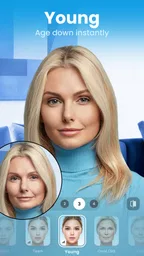
- AI filters can create convincing age and style transformations.
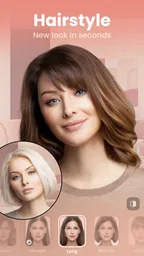
- The interface makes common edits easy to find.
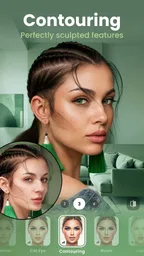
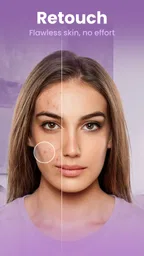
- Portrait retouching tools can improve selfies quickly.
- Edited images are easy to save and share.
- Some features work without advanced editing skills.
What could be better
- Many popular filters and tools require a paid subscription.
- Results can look unnatural on some faces.
- The app needs access to personal photos for editing.
- Processing can take longer with complex effects.
- Privacy terms may concern users sharing facial images.





