


BeautyPlus-Selfie Photo Editor review
 Analysis by Appsdrops
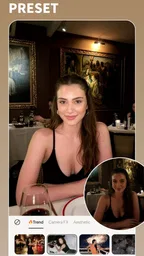
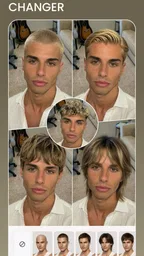
I see BeautyPlus as a quick, hands-on selfie editor rather than a substitute for a full photo-editing studio. Its appeal is straightforward: it helps me tidy up a portrait and give it a chosen look without making me learn a complicated workflow. That makes it useful when I want a photo ready to share soon, though the best results come from keeping the edits restrained.
Fast portrait edits, with room for personal control
BeautyPlus is a photography app from PIXOCIAL TECHNOLOGY (SINGAPORE) PTE. LTD. It is free to download, with optional in-app purchases ranging from $0.10 to $99.99 per item. The app is rated for Teen audiences, and its current version is 7.50.0, with Android support starting at version 8.0. Its average rating is 4.5 from around five million ratings, and it has passed 500 million installs.
Those figures suggest that it has become a familiar choice for people who take portraits on their phones. In my view, its strongest case is not that every selfie needs correction; it is that small adjustments can be easier to make in a dedicated portrait editor than in a general-purpose camera roll tool. I can focus on the face, compare different treatments, and stop when the image still looks like the person I photographed.
The app has been available since July 14, 2013, and version 7.50.0 reflects a product that has had time to establish its particular style. BeautyPlus is associated with selfie-focused editing, so I would approach it with a clear goal: improve a portrait’s presentation, not reshape the entire photograph. That distinction matters, especially if I want a natural result rather than a visibly retouched one.
Where the editing experience earns its place
The most practical advantage of a selfie editor is focus. A broad photo app may offer many tools, but finding the right portrait adjustment among them can interrupt a simple task. BeautyPlus is built around this kind of image, so its overall purpose is easy to understand: choose a selfie, make targeted changes, and review the result. That makes it approachable for someone who wants a polished photo without first learning advanced editing language.
For everyday use, I would start with the least dramatic treatment available and inspect the image at normal size before saving or sharing it. Close-up editing can make small changes feel more convincing than they look in a feed preview. Zooming back out helps me judge whether skin, facial detail, and the surrounding scene still feel consistent. Natural-looking edits usually depend more on restraint than on stacking effects.
A useful workflow is to make one kind of adjustment at a time, then pause and compare the image with the original. If I change several things in one pass, it becomes harder to tell which edit improved the portrait and which one made it feel artificial. This is particularly helpful for profile pictures, where a subtle cleanup can work better than a dramatic transformation. The goal is a recognizable face with a little more polish, not an image that looks detached from its source.
The app can also fit a quick, ordinary routine. Imagine taking a group selfie after dinner and noticing that one person’s face is too shadowed or that the overall portrait looks less lively than the moment felt. I might use BeautyPlus to make a modest portrait-focused adjustment, check that everyone still looks like themselves, and then share the photo. That is a more sensible use than applying a heavy preset automatically to every picture.
One detail worth considering is how the image will be used. A close-up selfie displayed on a phone can hide edits that become obvious when the picture is cropped or viewed larger. I would check the intended crop before finishing, especially for a profile image where the face occupies most of the frame. A treatment that looks balanced in the full picture may become conspicuous once the background and shoulders disappear.
The trade-off: convenience can encourage over-editing
BeautyPlus’s central strength also sets a boundary. A selfie editor naturally draws attention toward the face, so it can tempt me to keep adjusting after the photo is already good enough. When facial changes become too strong, the result can lose texture or look inconsistent with the lighting and background. This is not a reason to avoid the app; it is a reason to treat the preview as a suggestion rather than a target.
I would be cautious when editing portraits of other people. A change that seems minor to me may not be welcome to the person in the image, especially if it alters a feature they consider part of their appearance. For shared photos, I prefer edits that improve the overall presentation without implying that someone’s face needs to be corrected. The app is most comfortable when the person being photographed is also comfortable with the changes.
There is also a difference between quick portrait finishing and detailed photo correction. If the main problem is a distracting object, a difficult crop, uneven color across a landscape, or a need for precise control across many parts of an image, I would reach for a general photo editor instead. BeautyPlus is the more direct choice when the face is the focus; it is not automatically the better choice for every photograph just because it is convenient.
Free access makes it easy to try the app, but the presence of optional purchases is worth keeping in mind. I would explore the tools I actually need before paying for anything, rather than assuming every available option is essential to a basic selfie workflow. If I only want occasional light edits, I may find that my existing photo tools are enough. Someone who regularly prepares portraits for sharing is more likely to appreciate having a dedicated editor close at hand.
Who is likely to enjoy it most
I would recommend BeautyPlus to people who take selfies often and want a simple way to refine them before posting, sending, or using one as a profile picture. It is also a reasonable starting point for a beginner who wants to experiment with portrait editing without first committing to a more technical application. The large install base and substantial volume of ratings show that it has reached a broad audience, though popularity alone does not mean its editing style will suit everyone.
It is a weaker fit for anyone who prefers unedited photos, wants every portrait to retain visible natural texture, or feels uncomfortable with beauty-focused editing. It may also frustrate people who want a highly controlled, non-portrait workflow and expect the same app to handle every kind of image equally well. In those cases, a general editor—or simply the phone’s existing photo tools—may be a better match.
Compared with the usual alternatives, I see BeautyPlus as the specialist option: it is more clearly aimed at selfie finishing than a broad library-style editor, while a general editor is more flexible when I need to work on the whole frame. Neither approach is universally superior. If I am fixing a portrait quickly, I value a focused path; if I am balancing color, composition, and several unrelated details, I would rather use a tool designed for wider editing jobs.
For the best balance, I would save or keep an untouched original before making substantial changes, then review the edited image beside it. That gives me a clear reference point and makes it easier to undo a choice that has gone too far. I would also avoid judging the result only by the app’s editing preview: checking the finished photo in the place I plan to share it can reveal whether the effect feels too strong at its final size.
My verdict on BeautyPlus
BeautyPlus is worth trying if your main editing task is making selfies look a little more finished without a long learning process. I like its clear portrait-first purpose and the way it suits quick, repeatable edits. I would not treat it as a requirement for every phone photographer, and I would not chase a flawless-looking result at the expense of a believable one.
My recommendation is simple: use it when you want to make a specific portrait adjustment, keep the original as a reference, and stop once the photo still feels true to the person in it. If that sounds like your approach, BeautyPlus is a practical addition to a phone’s photography tools. If you want broader image control or prefer no retouching, another editor—or no edit at all—will probably serve you better.
What we like
- Offers a broad selection of beauty retouching tools.
- Includes filters for quick photo adjustments.
- Lets you add makeup effects to portraits.
- Provides collage layouts for combining photos.
- Supports editing selfies without advanced photo skills.
What could be better
- Some tools and effects may require a paid subscription.
- Frequent ads can interrupt the editing experience.
- Automatic retouching may look unnatural at high settings.
- Results can vary across different devices and cameras.
- Cloud features may require an internet connection.





