
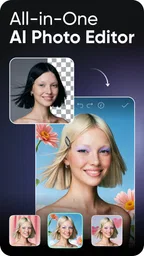


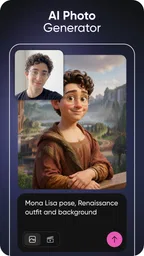

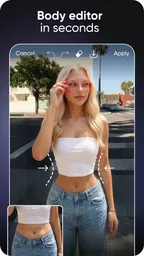

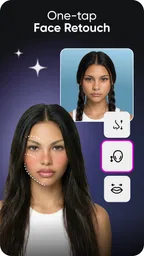
Picsart AI Photo Editor, Video review
 Analysis by Appsdrops
I think the most revealing way to judge a photo editor is to use it in the middle of an ordinary day, when someone wants a picture to look better but doesn’t want to open a complicated desktop program. Picsart AI Photo Editor, Video is built for that kind of quick, flexible work: tidying up a photo, trying a more playful look, assembling a collage, or making a short visual piece. It is a photography app from PicsArt, Inc., and its wide mix of editing tools makes it especially interesting on a phone that several people in a household might use.
One phone, several kinds of creative work
Imagine that a family has taken a group photo at lunch. One person wants a clean version to share, another wants to add a decorative effect, and someone else would rather make a collage from several pictures. Picsart can serve all three impulses without requiring everyone to switch to a different kind of app. That breadth is its main practical advantage: it treats editing as more than adjusting brightness and cropping.
In my experience, that flexibility is useful when the goal is still taking shape. I can begin with a straightforward correction, then decide whether the image would work better as a collage or with a more stylized treatment. Filters and effects make experimentation approachable, while retouching gives me a route toward a more polished portrait. The trade-off is that a large creative toolbox can take longer to learn than a focused editor.
The app’s AI emphasis is part of its identity, but I wouldn’t choose it solely because I expect one automatic touch to make every image look finished. The more dependable approach is to treat AI-assisted options as starting points, then inspect the result and adjust it to suit the picture. A face, a busy background, and a product shot all call for different levels of intervention; a dramatic effect that works on one may look distracting on another.
That makes Picsart a good fit for people who enjoy trying several directions before settling on one. If all you ever need is a quick crop and a small exposure correction, a simpler editor may be less distracting. If you want room to move from a basic edit to a more expressive composition without changing apps, Picsart has a stronger case.
Why its range helps—and when it gets in the way
A useful workflow is to make the practical edits first: frame the subject, correct the overall look, and only then add effects or decorative elements. This order helps me avoid polishing a version that I later decide to crop differently. It also makes it easier to compare a natural result with a more stylized one, rather than letting the first striking filter determine the whole edit.
Collages are another good example of the app’s broad approach. They can turn a set of related shots into one shareable composition, such as several pictures from a weekend outing. The useful decision is not simply which layout looks attractive; it is whether the images have enough in common to read as one story. I find that choosing pictures with a shared subject or color palette makes a collage feel intentional rather than like a crowded folder.
Video editing extends the same creative idea beyond still pictures, though I would not assume that a phone-first creative app is automatically the best tool for every video project. For a casual clip that needs visual personality, having photo and video work in one place can be convenient. For a task that depends on a highly controlled, technical workflow, a dedicated editor may be a better match.
Setting boundaries on a shared device
On a shared tablet or phone, the first question I would settle is whose creative space it is. A household can agree that one person chooses the source photos, another suggests edits, and the person responsible for the final image decides what gets saved or shared. That simple arrangement avoids the familiar problem of several people changing the same picture in different directions.
I’d also keep account boundaries clear rather than treating a shared device as a shared identity. Each person should understand which account they are using and whether an edit belongs to their own creative work. That matters in any app where people may make personal portraits, private jokes, or images they do not want mixed into somebody else’s projects. I would not rely on a general editing app to establish household rules on its own.
A practical tip is to agree on a small set of rules before a group editing session: work from a copy when the original matters, say who is making the final version, and check the finished image before it leaves the device. This is especially helpful with retouching and effects, where one person’s idea of “improved” may be another person’s idea of “too much.” The app gives people creative options; the household still needs to decide how those options are used together.
It is also worth considering who can comfortably navigate a busy interface. A child or occasional user may be able to make a collage or try a filter, but a broad editing workspace can invite accidental changes or confusing choices. I would show a new user one task at a time—first selecting a picture, then trying an effect, then reviewing the result—rather than handing over the phone and expecting the whole app to explain itself.
Coordination without turning editing into a chore
When several people contribute to a project, I find it helps to divide the work by intention instead of by button. One person can choose the pictures, another can suggest the mood, and a third can check whether the finished collage is easy to read. This keeps collaboration constructive: “make the faces clearer” is more useful than everyone tapping different effects at once.
For an everyday example, suppose a household wants to make a small set of pictures from a birthday dinner. I would select a few images with different moments, decide whether the result should feel natural or playful, and create a collage only if the pictures work together. If a portrait needs retouching, I’d keep the adjustment restrained and ask the person in the photo whether they like it. That last check is not an app feature; it is simply good shared-device etiquette.
One non-obvious trade-off with a flexible editor is that more choices can make group decisions slower. A narrow app may get everyone to a result faster because it offers fewer directions. Picsart is more rewarding when the people using it enjoy exploring, but a household that wants a uniform, repeatable treatment for every photo may prefer a more specialized workflow.
I would also avoid making important edits in a rushed group session. A quick pass can produce a fun result, but people often notice awkward cropping, a strong effect, or a distracting background only after they step away from the screen. A brief final review at normal viewing size is a better habit than judging everything while zoomed in or while several people are talking over one another.
Age, trust, and sensible expectations
The app is rated Teen, so I would take age context seriously when deciding whether it belongs on a younger person’s device. That rating is a useful signal for a parent or guardian, not a substitute for discussing what kinds of images are appropriate to edit and share. A young user may be focused on filters and collages, while an adult may be more attentive to how a portrait is changed or where a finished image goes.
For a shared household, I’d make the conversation specific: ask before retouching someone else’s appearance, don’t use a playful effect to embarrass a person, and get permission before sharing a picture that includes other people. These are particularly relevant in an app that makes visual changes easy and encourages experimentation. Clear expectations help preserve the fun without implying that the software itself can manage family trust.
It is also sensible to talk about paid choices before a child explores creative tools. Picsart is free to download, but it includes in-app purchases, with individual items ranging from $0.99 to $450.00. I would review purchase settings on the device and agree on who is allowed to approve spending. That is a household precaution, not a claim that every useful edit requires payment.
The app has a 3.9 average from around 12 million ratings and more than 436,000 written reviews, alongside over a billion installs. Those figures suggest that it is widely used, but popularity does not guarantee that its interface or creative style will suit every person. I’d use the free entry point to see whether its approach feels comfortable before making any purchase decisions.
How it compares with simpler photo editors
Compared with a basic phone editor, Picsart is better suited to people who want to go beyond cropping and tonal adjustments. Its mix of effects, retouching, collage-making, and video work provides more ways to shape an image. The cost of that range is a less focused experience: someone who wants to correct one photo in seconds may find the extra creative paths unnecessary.
Compared with a dedicated collage tool, Picsart makes more sense when collage is one part of a larger editing habit. You can approach a picture as a portrait, a graphic composition, or a short video project rather than being limited to arranging images. On the other hand, if a person makes collages almost exclusively and wants the quickest possible layout process, a narrowly designed app may feel more direct.
For people who care most about fine-grained control, I would judge the finished result rather than assume that a long feature list equals precision. Picsart is appealing as an accessible creative workspace, particularly for casual social images and personal projects. A specialist editor can still be preferable when consistency, detailed adjustment, or a tightly defined professional process matters more than variety.
Who should install it, and who may prefer another tool
I’d recommend Picsart to someone who likes experimenting with phone photography and wants one place to explore edits, visual effects, collages, and video. It is also a reasonable choice for a household where people take turns making casual creative projects, provided they respect account boundaries and agree on who approves the final image. The app is free to start, so trying a basic workflow is an easy way to see whether its breadth is useful rather than overwhelming.
I would steer away from it if the priority is a distraction-free editor for routine corrections, or if everyone sharing a device expects to work without discussing account use and purchases. I’d also choose a more specialized option for a task that needs a precise, repeatable professional workflow. These aren’t flaws in Picsart so much as consequences of its broad, playful character.
The app has been available since November 4, 2011, and version 31.1.6 requires Android 6.0 or later. Its long-running presence and large audience make it easy to consider, but the right test is still personal: can you find the tools you need, and do you enjoy the process of trying ideas? My advice is to start with one real photo, make a restrained edit, then try a collage or effect only if it adds something. That small trial will tell you more than browsing every option at once.
For a household, my verdict is that Picsart works best as a shared creative toolbox, not as a substitute for clear agreements. It offers enough variety to keep casual photo projects interesting, yet that variety calls for a little patience and sensible boundaries. If your family enjoys making images together and can coordinate whose account, photos, and final decisions are involved, it is worth trying. If you mainly want fast, quiet corrections with almost no choices to manage, a simpler editor is likely the happier fit.
What we like
- Includes a large library of stickers and design assets.
- Supports editing photos and videos in one app.
- Offers collage layouts for combining multiple images.
- Provides templates for creating social media posts.
- Lets users save edited work for later revisions.
What could be better
- Many advanced tools require a paid subscription.
- The interface can feel crowded for new users.
- Some effects may take time to load on older devices.
- Export options and quality may vary by feature.
- Ads can interrupt editing in the free version.





