



TimeCue – Reminders & Alerts review
 Analysis by Appsdrops
I judge reminder apps by a simple test: do they help me act at the right moment, or do they just give me another list to manage? TimeCue is a productivity app built around making time itself the prompt. Its brief store tagline points to that idea, but the useful question is how well a time-centered approach fits real routines. I see the appeal for someone who wants a nudge tied to a moment rather than another task list to check later. I would treat it as a focused tool, not assume it can replace a calendar, notes app, or full planning system.
Why a time-based cue can change a routine
The central promise of TimeCue is easy to understand: a reminder can help turn an intention into an action when the relevant moment arrives. That sounds modest, yet it addresses a familiar problem. A task may be written down and still get missed because I have to remember to look at the list. A cue linked to a time can put the task back in front of me when it matters.
This makes the app’s concept different from relying only on a notebook or a general task list. Those tools are good at holding information; they depend on me returning to them. A timely alert can reduce that extra step. For a person who remembers what needs doing but loses track while moving between work, errands, and home, that distinction could be more valuable than a long feature checklist.
The catch is that reminders are only helpful when they arrive at a useful time and are specific enough to prompt action. A vague entry such as “sort things out” is hard to act on, even if it appears at the right moment. I would write cues as concrete next steps: “put the form in my bag” or “call the clinic after lunch.” That small change makes a time-based tool more practical without asking it to do the thinking for me.
What the app’s identity tells me—and what it doesn’t
TimeCue is a free productivity app from Classified Prime LLc. It is rated for Everyone, and its current release is version 1.00.5. The app has a 3.6 average from 260 ratings, alongside 82 written reviews, and has passed 500K installs. Those figures suggest it has reached a broad audience, while the middling average is a reason to approach it with realistic expectations rather than assume every user will find it a perfect fit.
Its release date is listed as July 28, 2026, and it requires Android 8.0 or later. That matters if I am choosing a reminder tool for an older phone: checking the operating-system requirement before planning a switch can save time. The app’s simple positioning is appealing, but I would still try it with a small, low-stakes routine first and see whether its alerts suit my habits.
Making a reminder useful in practice
I would start by choosing one recurring moment that already has a natural place in my day, rather than transferring every obligation at once. For example, if I often forget to take a reusable bag when leaving for groceries, I would make the cue about preparing the bag before departure, not about “remembering groceries.” The action becomes clear, and the reminder can support a routine instead of adding another layer of planning.
A second useful workflow is to separate time-sensitive actions from things that merely need attention eventually. If a task must happen at a particular point—leaving for an appointment, sending a document before a meeting, or checking something after arriving home—it makes sense to give it a cue. If it can wait until any open stretch of the day, a regular to-do list may be less intrusive. Putting every loose thought into an alert risks turning a helpful prompt into background noise.
I also find it useful to phrase reminders from the point of view of the next physical action. “Start the report” can feel too large when it appears on screen; “open the draft and write the first paragraph” is easier to begin. This is a general habit rather than a special feature, but it is especially relevant to a tool whose value rests on catching attention at a moment. The clearer the instruction, the less mental work I have to do after the cue arrives.
For shared routines, I would be careful about treating a personal reminder as a team system. A prompt on one person’s device may help that person remember to pick up supplies, but it does not automatically establish that everyone else has seen or accepted the responsibility. If coordination, delegated tasks, or a shared schedule is central to the job, I would choose a tool designed around those needs rather than rely on a personal alert as a substitute.
A realistic day where it earns its place
Imagine a busy weekday with an early appointment, a grocery stop on the way home, and a form that must be sent before the evening. A paper list may keep all three items visible, but it cannot decide when I am most likely to act on each one. A time-oriented reminder can be most useful when I match each cue to the transition: prepare the form before leaving, remember the shopping bag before the stop, and send the document during a quiet moment at home.
The key is not to schedule every minute. I would use only the prompts that prevent a predictable miss. If I set alerts for things I already do reliably, the extra interruptions could make me ignore the important ones. A more disciplined setup—few cues, clear wording, and a direct connection to an action—should make the app feel like support rather than a stream of demands.
Another practical test is to ask what I will do if I cannot act when a cue appears. A reminder that says “make the call” may be poorly timed if I am commuting or in a meeting. A better plan might be to place the cue at the first realistic window, or write a follow-up step that is possible in that situation. This is where honest planning matters: no alert can make an unavailable moment convenient.
Where the approach has limits
The main tradeoff of time-based prompting is that it can be less flexible than a task list. If my day changes often, a cue set for a specific moment may no longer fit. I could end up postponing it repeatedly or dismissing it, which weakens the habit the app is meant to support. For work driven by shifting priorities, I would prefer a system that makes rescheduling and reviewing a larger queue central to the experience.
There is also a risk of confusing “being reminded” with “being organized.” A reminder can bring an obligation to mind, but it cannot decide whether that obligation still matters, break a complicated project into steps, or resolve competing deadlines for me. I would keep planning decisions in a calendar or task manager if they require a broader view. TimeCue makes the most sense as a prompt layer for actions I have already chosen, not as a replacement for judgment.
Notification fatigue is another real concern with any app built around alerts. Even well-written cues can become easy to dismiss if they arrive too often or at awkward times. I would begin with a handful of reminders and review which ones actually changed what I did. If a cue is repeatedly ignored, I would adjust its wording or timing—or remove it—instead of adding more alerts to compensate.
The rating gives me a reason to keep expectations measured. An average of 3.6 is neither a strong endorsement nor a verdict that the app is unusable; it simply reinforces the value of testing it against a specific routine. Because the app’s appeal depends on whether its approach matches the way I manage time, a short personal trial is more informative than assuming it will work for everyone.
When another kind of tool is the better choice
I would skip a reminder-first approach if I need a searchable archive of notes, detailed project tracking, collaborative assignments, or a calendar view that connects many people and events. Those jobs need more than a cue at a moment. Likewise, someone who prefers to review a single list and choose tasks based on energy or changing priorities may find scheduled alerts too rigid.
On the other hand, a notes app alone may not be enough when the recurring problem is forgetting to revisit the note at all. A standard to-do list can hold a task neatly but still leave the timing of action up to the user. TimeCue’s time-centered idea is most relevant in that gap: the task is known, but the moment to act is easy to overlook.
I would also avoid relying on any one reminder app for critical obligations without considering a backup. If missing an action would have serious consequences, I would use a dependable routine that suits the situation—such as a calendar entry or another established safeguard—rather than assume a single alert will always be noticed. The best tool is the one that fits both the importance of the task and the way I actually respond to prompts.
Who is likely to get the most from it?
TimeCue should appeal most to people whose days contain repeatable transitions and small actions they tend to forget: preparing something before leaving, following up after a meeting, or handling a household task at a particular point in the day. It may also suit someone who finds a long task list overwhelming but responds well to a short, timely instruction. For those users, a focused reminder can reduce the effort of keeping an intention in mind.
I would recommend trying it with one recurring pain point rather than migrating an entire planning system. Pick a task you genuinely miss, write the cue as a direct action, and use it for a few ordinary days. If the prompt arrives when you can act and helps you follow through, expand gradually. If you keep dismissing it because the timing does not match your life, that is useful evidence that a flexible list or calendar may be a better fit.
My overall view is that TimeCue has a clear, practical angle: it treats the moment of action as the part of a reminder worth focusing on. That can be more helpful than simply collecting tasks, but it does not solve planning, prioritization, or coordination on its own. I would choose it for a small set of time-sensitive personal nudges, keep the wording concrete, and resist filling it with every obligation. Used that way, it has a sensible role; if you need a comprehensive organizer, I would look elsewhere.
What we like
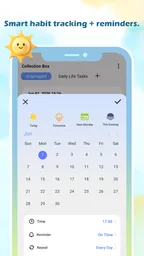
- Quickly create reminders for specific times and dates.
- Recurring alerts reduce the need to recreate routine reminders.
- A focused design makes essential reminder controls easy to find.
- Notifications help keep upcoming tasks visible.
- Useful for personal tasks that do not need a full calendar.
What could be better
- Reminder features may be limited compared with full calendar apps.
- Notifications can be missed if alerts are muted or restricted.
- A reminder list can become cluttered without regular cleanup.
- Recurring schedules may not cover every unusual routine.
- The app is less useful for users who prefer managing tasks on a computer.





