

Time Warp Scan - Face Scanner review
 Analysis by Appsdrops
I enjoy camera effects most when they give me something playful to do, rather than simply laying another filter over a photo. Time Warp Scan takes that idea in a different direction: a moving scan line turns a face or scene into a stretched, frozen-in-pieces image. The results can be funny, odd, or surprisingly composed, but they depend on how you move while the scan passes. I’d treat it as a creative tool for experimenting, not as a dependable camera for everyday portraits.
What the scan effect asks you to do
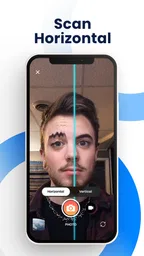
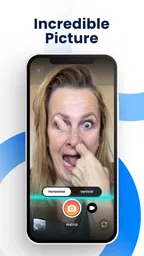
Time Warp Scan - Face Scanner is a free photography app from Braly JSC, built around the time-warp effect popular on short-form video platforms. Its central appeal is simple: the scan line travels across the frame, recording different parts of the image at different moments. If you move your face, hand, or another object as it passes, the finished result can appear bent, lengthened, or divided into mismatched positions.
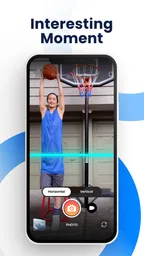
That timing is the whole creative challenge. A conventional photo filter changes the look of the image after capture; this effect rewards planning the movement itself. I get more interesting results when I decide what the scan should reveal before starting—such as a changing expression or a hand moving from one side of the frame to the other—instead of hoping a random gesture will look good.
The app is aimed at casual experimentation, especially for people who like making a quick visual joke or sharing an unusual portrait. It has a 4.1 average from around 39,000 ratings, and it has passed 10 million installs. Those figures suggest that the effect has broad appeal, but they don’t tell me whether a particular scan will suit my style; that comes down to patience, lighting, and how much control I want over the final image.
A playful tool, not a complete editing suite
I would not choose this as my main camera or as a replacement for a general photo editor. The distinctive result comes from the scan’s timing, not from a broad set of adjustments. That makes the app easier to approach than a full editing workflow, but also means it is best when I want this particular visual trick. For careful retouching, color correction, or polished portraits, a conventional editor gives me more useful control.
There is a practical difference between taking a normal photo and making a scan-based image: I need to remain aware of the frame while the effect is happening. A small movement can become a conspicuous distortion, which may be the point for a comic image but a drawback for a natural-looking picture. I find it more helpful to judge each result as an experiment than to expect every attempt to be post-ready.
Small choices that improve the result
For a more readable image, I would start with a steady phone, a simple background, and one clear subject. Busy scenery competes with the distortion, while a plain wall makes a warped face or moving hand easier to see. This is not a hidden setting; it is a shooting choice that makes the effect look intentional rather than accidental.
Movement should be deliberate and modest at first. A slow change in expression or a hand entering the frame gives the scan a clear subject to transform. Large, hurried gestures can produce a result that is difficult to interpret, especially if the subject crosses the frame before the scan has captured enough of it. I’d make a few short attempts and vary one thing at a time—pose, speed, or position—so I can tell what caused the better result.
Lighting matters for a different reason: the effect can only make a compelling distortion from what the camera can see clearly. I’d avoid a dim room or strong backlight when the face is meant to be the focus. If I’m filming another person, I’d also agree on the movement beforehand; that avoids awkward retakes and makes it easier to keep the subject framed while the line travels.
Trust and the choices a user can actually assess
Because this is a camera-focused app, I would pay attention to the permission prompts shown by my device and make choices based on the task I’m doing. Camera access is relevant to capturing an image; I would not grant unrelated access simply because an app requests it. Permission controls are managed through the phone’s settings, so I can review or change what the app is allowed to use there.
I don’t treat a playful visual effect as proof of how an app handles personal data. A face in a camera frame can be sensitive, particularly if I’m recording a child, a friend, or someone who has not agreed to be filmed. My own cautious routine is to capture only what I intend to keep, avoid including private surroundings, and ask before making or sharing an image of another person.
The user-facing choices I can assess are the ones presented by the app and the operating system: whether I grant a permission, whether I continue with a capture, and whether I keep or share the result. I wouldn’t read more into those visible controls than they establish. If detailed data practices or account options matter to you, check the current information shown in the app store and the controls available on your device before relying on it for sensitive material.
Where it fits among camera alternatives
Compared with a standard camera app, this one gives me a distinctive effect without asking me to build it manually in an editor. Compared with broad social or photo-editing apps, its appeal is narrower: the scan itself is the reason to open it. That focus is useful when I want a quick visual experiment, but it is less convenient if I want a single place for shooting, detailed editing, and managing a larger set of images.
A realistic use is a casual group moment: before a gathering, I could ask a willing friend to hold a pose while I make a scan, then try a second version with a small movement. It works best when everyone understands that the image may look deliberately distorted. For a family keepsake, a work profile picture, or a moment that needs to look true to life, I’d use the regular camera instead.
The app is free to download, with in-app purchases ranging from about 49 cents to $9.49 per item. I’d try the basic experience before spending anything and decide whether I’m actually using the effect often enough to justify a purchase. It is rated for Everyone, but that age label does not replace a parent’s judgment about camera use, sharing, or a child appearing in images.
Practical fit, version, and limitations
The current version is 3.7.10, and the listed minimum operating system is 7.0. I’d check that my device meets the requirement before installing, then spend a few minutes testing the scan with a low-stakes subject. The app’s focused concept means the learning curve is mostly about timing and composition rather than mastering a complicated editing interface.
One limitation is that a striking effect is not the same as a reliably flattering image. Faces can become comically stretched, and a movement that seems subtle in real life may look exaggerated once captured across the scan. If I need consistent results, I would rather use a normal camera and make controlled edits afterward. If I want surprise and visual humor, the unpredictability becomes part of the fun.
I’d also be selective about where I use it. A scan is a poor fit when someone needs a quick, conventional photo, when the surroundings are private, or when another person is uncomfortable being recorded. It makes more sense as a short creative session with a clear subject and a shared understanding of what will happen to the image.
My verdict: worth trying for the right kind of fun
Time Warp Scan - Face Scanner is easy to recommend to someone who likes playful camera experiments and is happy to make several attempts for one good result. Its strength is the connection between movement and image: I can shape the distortion by thinking ahead, choosing a clear frame, and keeping gestures controlled. That gives the effect more creative value than a filter I simply tap once and forget.
I would skip it if I wanted a full-featured photo editor, a dependable portrait camera, or a tool for handling sensitive images without first reviewing its current permissions and privacy information. For everyone else, it is a low-commitment way to see whether this unusual scan style sparks an idea. My advice is to start with a simple background, try one deliberate movement, and keep the results that feel funny or expressive rather than chasing a perfect, natural-looking shot.
What we like
- The simple controls make it easy to start a scan.
- Short scans are convenient for quick social posts.
- The visual effect can create playful face distortions.
- Results are easy to share with friends.
- The app offers a lighthearted way to experiment with selfies.
What could be better
- The effect depends on steady movement during each scan.
- Fast motion can produce uneven or unexpected distortions.
- Results may vary with lighting and camera quality.
- Repeated scans can feel less entertaining over time.
- The app may request access to your camera and media.





