


Time Warp Scan - Face Scan review
 Analysis by Appsdrops
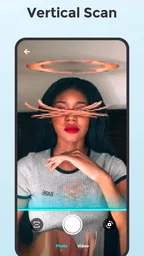
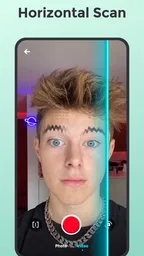
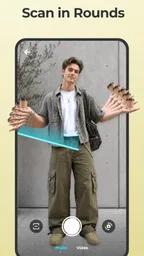
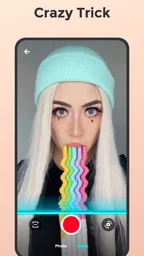
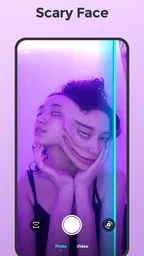
I’d treat Time Warp Scan - Face Scan as a playful photography tool for a particular kind of idea, not as an all-purpose photo editor. Its appeal is the time-warp scan effect: you set up a shot, let the moving scan line pass through it, and use the resulting distortion to make an image or clip that looks deliberately strange. That makes it a good fit for quick social posts, silly portraits, and experiments with pose and timing. It is less compelling if what you really need is careful retouching, reliable collage layouts, or a complete editing-to-publishing workflow.
Starting with an idea, not a polished photo
The best way to approach this app is to decide what kind of visual joke or transformation you want before you begin. The scan effect rewards a simple subject and a clear movement: a face changing expression, a hand moving across the frame, or someone shifting their posture as the line travels. If the scene is already busy, the distortion can become hard to read. I’d start with one person, a plain background, and a pose that can change in an obvious way.
That makes the app especially approachable for casual creators. You don’t need a finished image or a complicated concept; the effect itself can supply the creative prompt. For instance, while waiting with a friend, you could try a straight-faced portrait, then repeat it with a grin or a deliberately awkward pose. The amusing result comes from the mismatch between the subject’s movement and the scan, rather than from elaborate editing.
It is a photography app from Photo Collage & Grid - Foto Grid, and the store summary positions it around time-warp scanning and funny visual effects. The product name also includes “Face Scan,” which points toward portraits as a natural starting point, but the broader creative value is in experimenting with how a moving subject is captured. I’d think of it as a small idea generator for images and videos, rather than a tool for fixing an existing photo.
Who will get the most from it
If you like making informal content for friends, trying a visual trend, or adding an odd image to a story, this is a more direct option than opening a full editor and building an effect from scratch. It is also useful when you want a fast creative exercise: pick a pose, test the scan, see what happens, and adjust. The low-pressure nature is part of the appeal; a result can be entertaining precisely because it is imperfect.
On the other hand, I would skip it if your main goal is a clean headshot, a product photo, or a carefully composed image for work. A scan distortion is an effect, not a substitute for lighting, cropping, color correction, or detailed retouching. People who prefer predictable, polished results may find the central gimmick too narrow, especially if they don’t enjoy making several attempts to get a funny outcome.
Making a scan that reads clearly
When making this kind of image, I’d pay more attention to framing and timing than to adding extra visual complexity. Keep the face or moving object comfortably inside the frame, leave some room around it, and avoid changing several things at once. If you shift your whole body, move a hand, and change expression together, it can be difficult to tell which part created the interesting distortion. A single deliberate movement gives you a more useful result to judge.
Lighting and background matter for a practical reason: the scan effect is easier to appreciate when the subject stands out. A face against a cluttered room can blend into the scene, while a simpler setting gives the warped outline more visual contrast. You don’t need a studio setup, but I’d avoid placing the subject directly in front of a busy shelf or patterned wall if the aim is a readable portrait.
A helpful workflow is to make one conservative attempt first, then vary only one element in the next try. Keep the framing and pose, but change the expression; or keep the expression and move a hand. This is more informative than repeating the same shot without a plan. It also helps when you’re making a short clip for a social post: the viewer needs to understand the joke quickly, so a clear transformation usually works better than a complicated performance.
Iteration without losing the original idea
The effect is naturally experimental, so I’d expect some results to be throwaways. That isn’t necessarily a flaw; the app is most useful when you treat each take as a quick test rather than expecting the first scan to be the finished piece. The trade-off is that a playful tool can take more attempts than a straightforward camera shot. If you are in a hurry, settle on a simple pose and avoid turning the session into an endless search for the perfect distortion.
For a more controlled comparison, make a small set of variations around one concept. Try a still pose, a gradual expression change, and a movement that crosses the frame. Then choose the version where the effect is most legible, not necessarily the one with the most dramatic deformation. That distinction matters: an extreme result can look chaotic, while a subtler one may communicate the intended joke better on a small phone screen.
I’d also be selective about using the scan on every subject. A face with a strong expression gives the effect something recognizable to transform. A distant subject or a very fast movement may be less satisfying because the visual idea can get lost. This is where the app’s focused design is both a strength and a limit: it encourages a specific kind of experiment, but it won’t solve every creative brief.
From a fun take to something shareable
For handoff, the useful question is whether the result works outside the app. Before sharing a scan, I’d review it at the size people are likely to see on a phone and check that the face or movement remains understandable. A clip that makes sense only when watched closely may not land in a fast-scrolling feed. Keeping the subject centered and the idea simple gives the finished work a better chance of reading at a glance.
It can also help to plan the post around the image rather than expecting the effect to tell the whole story. A short caption can set up the joke, while the scan provides the visual payoff. If you’re making content for a group chat, the rough, spontaneous look may be exactly right. If you’re preparing a consistent series or branded material, you may want to create the scan here and use a separate editor for a more controlled layout or finishing pass.
That is the key comparison with general photography editors: those usually offer broader adjustment and composition tools, while this app’s distinctive value is getting to a time-warp result quickly. A standard camera app is the better choice for dependable everyday pictures. A full editor is more suitable when you need precise control across several images. This one makes more sense when the concept depends on the scan itself and you want to test it without building the effect manually.
What to expect from the app as a product
Time Warp Scan - Face Scan is free to download, with in-app purchases listed from $0.99 to $38.99 per item. I’d keep that in mind if you are browsing beyond the basic experience: the app can be tried without an upfront purchase, but optional spending may be part of using additional offerings. Its age rating is Everyone, so the stated content classification is broad; as with any app, I’d still make my own judgment about whether its creative style suits the person using it.
The app has a 4.5 average from around 45,000 ratings, with about 1,300 written reviews and over 10 million installs. Those figures suggest that it has found a sizeable audience, but popularity doesn’t make the effect universally useful. I’d read that reception as a reason to give it a try if the format sounds fun, not as a promise that every scan will be a hit.
It was released on July 8, 2022, and its current version is 3.8.1. It requires Android 8.0 or later. Those details are worth checking before planning a shoot on an older device, particularly if you intend to use it as part of a time-sensitive content workflow. The app is focused enough that I would test the whole process before relying on it for a post you need to deliver on a schedule.
My creator verdict
I’d recommend this app to someone who enjoys making quick, oddball portraits and wants a simple way to explore the time-warp scan look. Its strongest use is not professional image correction; it is turning a small movement into a shareable visual gag. Start with a clean background, make one controlled change per take, and choose the result that reads clearly rather than the one that looks most extreme. Those habits make the creative process more purposeful and reduce aimless retakes.
I would choose another tool for careful photography, detailed edits, or a polished series that needs consistent finishing. But if your brief is “make this ordinary moment look strange in a fun way,” this is a focused place to begin. It is best when you approach it with a small idea, give yourself room to experiment, and treat the final scan as one ingredient in the post rather than a complete production suite.
What we like
- The scan effect is easy to try without editing skills.
- A visible line makes it clear when the scan is happening.
- The effect can create playful changes to faces and objects.
- Short clips are convenient to share on social platforms.
- The simple interface makes the main feature easy to find.
What could be better
- Results can look awkward when subjects move during a scan.
- Lighting changes may make the scan appear uneven.
- The effect offers limited variety compared with full video editors.
- Capturing a clean result may take several attempts.
- Some features or exports may depend on the app version.





