




Tilt: Cash Advance & Credit review
 Analysis by Appsdrops
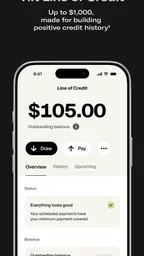
Choosing an app for short-term cash or credit is a personal decision, not just a matter of finding the biggest number on a screen. I’d start by asking what I need: help covering a near-term gap, a way to explore credit options, or a familiar account for everyday banking. Tilt: Cash Advance & Credit is aimed at people who want cash and credit tools that look beyond a credit score alone. That focus makes it worth considering, but it also means I would compare its actual offer and terms with my needs before relying on it.
Start with the kind of help you need
Tilt is a free finance app from Tilt Finance, available to users of all ages according to its Everyone content rating. The app’s framing is broader than a traditional credit-score checker: it presents cash and credit as options for more people. In practice, I’d treat that as an invitation to explore, not a promise that every user will qualify for a particular product or receive the same terms.
Before signing up, I’d decide whether I’m looking for occasional support or a longer-term financial tool. If a bill is due before payday, a cash-related option may feel relevant; if I’m trying to understand or build my credit choices, the credit side may matter more. Those are different jobs, and a useful first step is to identify which one is urgent rather than opening an app and borrowing simply because an option appears.
It’s also sensible to ask what information you’re comfortable sharing and to read the terms shown during the application process. Financial apps can involve personal details, and borrowing decisions deserve more attention than a quick tap. I would compare any repayment obligation with my next month’s essential expenses, not just with the amount currently in my account.
Why Tilt may suit a wider range of users
The app’s central appeal is its attempt to look beyond a single credit-score snapshot. That can matter if a conventional lender’s decision process feels narrow or if you want to explore options without assuming that one score tells your whole financial story. I find that positioning more useful as a starting point for comparison than as a guarantee of approval.
Tilt has an average rating of 4.6 from around 307,000 ratings, with roughly 110,000 written reviews and over 5 million installs. Those figures suggest that many people have tried it, but they shouldn’t replace a careful look at your own eligibility, repayment responsibilities, and the terms presented to you. Popularity can help signal that an app is established; it can’t tell me whether a particular offer is right for my budget.
One practical tip is to use the app with a specific question in mind. For example, if I want to compare a cash option with waiting until payday, I’d first write down the bill amount, due date, and money I expect to have available. That makes it easier to judge whether borrowing solves a temporary timing problem or merely shifts it forward.
Another useful habit is to pause before accepting anything and review the full repayment picture. A cash advance can feel small when viewed alone, but it still competes with groceries, transport, and other bills later. I’d look at the amount due and the timing together, then decide whether the convenience is worth the commitment. This simple check is particularly valuable when money is tight and a fast decision feels tempting.
A realistic way to use it
Imagine a household expense arrives a few days before expected income. I would open Tilt to see what options are available, then compare the proposed repayment timing with the bills already scheduled. If the repayment would make rent, utilities, or food harder to cover, I’d look for another solution instead of treating immediate access as a win. If it fits comfortably, I’d still keep a note of the obligation and avoid taking more than the shortfall requires.
This workflow is more deliberate than simply checking whether cash is available. It turns the app into one part of a decision: assess the gap, inspect the terms, compare the timing, and only then act. For credit-related use, I’d similarly consider whether the option supports a concrete goal rather than applying out of curiosity. If you’re unsure how a product affects your finances, a qualified financial adviser or a trusted nonprofit counseling service may be a better source of personalized guidance.
That distinction matters because an app can make exploring feel easy, while the financial consequences remain yours. I wouldn’t use Tilt as a substitute for a spending plan or as a reason to borrow repeatedly. Used thoughtfully, it may help someone investigate a short-term need; used without a repayment check, it can make a future budget less flexible.
Where other approaches can be a better fit
Tilt is not automatically the best choice for every financial situation. If you need a primary account for deposits, bill payments, and routine spending, a full-service bank or credit union may be a more natural place to start. If your priority is understanding a credit report or tracking credit changes, a dedicated credit-monitoring service may be more focused. Those alternatives serve different purposes, so the right comparison is about the job you need done, not which app has the broadest pitch.
For a one-time emergency, I’d also compare non-borrowing options: asking a bill provider about a payment arrangement, checking whether an employer offers a relevant benefit, or adjusting another expense may avoid adding a repayment obligation. Those routes aren’t available to everyone, and they may not solve an urgent problem, but they’re worth considering before taking credit.
People who want a traditional loan with clearly understood terms may prefer to compare offers from established lenders directly. Likewise, anyone who values a long-standing relationship with a local institution, in-person help, or a particular account setup should not switch simply because a mobile app is convenient. Tilt’s broader approach may be appealing, but convenience alone is not a reason to replace a financial service that already meets your needs.
I would skip Tilt if I were looking for guaranteed approval, a fixed outcome, or a replacement for professional debt advice. I’d also hesitate if I couldn’t comfortably manage a repayment or if using a cash option would become a repeated response to an ongoing income-and-expense mismatch. In that case, talking through a budget or seeking nonprofit credit counseling may address the underlying problem more directly.
What switching really involves
Trying a new finance app can create more work than installing it. You may need to review disclosures, provide personal information, understand how an offer works, and keep track of another account or obligation. I’d make that effort only if Tilt addresses a need that my current bank, credit union, or credit-focused tool does not handle well. Before changing routines, I’d also make sure I know where to find the repayment details and how to contact support if something is unclear.
There’s no need to treat an app download as a commitment to use every feature. I’d first explore the available information and decide whether the terms make sense. If the offer doesn’t fit, stopping there is a sensible outcome. If I do proceed, I’d keep a simple record of the amount and due date in the same place I track other bills, rather than relying on memory or assuming an app notification will be enough.
Tilt’s current version is 7.79.0.867, and it first appeared on December 4, 2017. Its minimum operating-system requirement is 7.0, so it can run on devices meeting that baseline. I’d still check that the version available for my device is current and that the app behaves as expected before entering sensitive information. Keeping financial apps updated is a useful routine, but it does not replace reviewing permissions and disclosures for yourself.
The fact that Tilt is free to download is helpful when deciding whether to explore it, but I would not confuse that with every financial option inside the app being cost-free. The important question is the complete cost and repayment obligation of any product you consider. Read the terms for the specific offer, and compare them with alternatives before accepting. That’s a more reliable way to judge value than focusing on the download price.
My recommendation
I’d recommend Tilt to someone who wants to investigate cash and credit options through a mobile app and appreciates an approach that is not framed around a credit score alone. Its broad appeal and substantial user base make it a credible option to examine, while its finance focus means that careful reading matters more here than it would in a casual utility app.
I would not recommend treating it as a guaranteed source of emergency money or as a substitute for a bank, a credit counselor, or a repayment plan. The best user is someone with a specific need, enough time to review the terms, and a realistic plan for the next payment. If your situation calls for a full banking relationship, tailored debt help, or a solution that avoids borrowing, another route may be better.
My bottom line is to try Tilt as a comparison tool, not as an automatic yes. Check what is offered, work out the effect on your next budget, and walk away if the numbers do not fit. That measured approach is the strongest way to benefit from an app designed to widen access without losing sight of the responsibility that comes with cash and credit.
What we like
- No credit check is required to request a cash advance.
- The app can help users track spending and account activity.
- Eligible users may access funds without a traditional loan application.
- Credit-building features can support efforts to establish payment history.
- A mobile interface makes it easy to review available features on the go.
What could be better
- Cash advance eligibility and limits may vary by user.
- Fees or optional tips can make advances more expensive.
- Some features may require a linked bank account.
- Credit-building benefits may depend on timely payments and account terms.
- Availability may be limited by location or other eligibility rules.





