
TikTok Studio review
 Analysis by Appsdrops
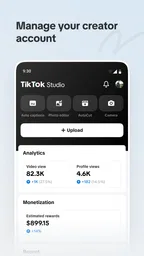
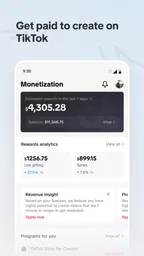
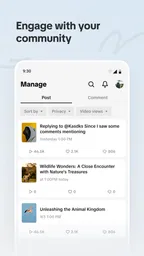
I see TikTok Studio as a companion for people who publish on TikTok and want a more deliberate way to manage their creator work. It is a free video-focused app from TikTok Pte. Ltd., and its purpose is different from simply opening TikTok to watch clips: it gives creators a separate place to handle the work around making and publishing content. That distinction is useful, but it also sets expectations. I would not choose it as a general video editor or as a replacement for the main TikTok app.
A creator workspace alongside TikTok
The strongest reason to try TikTok Studio is focus. Separating creator tasks from the scrolling feed can make it easier to check on a post, plan the next one, and get back to work without being pulled into unrelated videos. For someone who treats TikTok as a hobby or a small business channel, that change in routine can matter as much as any individual tool.
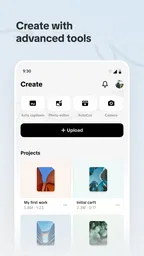
Its place in the video players and editors category can be a little misleading if you expect a traditional editing suite. I think of it more as a creator-management companion within TikTok’s ecosystem. A person looking for layered timelines, detailed color controls, or broad export options should compare it with a dedicated editor. TikTok Studio makes the most sense when the destination for the work is TikTok itself.
The app has an average rating of 4.5 from around 501,000 ratings, with about 5,400 written reviews and over 100 million installs. Those figures suggest that it has reached a large audience, though they do not tell me whether it fits a particular creator’s workflow. I would use them as context, not as a substitute for trying the app with the way I actually make content.
Where it fits in an everyday workflow
A realistic use case is a small shop owner who records a few short product clips between other tasks. They might use TikTok Studio to keep creator work in view, publish content, and make time to review how it is doing, rather than switching repeatedly between a general video tool and the TikTok feed. The value is less about making every clip look elaborate and more about reducing friction between creating and managing posts.
That workflow suits people who already publish on TikTok and want a dedicated creator space. It is less compelling if you post only occasionally, mainly watch videos, or manage content across several platforms. In those cases, the extra app may add another place to check without solving a problem you often have.
One practical habit I would recommend is deciding what you want to learn from each post before publishing it. For example, a creator could compare whether a quick demonstration or a behind-the-scenes clip earns more attention from their own audience. Keeping that question in mind makes the management side more purposeful than simply checking numbers out of habit. It also helps avoid treating every fluctuation as a verdict on the quality of the work.
What the current release tells me
The app’s current version is 44.6.3, and it was released on May 28, 2024. Those are useful markers for identifying the edition someone is considering, but they do not, by themselves, reveal which tools changed or how the interface has evolved. I would not infer a specific new feature from a version number alone.
For existing users, the safest way to think about an update is as a reason to check the current app experience rather than assume that an old routine still maps perfectly to it. If a familiar control appears elsewhere or a workflow feels different, take a moment to confirm the steps before relying on them for a time-sensitive post. That is sensible advice for any frequently updated creator tool, especially one tied closely to a publishing platform.
The app supports Android 6.0 and later, which gives it a broad device starting point. A minimum operating-system requirement does not guarantee that every phone will feel equally smooth, however. If you create or review videos on an older device, I would test a normal session before making Studio central to a deadline-driven workflow.
TikTok Studio is rated for Teen audiences. That makes it important for younger users and families to consider the wider context: this is a creator tool associated with a social video platform, not an isolated editing utility. I would make sure the account and platform experience are appropriate for the person using it, rather than judging suitability only by the tools for making videos.
Small workflow choices that make it more useful
First, separate creation from evaluation. When I am preparing a post, I would focus on the clip and its message; after it has been published, I would return to the creator workspace to review its performance. Switching constantly between editing decisions and audience response can encourage overcorrection, especially when one post does not behave as expected.
Second, treat Studio as the management layer, not necessarily the whole production process. A creator who needs careful trimming, sound mixing, captions with precise timing, or a consistent visual style may prefer to prepare the video in a specialist editor and use TikTok Studio for the TikTok-facing part of the routine. That division keeps expectations realistic and lets each tool do the job it handles best.
Third, use a simple repeatable check before publishing: confirm that the clip communicates one clear idea, that its framing works on a phone screen, and that its sound is understandable. These checks are useful regardless of which tools a creator uses, but they are particularly valuable when the goal is quick publishing rather than a long editing session. A dedicated creator app can support a routine; it cannot make an unclear clip clear by itself.
Finally, keep a lightweight record of experiments outside the app if you are comparing content approaches over time. A note such as “short demo versus personal story” gives later performance checks a question to answer. This is more informative than repeatedly opening a dashboard without knowing what decision the numbers should guide.
How it compares with familiar alternatives
Compared with the main TikTok app, Studio’s appeal is the creator-oriented context. The main app is where many people spend time watching and interacting; a separate workspace can help a publisher approach their account with more intention. If your biggest problem is distraction, that separation may be valuable. If you prefer having every task in one place, the extra app may feel unnecessary.
Compared with a general mobile editor, Studio is more closely tied to TikTok publishing. A broad editor is usually the better choice when you need detailed control over the finished video or want to prepare a clip for multiple destinations. A social scheduling or analytics service may suit someone coordinating several channels, while Studio is a more natural fit for a person whose creator routine centers on TikTok.
The trade-off is focus. A TikTok-centered workflow can be convenient, but it is not the same as a neutral production setup. If you make a master video for several platforms, build a reusable brand package, or want maximum control over files before they reach a social network, I would keep a separate editing process. Studio can still be part of that routine, but it need not be the only tool.
Friction and remaining gaps
The main limitation is that a creator-management app is only valuable when it matches how you publish. Someone who wants a sophisticated editor may open it expecting production controls it is not intended to replace. Someone who wants a cross-platform command center may find a TikTok-focused companion too narrow. Choosing it for the wrong job is more likely to disappoint than the idea of a dedicated workspace itself.
There is also a habit cost. A separate app means another interface to learn and another place to check. If your posting schedule is light, that overhead can outweigh the convenience. I would install it because I have a recurring creator task to solve, not simply because a platform offers an additional app.
For people deciding whether it is worth using, the practical question is whether you regularly need to manage TikTok publishing rather than just make an occasional clip. If yes, try a complete small workflow: prepare a post, publish it, then return later to review the result. If that feels clearer than handling everything in your usual routine, Studio has earned its place. If not, keep using the tools you already understand.
Who I would recommend it to
I would recommend TikTok Studio to regular TikTok creators, especially people who want a more focused space for the work surrounding their posts. It is a sensible option for creators who are learning what their audience responds to, small businesses publishing short demonstrations, and individuals who want to make creator tasks feel separate from browsing.
I would skip it if I were only looking for a powerful video editor, a universal publishing system, or a tool for managing a broad social presence. I would also hesitate if I posted rarely and had no difficulty with my current setup. Free access removes a price barrier, but it does not remove the time cost of adding another app to a routine.
Overall, TikTok Studio is best judged as a focused companion to TikTok rather than a complete production workshop. Its appeal is the chance to give publishing and creator management their own space; its limits come from that same platform-specific focus. I would try it when TikTok is a regular part of my creative work, keep a specialist editor for demanding video tasks, and watch future releases for clearly documented workflow changes before assuming the app has gained capabilities I need.
What we like
- Dedicated tools make creator workflows easier to manage.
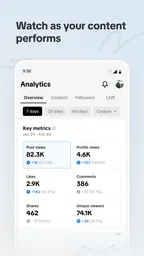
- Performance analytics help track how content is doing.
- Comment management supports more efficient audience engagement.
- Live-streaming tools expand how creators can reach viewers.
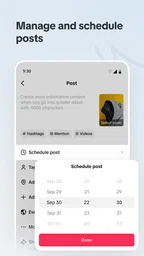
- Content scheduling helps maintain a consistent posting routine.
What could be better
- Some features may require a minimum follower count.
- The interface can feel complex for first-time creators.
- Analytics may take time to reflect recent performance.
- Certain tools are unavailable in some regions.
- Uploading and streaming can use substantial mobile data.





