




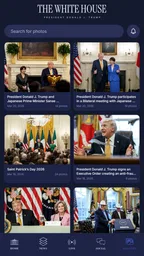



The White House review
 Analysis by Appsdrops
I think of The White House as a focused way to follow the administration’s own announcements, rather than as a complete news service. That distinction is its main strength and its main limitation. If I want official statements, policy updates, breaking announcements, or a live stream in one place, this News & Magazines app makes sense. If I want independent reporting, competing interpretations, or a broad view of the day’s news, I would pair it with other sources instead of relying on it alone.
Official updates, without the wider newsroom
Developed by the Executive Office of the President, the app puts the White House’s communications at the center of the experience. That gives it a specific job: helping me see what the administration is saying and follow its public-facing activity. It is not trying to be a general-purpose news reader, and I find it more useful when I judge it by that narrower purpose.
The app’s appeal is clearest when an announcement is changing quickly. Rather than waiting for a news outlet to summarize a statement, I can use the official channel to check the administration’s own wording and see whether a live stream is available. That is useful for readers who want to hear an event directly, or who need the original announcement before forming an opinion about how it is being covered elsewhere.
In ordinary use, I would treat it as one stop in a small information routine: check the official feed for what has been announced, then read independent reporting for context, scrutiny, and reactions. The first step can establish what the White House says happened; it does not, by itself, answer what the announcement means or how other people interpret it. Its strongest role is as a primary source, not a substitute for journalism.
Where the official source is especially useful
The most practical benefit is direct access. If a policy announcement is circulating in headlines or social posts, going to the administration’s own app can help me distinguish the actual statement from a shortened paraphrase. I would still compare coverage before drawing conclusions, but having the source close at hand can make that comparison more grounded.
Live streams are another reason to keep it installed. For a scheduled public event, I can choose to watch the source rather than depend on a clip or secondhand description. That is particularly helpful when tone, emphasis, or the exact sequence of remarks matters to me. It is less convenient if I want a brief, neutral summary instead of watching an event unfold; in that situation, a concise report from a news organization may be a better fit.
A useful habit is to separate “what was announced” from “what changes for me.” I would first use the app to locate the official message, then look for independent coverage that explains the practical effects, background, and unanswered questions. This two-step approach reduces the risk of treating an official announcement as a complete account, while still taking advantage of the app’s direct access.
It can also serve readers who follow government news intermittently rather than all day. If I hear about a White House statement during a commute or conversation, I can check the official source when I have a moment instead of trying to reconstruct it from snippets. The app’s value in that scenario is less about replacing a daily news habit and more about making a specific source easy to revisit.
The limitation is built into the app’s purpose
Because this is the White House’s own channel, its perspective is necessarily the administration’s perspective. That is not a flaw in the same way a technical problem would be; it is a reason to use the app with clear expectations. Official communications can tell me what the administration wants to announce and how it presents its work. They cannot provide the same independent challenge, fact-checking, or range of viewpoints that I expect from a newsroom.
This matters most when a topic is contested or consequential. A statement may foreground some details and leave others for reporters, experts, or affected communities to examine. I would not use a single official account to decide whether a claim has been independently verified, what a policy’s full implications are, or how different groups are responding. For those questions, established news outlets and specialist reporting are the better companion.
There is also a difference between being able to access a live event and having time to watch it. A stream can be valuable for readers who want the complete source material, but it may be an awkward way to stay informed during a busy day. If I only have a minute, a written summary from a publication that prioritizes concise reporting is likely to serve me better. The app works best when I choose the format deliberately rather than expecting every update to arrive in the form I prefer.
That makes it a less natural choice for someone seeking a balanced headline feed across politics, business, local news, and international events. Its focus is narrow by design. Readers who want a single app to compare different outlets, organize stories from many publishers, or get a broad daily briefing should look to a general news app as their main tool and use this one selectively.
A practical fit for different readers
I would recommend it to people who regularly follow White House activity: policy watchers, students studying government, journalists checking primary material, and readers who want to hear an event directly. It may also suit someone who usually relies on news summaries but occasionally wants to inspect the administration’s original announcement. The official source can be a helpful reference point, especially when a short headline leaves room for uncertainty about what was actually said.
For a realistic everyday example, imagine hearing that a policy change has been announced while getting ready for work. I would open the app to find the White House’s own presentation, note the exact scope of the announcement, and then use a separate news source later to check what the change means and what critics or independent analysts are saying. That is a more useful workflow than either accepting a social-media summary at face value or assuming the official app has answered every relevant question.
It is less suitable for readers who want a clearly independent editorial voice, a comprehensive national news digest, or coverage that routinely places opposing arguments side by side. It is also not the app I would choose when I need a quick overview of a developing story from multiple sources. Those needs call for a newsroom or news aggregator, while this app is best kept as a direct line to one institution’s public communications.
For a government-focused app, the surrounding store figures suggest that it has found an audience: it holds a 4.9 average from around 6,300 ratings, with roughly 1,800 written reviews and over 100,000 installs. Those numbers are a useful sign of interest, but they do not change how I would evaluate the product: its usefulness depends on whether you want official White House material, not on whether you want a complete account of the news.
Access and day-to-day expectations
The app is free, carries an Everyone age rating, and is listed for Android devices running version 7.0 or later. Its current version is 47.7.11, and it was released on March 26, 2026. For me, those details make it straightforward to consider as a source alongside a regular news app, rather than as a paid subscription commitment. The key decision is not cost; it is whether direct access to White House communications is useful enough for your routine.
One small but important point is to decide in advance what you want from a visit. If I open it to verify an official statement or watch a live event, I have a clear purpose. If I open it expecting an all-sides account of a complex issue, I am asking it to do a job it was not built for. That expectation check makes the app more useful and helps prevent the official point of view from being mistaken for the whole story.
I would also avoid treating a live stream as a replacement for written coverage. Watching the original event can reveal details that a short excerpt misses, but it takes attention and may not explain the context. My preferred approach is to use the stream when the event itself matters, then turn to reporting and analysis when I need background, verification, or consequences. That division of labor plays to the strengths of both kinds of source.
My verdict
The White House is worth installing if you want direct access to official announcements, policy communications, and live streams from the administration. I appreciate the clear purpose: it gives me a place to check the source rather than rely solely on summaries. Its focus, however, means I would never make it my only news app. The official perspective is informative, but it is not independent coverage.
My recommendation is simple: use it as a reference tool and pair it with reliable reporting from outside the government. If that combination matches how you follow public affairs, this free app is a sensible addition. If you want one balanced, broad-ranging news feed that does the comparison and analysis for you, choose a general news service instead and treat this one as an occasional source check.
What we like
- Official source for White House news and announcements
- Provides access to presidential statements and executive actions
- Offers background on the building and its history
- Free to access without a subscription
- Useful for checking information directly from the administration
What could be better
- Content reflects the current administration's perspective
- The app may offer limited features beyond official information
- Updates can be frequent and may overwhelm occasional readers
- It is not a neutral source for evaluating policy
- Some information may be available only through external links





