



The Knot Wedding Planner review
 Analysis by Appsdrops
Wedding planning has a way of taking over the kitchen table: one person is comparing venues, another is trying to remember the budget, and somebody else is asking whether the guest list has been updated. The Knot Wedding Planner is designed to bring common planning tasks together in one mobile app, with vendors, budgeting tools, a wedding website, and checklists. I like the idea of keeping those details close at hand, especially when planning involves a partner or family members who share the work.
Planning from a shared household routine
The app’s appeal is easy to understand if wedding decisions happen in short bursts throughout the day. Instead of waiting until everyone can sit down with a laptop, you can use a phone to check planning tasks while commuting, running errands, or talking things through at home. The Knot describes its service as a way to plan a wedding on the go, and that mobile-first approach suits the stop-and-start rhythm of a busy household.
When several people are involved, having vendors, a budget, a website, and checklists in one planning destination can make conversations more focused. A partner might be thinking about the budget while a relative is helping research vendors; a checklist can give everyone a concrete next step to discuss. I wouldn’t treat an app as a substitute for agreeing on decisions together, but it can give those conversations a useful shared subject.
That distinction matters. A household may share the planning effort without sharing every personal account or device. I’d think of the app as a planning aid for the person who owns the account and a reference point for conversations with others, rather than assuming every participant should use the same login. Clear expectations around who handles which task can prevent duplicate effort and make the experience feel less chaotic.
A practical place to begin
For someone just starting to plan, I’d begin with the broad picture rather than trying to complete everything at once. Use the available checklist to identify what needs attention, then consider the budget and the vendor search as decisions take shape. The wedding website can also be part of the planning picture, but it works best when the couple has a clear idea of what they want to share with guests.
This kind of gradual approach is especially helpful in a shared household. One person can take the lead on a task, then bring the important choices back to the group. That keeps planning collaborative without turning every small update into a household meeting. In my view, the best use of a wedding planner app is not to make every decision for you; it is to help you remember the decisions that still need to be made.
Setting boundaries before everyone joins in
Before using any planning app together, I’d establish a few simple boundaries: who is responsible for the account, which tasks other people are helping with, and what information should remain private until the couple is ready to share it. These are ordinary household agreements, not a claim about special account controls. They help avoid confusion when a wedding involves parents, siblings, friends, or other relatives who all want to contribute.
It’s also worth deciding which choices belong only to the couple. Vendor research and practical errands may be easy to delegate, while the guest list, budget priorities, and wedding details can be more personal. A shared planning routine works better when helpers know whether they are gathering options or making a decision. I find that a quick conversation before assigning tasks can prevent well-meaning suggestions from becoming unwanted pressure.
Phones are personal devices, even when people use them around the same kitchen table. If someone else needs to look at a checklist or discuss a vendor, the account holder can choose what to show and when. That approach keeps the household collaboration grounded in consent and common sense instead of assuming that installing an app means opening every planning detail to everyone.
Keeping coordination manageable
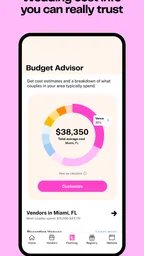
Wedding planning can produce a lot of small follow-ups: compare options, check costs, talk to a vendor, or decide what information belongs on the wedding website. The Knot’s mix of planning tools gives those conversations a natural structure. I’d use the checklist to keep tasks visible, the budget feature to frame financial discussions, and vendor information as a starting point for evaluating choices together.
The key is to avoid making the app itself another source of pressure. A checklist is useful when it helps you see what matters next; it is less helpful if every unfinished item feels like an emergency. In a household, people may have different schedules and different levels of involvement. Agreeing on a realistic pace makes it easier to share the work without expecting everyone to keep checking a phone all day.
For couples who divide responsibilities, a simple verbal update can still be valuable. One person might explain which vendors they are considering, while the other checks whether the choices fit the budget and the couple’s priorities. That kind of coordination does not require assuming that every household member has access to the same account. It relies on thoughtful communication, with the app serving as a convenient planning companion.
Age, trust, and who helps
The app is marked for everyone, but wedding planning is naturally aimed at people organizing a wedding and the adults they choose to involve. An age label should not be confused with a recommendation that children participate in account decisions or handle private details. If younger family members help with appropriate tasks, I’d keep the role clear and have an adult guide what information they see or share.
Trust matters just as much as convenience. A wedding website may be intended for guests, while budget choices or early vendor discussions may be for the couple and a small circle. I’d decide what is ready to be shared before involving helpers, and I’d keep sensitive conversations within the group that needs to make those decisions. That’s sensible practice for any planning process, whether it happens on a phone, in a notebook, or around the dinner table.
For households with a shared device, it is particularly useful to pause before handing the phone around. The person managing the planning account can stay in control of what is open and explain the task at hand. That does not require elaborate rules: a clear, respectful conversation about privacy and responsibility is usually a good foundation.
What the app offers and who may enjoy it
The Knot Wedding Planner is a free wedding-planning app from The Knot. It has a 4.7 average from around 58,000 ratings, and it has passed one million installs. Those figures suggest that many people have turned to it for wedding planning, although the right fit still depends on how you prefer to organize a major event.
The app is currently at version 5.2.6 and supports devices running Android 9 or later. It first appeared on September 28, 2014, and its content rating is Everyone. I’d consider those practical details when deciding whether it suits the phone you plan to use, particularly if your household relies on an older device.
Its strongest everyday appeal is the combination of several familiar planning needs: finding vendors, thinking through costs, preparing a wedding website, and keeping track of tasks. That combination can be handy for someone who wants a mobile starting point rather than juggling separate reminders and notes. Still, a planning tool is only useful when its structure matches your own process. Some couples may prefer a simple checklist and regular conversations; others may appreciate having more of the planning organized in one app.
A balanced household verdict
For a household sharing wedding responsibilities, I see The Knot Wedding Planner as a convenient way to keep the main planning topics in view. It can help a couple organize next steps and give relatives or friends a clearer idea of where help is useful. Its mobile focus is a natural match for decisions made between errands and everyday commitments, while its mix of planning tools gives the couple several practical starting points.
I’d recommend approaching it with a little structure: decide who manages the account, agree on which tasks can be shared, and keep private decisions private until the couple chooses otherwise. Those boundaries make collaboration easier without assuming that every person needs direct access. They also help keep the planning centered on the people getting married rather than on the app itself.
Overall, The Knot Wedding Planner is a sensible option for couples who want a free mobile tool for vendor planning, budgeting, a wedding website, and checklists. I especially like the potential for turning scattered household conversations into manageable next steps. Use it as a helpful organizer, not as a replacement for trust, clear communication, or the couple’s own priorities, and it can make the work of planning feel more approachable.
What we like
- Customizable checklists help organize planning tasks by deadline.
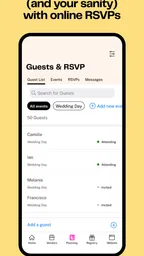
- The guest list tools make it easier to track invitations and RSVPs.
- Budget tracking helps couples monitor wedding expenses.
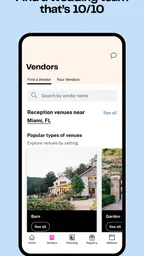
- Vendor listings make it easier to discover local wedding professionals.
- The app brings key planning details together in one place.
What could be better
- Some features may require an account to use.
- Vendor availability and pricing can vary by location.
- The app may send notifications that some users find distracting.
- Planning tools can feel overwhelming for couples with simple weddings.
- Some vendor listings may have limited reviews or details.





