






The Guardian - US & World News review
 Analysis by Appsdrops
I think of The Guardian less as a quick headline ticker and more as a place to spend a considered few minutes with the news. It brings reporting, opinion, analysis, sport, podcasts and puzzles together, which makes it useful when I want more than a notification-sized summary. The trade-off is that a broad mix of coverage takes a little more intention to navigate than a feed designed only to serve the next headline.
Finding your way around without getting lost
The first practical question is what you want from a news app. If you open it to check one developing story, then leave, a large selection of sections can feel like extra browsing. If you want to move from a major event to its context, then perhaps read a column or listen to a podcast, the mix is the point. I find it works best when I arrive with a purpose rather than expecting the app to make every choice for me.
A useful habit is to decide whether you are in a quick-check or a reading session. For the former, scan the leading coverage and stop when you have the essentials. For the latter, follow a story into analysis or opinion and take time with the reporting. That distinction helps keep a daily news check from turning into an unplanned scroll, while still making room for the depth that sets this publication apart from a bare list of alerts.
Readers can also get stuck because different types of material sit under the same broad news experience. A reported article, a strongly argued opinion piece and an explanatory analysis are not interchangeable, even when they cover the same subject. I recommend checking the article’s framing before treating its conclusions as straight reporting. That small pause is especially worthwhile when a topic is contentious or a headline sounds unusually definitive.
The Guardian is a News & Magazines app from Guardian News & Media Ltd. It is free to download, though in-app purchases are listed at prices from $0.99 to $144.99 per item. I would treat the free download and any optional purchase as separate decisions: start by seeing whether the reading experience suits you, then consider any purchase only if its terms and value are clear in the app.
Start with a simple setup check
When an app does not behave as expected, I avoid changing several things at once. First, I check that the device has a working internet connection and that the app is open normally. If a page seems slow or fails to refresh, I try again after reconnecting, then close and reopen the app. These basic checks are more useful than assuming a news service is down or that an account or purchase is at fault.
If you are installing it for someone else, check that the device’s app store is set to the right account and that there is enough room for an app download. A failed installation is not necessarily a problem with the app itself. I would also confirm that the device’s software and store are functioning normally before retrying. This is ordinary housekeeping, but it prevents a frustrating loop of tapping install without knowing whether the issue is network, storage or the store account.
The app is rated Everyone 10+, a detail worth checking if you are choosing news access for a younger reader. That rating does not mean every story will be comfortable or appropriate for every child: news can cover distressing events, and the right level of supervision depends on the reader. I would make the decision based on the child and the material they are likely to encounter, rather than relying on an age label alone.
One non-obvious setup tip is to give yourself a short first session rather than trying to assess everything at once. Read one story, visit a different kind of section, and see whether the layout helps you understand where you are. Then decide whether you want a focused news reader, a wider mix that includes sport and puzzles, or something that can also fill a commute with audio. This gives you a more honest sense of fit than judging it from a single headline.
Recover a reading session before starting over
If you are interrupted halfway through an article, I would first return to the app and check whether the story is still available in the place where I opened it. If it is not immediately obvious, use the app’s visible navigation and search options rather than repeatedly refreshing or reopening the same screen. I cannot promise that every reading position will be preserved, so for a long piece I sometimes note the headline or keep the article open until I have time to finish.
That simple workflow is especially helpful when reading analysis that builds an argument over several sections. If you lose your place, scan the article’s headings or opening paragraphs to orient yourself instead of reading from the beginning automatically. It saves time and reduces the risk of mistaking a later qualification for the article’s main point. For a developing story, meanwhile, revisit the coverage with the understanding that newer reporting may change the picture.
Audio and reading serve different moments. A podcast can be convenient when your attention is free from the screen, but it is a poor substitute when you need to compare details, check names or move quickly between paragraphs. I would use listening for a walk or routine task and return to the written article when precision matters. Puzzles offer another kind of break, but they are not the reason I would choose a news source; they make the app more versatile rather than changing its core purpose.
If something appears to be missing, I try to distinguish a navigation problem from a loading problem. A section may simply be farther down the page or behind another part of the app; a blank or incomplete screen may instead call for a connection check and a fresh launch. Avoid reinstalling immediately if you have an unfinished session or are unsure how purchases are associated with your store account. Reinstalling is a bigger step, and basic checks often clarify the issue first.
Separate app trouble from the wider situation
News changes quickly, and a story may develop while you are reading it. That can make an earlier page feel incomplete even when the app is working normally. I treat headlines as an entry point, then look at the article’s details and whether the coverage has been updated before drawing a firm conclusion. This is a useful habit with any live news service, but it matters particularly when one article is being read over several visits.
Likewise, a disagreement with a report is not evidence of a technical fault. The Guardian includes opinion as well as reporting and analysis, so I pay attention to which kind of piece I am reading and what it is trying to do. When I want a fuller picture, I compare the reporting with other reputable coverage rather than expecting a single publication to settle every dispute. Readers who want only neutral-feeling headlines may find the mix of perspectives less comfortable than a tightly filtered wire-style feed.
For a screen that will not load, the sensible order is modest: check the connection, try another part of the app, close and reopen it, then see whether the app store offers an update. If other apps also fail to connect, the likely issue may be the device or network rather than this one publication. If only one article is affected, try returning to it later. These steps do not diagnose every problem, but they help avoid blaming the wrong cause or making unnecessary changes.
For purchase questions, I would check the wording and account shown in the app store before buying anything. The listed range is broad, so the exact item matters; do not assume that every reader needs an in-app purchase or that a purchase has the same terms across all items. If a transaction does not appear as expected, start with the store account used for the transaction and the store’s own purchase records. That is a more useful first step than repeatedly tapping a purchase button.
How it compares with a basic headline feed
Compared with a minimal news aggregator, this app makes a stronger case for staying with a publication’s reporting and editorial voice. That can be an advantage when I want connected coverage, analysis and opinion in one place. It can also be a limitation: someone who wants headlines gathered from many outlets, with a highly personalized stream, may be better served by an aggregator. The Guardian is a better fit when the reader actively wants its journalism, not simply the broadest possible mix of sources.
Against a single-purpose sports app or podcast player, the appeal is convenience rather than specialization. I can move between general news, sport, audio and puzzles without treating each as a separate destination, but a dedicated service may offer a more tailored experience for someone who follows one team or listens to podcasts all day. I would not choose this app as my only tool for a narrow hobby; I would choose it as a broader daily reading companion.
Its scale may reassure readers who prefer an established publication: it has more than five million installs, an average rating of 4.5 from around 406,000 ratings, and about 21,000 written reviews. Those figures are context, not a guarantee that the app will suit your habits. I would weigh the actual editorial mix and reading experience more heavily than popularity, especially if you are sensitive to a publication’s point of view.
Who will get the most from it
I would recommend it to readers who want substantial reporting and are comfortable separating news from commentary. It also makes sense for someone whose routine varies: a quick look at current events in the morning, a longer article later, and perhaps audio or a puzzle when there is time. A realistic use is opening it over breakfast, reading one developing story carefully, then returning in the evening for an analysis piece rather than trying to consume every update as it arrives.
I would skip it if you want an entirely customized cross-publication feed, dislike editorial viewpoint in a news product, or need a specialist tool for one subject. It may also frustrate readers who expect every visit to surface only a handful of perfectly tailored headlines. In that case, a news aggregator or a focused sports or audio app is likely a better match. The Guardian rewards a reader who is willing to choose what to read, rather than one who wants the app to make every choice.
Released on September 7, 2011, The Guardian has had a long life as a mobile news destination, but my practical judgment is about what it offers now: a broad, publication-led mix with room for both quick checks and deeper reading. I would install it free, test a few different kinds of content, and keep it if the reporting style and sections fit my day. My verdict is that it is most useful when you want to spend time with the news, not merely collect headlines.
What we like
- Customizable alerts help you follow breaking stories and topics of interest.
- Saved articles make it easier to return to stories later.
- Audio options provide an alternative to reading on screen.
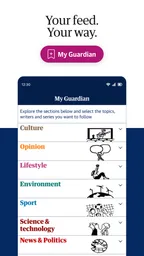
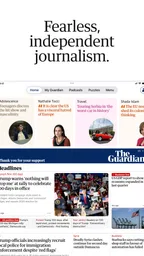
- A clear layout makes browsing sections straightforward.
- The app offers access to international reporting and analysis.
What could be better
- Some articles require a subscription to read in full.
- Frequent notifications may feel distracting unless carefully adjusted.
- Audio playback can use mobile data when Wi-Fi is unavailable.
- Some features may work differently across Android and iOS devices.
- The app may collect usage data according to its privacy policy.





