Talk & Translate AI Translator review
 Analysis by Appsdrops
When I need to understand a short message in another language or make myself understood during a simple conversation, I want a translator that gets me from the first words to a usable result without much setup. Talk & Translate AI Translator is built around that practical job: it brings text, voice and camera translation together, rather than asking me to choose a separate tool for each kind of input. That makes it appealing for travel and everyday exchanges, though it is not a substitute for careful human translation when exact meaning matters.
From a language problem to a first translation
I’d reach for it in situations where the need is immediate: checking a notice, composing a basic question, or trying to follow what someone has just said. The app is in the Books & Reference category, and its focus is less on studying a language from the ground up than on removing a communication hurdle. MobiSystems is the developer, and the app is free to install, with in-app purchases listed from $3.99 to $69.99 per item.
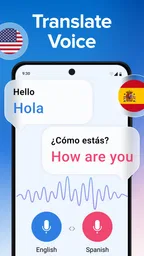
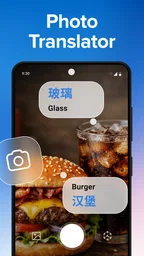
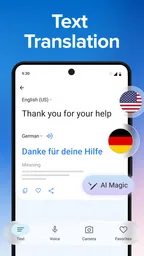
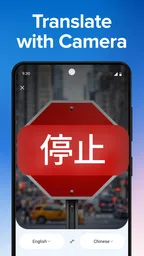
The first useful choice is how to provide the material. For a sentence I can type, text is the controlled option: I can reread what I entered and correct a name or phrase before translating. For a spoken exchange, voice input can be more natural, especially when typing would slow things down. A camera-based translation is the sensible route when the words are already printed on a sign, label or menu.
That choice matters more than it might seem. A camera is convenient when copying unfamiliar writing would be difficult, but it can struggle with cramped layouts, glare, decorative lettering or text mixed with images. If the wording is important, I’d use the camera result as a first reading, then enter a short, clear version manually to check whether the meaning still makes sense.
Choosing the input that fits the moment
For a quick spoken question, I’d keep the sentence short and say one idea at a time. That gives a translator less room to confuse where one thought ends and another begins. If I were asking for directions, for example, I would translate the destination question separately from a follow-up about walking time. This is a practical way to reduce ambiguity, not a guarantee that every nuance will carry over.
For typed text, I’d avoid slang, jokes and long sentences with several clauses when accuracy matters. I would also check names, addresses and numbers carefully after translation; these details are easy to misunderstand in any language tool and can have consequences if copied without review. A translation is most helpful when I treat it as a draft of what to say, rather than as proof that every word is exact.
The camera workflow has a different trade-off. It saves effort when I’m looking at printed material, but it is less useful if I need to discuss a passage in detail or preserve its formatting. In that case, I’d capture only the relevant phrase and compare the translated wording with the original. Breaking a long sign or paragraph into smaller parts can also make it easier to spot a mistranslated instruction.
Turning a translation into a conversation
A translation app is only one side of an exchange. The other person still needs a clear way to respond, and the conversation can become awkward if each speaker rushes ahead while the device is catching up. I’d take turns: say one short sentence, let the translation appear or play, then pause for the reply. That rhythm is slower than speaking freely, but it gives both people a better chance to notice when something has gone wrong.
In a realistic travel situation, imagine arriving at a café and needing to ask whether a dish contains an ingredient you avoid. I’d type a direct question rather than a complicated explanation, show or play the translated result, and then ask a simpler follow-up if the answer is unclear. I would not rely on a fluent-sounding translation alone for a serious allergy; I’d use whatever other confirmation is available. The app can help start the exchange, while judgment remains essential.
For a quick interaction with a shop worker, voice translation may feel less cumbersome than passing a phone back and forth to type. But noisy surroundings or overlapping speech can make voice input unreliable. If the result looks odd, switching to text is a useful handoff: I can restate the message in fewer words and give the other person a clearer version to read.
The same handoff helps with printed information. I might use the camera to get the gist of a notice, then type a specific line if I need to understand a deadline or instruction. Moving between camera and text is not a flaw in the workflow; it is a way to use the most convenient input for discovery and the more controllable one for checking.
What the language range and offline option change
The app is presented as supporting more than a hundred languages, which gives it broad potential for trips or conversations involving less familiar language combinations. I would still check that the language pair I need is available in the mode I intend to use before depending on it. A large overall language count does not necessarily mean every language behaves identically across text, voice and camera translation.
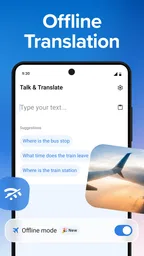
Offline translation is particularly relevant when planning ahead. If I expect to be somewhere with patchy connectivity, I would investigate and prepare the relevant offline language option before leaving rather than waiting until I’m standing in front of a sign. Offline access can be a practical safeguard, but I would test the specific task in advance: a text phrase, a spoken exchange and a camera reading are different jobs, and I would not assume that preparing for one automatically covers the others.
This is one place where the app’s combined approach is useful. Instead of thinking only, “Can it translate this language?”, I’d ask, “What will I need to translate, and will I have a connection when I do it?” That small planning step can prevent the frustrating experience of opening a translator at the exact moment you need it and discovering your chosen workflow is not ready.
Where it sits beside other translation options
Compared with a basic text-only translator, Talk & Translate has a broader set of ways to start: typed words, speech or camera input. That variety is valuable when the source changes from one moment to the next. A dedicated language-learning app is a better fit if my main goal is structured lessons, practice and long-term progress; this translator is oriented toward getting through a real exchange, not building a curriculum.
A human interpreter or professional translation remains the safer choice for legal, medical, financial or otherwise consequential material. Machine translation can flatten politeness, misread context or choose a plausible but incorrect meaning. I would use this app to understand the general direction of an everyday conversation, then seek qualified help when a mistake could affect someone’s health, rights or money.
It also differs from simply searching for a translated phrase online: the camera and voice paths can help when I don’t already know how to formulate a query. The trade-off is that an app-mediated conversation can feel less natural than a person speaking directly in a shared language. If both people can communicate comfortably without a device, I would not insert a translator just for the sake of using one.
Cost, expectations and the points of friction
The app is free to download, but it includes optional in-app purchases priced from $3.99 to $69.99 per item. I’d check what an offered purchase unlocks and whether it matches my intended use before paying. Someone who only needs occasional short translations may have a different calculation from a frequent traveler, and the broad range makes it worth reading the purchase details carefully rather than assuming every useful function is included at no cost.
There is also a difference between getting a translation and getting a dependable conversation. Speech recognition can be affected by accent, speed and background noise; camera results depend on readable text; typed results depend on the wording I provide. These are ordinary sources of friction for this kind of tool, but they mean I need a fallback. If a sentence is important, I’d shorten it, switch input methods or ask the other person to confirm the key point.
Privacy-conscious users should also think before entering sensitive material into any translation service. I would avoid putting confidential documents or personal details into a general-purpose translator unless I had checked the relevant privacy information and was comfortable with it. For casual directions or a menu, the stakes are usually different from those involved in a private letter or workplace document.
Who I’d recommend it to
I’d recommend it to travelers, visitors and multilingual households who regularly need quick help with short exchanges, especially when the source may be spoken one moment and printed the next. Its age rating is Everyone, and it has a 4.5 average from around 24,000 ratings, with over 5 million installs. Those figures suggest it has reached a broad audience, but they do not remove the need to judge each translation in context.
It is less suited to someone looking for a full language course, a guaranteed interpreter, or polished translation of long and sensitive documents. If I needed to translate a complex contract, preserve a literary voice or make a medical decision, I would choose a qualified person or a specialist service instead. The app’s strongest role is as a practical bridge for everyday communication, not an authority on every sentence.
The current version is 14.7.869, and it requires Android 8.0 or later. If I were installing it for an upcoming trip, I’d try the language combinations and input styles I expect to use before I leave, and prepare for offline use where needed. That gives me a chance to learn the interface while the stakes are low rather than in the middle of an unfamiliar conversation.
A useful bridge, with sensible limits
My overall view is that Talk & Translate AI Translator is most valuable when it helps turn a confusing moment into a manageable exchange. Text gives me control, voice can speed up a brief conversation, and camera input can save time with printed words. The ability to move between those routes is its clearest practical strength.
I would keep it as a travel and everyday communication aid, while resisting the temptation to treat a confident-sounding result as automatically correct. Short phrases, deliberate turn-taking, a switch to another input method when something feels wrong, and advance preparation for offline use all make the experience more dependable. If that is the kind of help you need, it is worth trying; if you need precision without room for error, a human translator is the better choice.
What we like
- Voice input makes quick translations easy.
- Text-to-speech helps with pronunciation practice.
- Camera translation can make signs easier to understand.
- Conversation mode supports face-to-face exchanges.
- Useful for travelers who need translations on the go.
What could be better
- Translation quality may vary by language pair.
- Speech recognition can struggle in noisy settings.
- Some features may require an internet connection.
- Camera translation may be less accurate with poor lighting.
- Subscription costs may apply for advanced features.





