
Suno - AI Music & Songs Maker review
 Analysis by Appsdrops
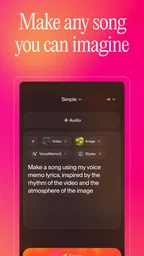
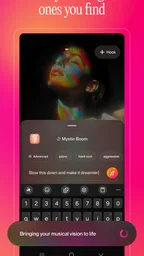
Suno is most appealing when I want to turn a musical idea into something I can actually hear, rather than spend an evening learning production software. It is a music and audio app from Suno, Inc, built around generating songs with AI. That makes it a very different sort of creative tool from a streaming service or a conventional recording app: the starting point is an idea, and the app helps make it audible.
My main recommendation is to approach it as a sketchpad for songwriting and musical curiosity. It can help you explore a mood, test a lyrical premise, or make a playful track for a personal project. It is less suitable if you need precise control over every instrument, a dependable studio workflow, or a finished commercial recording without further editing. The fun is in getting from a prompt to a surprising result; the trade-off is that the result may not match the sound in your head on the first attempt.
From a short idea to a song-shaped draft
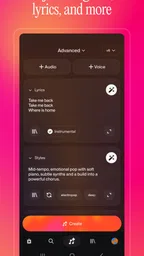
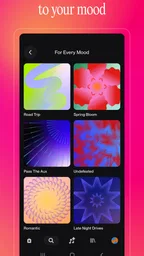
The useful shift is to think in terms of direction rather than instructions for a machine. Instead of trying to describe every musical detail, I would start with the feeling and purpose of the piece: perhaps a gentle song for a quiet commute, an energetic chorus for a workout playlist, or a comic tune for a friend’s birthday. That gives the generator a clear creative destination while leaving room for unexpected choices.
When an early result is close but not quite right, I find it more productive to change one part of the idea at a time. If the track feels too serious, adjust the emotional direction; if it lacks a memorable center, make the intended hook or lyrical subject clearer. Rewriting the whole prompt after every attempt makes it harder to tell which change helped. Treating each generation as a draft keeps the process focused and makes experimentation feel less random.
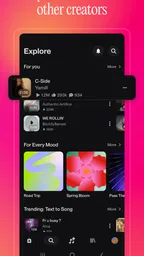
That draft-first approach is also where Suno differs from ordinary music apps. A streaming service helps me find existing songs, while a traditional audio editor gives me direct control over recorded material. Suno sits between those activities: I describe what I want and listen to an AI-made interpretation. It is a stronger fit for starting points and playful concept tests than for detailed mixing, editing, or mastering.
Why a little prompt discipline pays off
A practical workflow is to keep a short note of the prompt ideas that produce the most promising direction. I would record the mood, subject, and any specific quality that seemed to work, then alter just one element on the next try. This is a simple way to avoid repeating vague requests and to make a session feel like creative iteration rather than a string of unrelated guesses.
It also helps to decide what “good enough” means before generating. If the goal is a funny surprise to share with a small group, an imperfect vocal or an unexpected arrangement may be part of the charm. If the goal is a polished song for a public release, the same quirks become problems that require careful review and likely more production work elsewhere. The app can make ideas tangible, but it does not remove the need for taste and judgment.
Speed expectations and the best way to use a session
AI music generation is not the same as tapping play on a song already in a library. The app has to produce a new result, so I would plan for a wait rather than expect every idea to appear instantly. I would use that pause to refine the next prompt or decide what I want to listen for, instead of starting many generations without a clear reason.
That matters most when inspiration is fleeting. For a quick gift idea or a moment of curiosity, a simple prompt is likely to be more satisfying than a long attempt to specify every detail. For a more serious concept, it is worth slowing down: define the core message first, listen critically, and make a deliberate adjustment. The fastest route to a useful result is often not making more attempts, but making each attempt more informative.
I would also avoid judging the app on a single generation. Creative output is inherently variable, and an early result may miss the tone even when the idea is strong. If you are using it between errands or during a short break, save the session for exploration rather than expecting a finished song before you have to leave. That expectation makes the experience much more pleasant.
Heavy-use moments: inspiration, iteration, and limits
The app is at its most engaging when I have a specific reason to make something. A family gathering, a small video project, or a personal writing exercise gives the music a job to do. For example, I might want a lighthearted tune for a birthday slideshow. I would begin with the recipient and the tone, listen for whether the result feels affectionate rather than embarrassing, and revise the wording if it leans too far into parody.
That kind of use exposes a useful trade-off: generating alternatives can broaden the idea, but too many near-identical attempts can waste time and make it harder to choose. I would first decide whether I want a different mood, a clearer subject, or a stronger sense of energy. Changing one dimension at a time gives each new result a purpose. If none of the versions suits the occasion, it may be better to switch to a familiar licensed track or a human-made composition than keep pushing the generator.
For aspiring songwriters, the value can be less about adopting a generated song and more about escaping a blank page. A rough musical interpretation may reveal that a lyric feels too wordy, that a concept suits a different mood, or that a chorus needs a simpler idea. I would treat those observations as prompts for my own work, not as proof that the generated arrangement is the one I should keep.
There is a boundary around public or professional use that deserves thought. Before relying on any AI-generated track in a project with commercial, legal, or reputational stakes, I would check the applicable terms and review the result carefully. A song that works as a private joke or an informal draft is not automatically appropriate for a client deliverable. If exact authorship, rights, or musical direction are central, a conventional production route is the safer choice.
Reliability and what to do when a result disappoints
For a creative app, reliability is not only whether it opens; it is whether the process lets me recover from an unhelpful result without losing the thread of an idea. I would keep my core concept in a note outside the session, especially when I have found wording that captures the intended mood. That small habit makes it easier to return to the idea if I need to restart or rethink the prompt.
I would also separate technical frustration from creative mismatch. If the app feels slow or a generation does not arrive as expected, I would avoid rapidly repeating the same request. First check whether the connection is behaving normally, then try again with the original idea preserved. If the result arrives but sounds wrong, that is a prompt or creative problem, not necessarily an app failure. Keeping those cases distinct prevents needless changes and helps make the next attempt more useful.
No generative music tool can guarantee that every output will be coherent, tasteful, or aligned with the user’s intention. Suno’s strength is opening up possibilities quickly; its weakness is the gap between describing a song and controlling one with exactness. I would listen to the whole result before sharing it, paying attention to whether the lyrics and tone fit the context, rather than deciding from the first few seconds.
Device demands and choosing the right setup
Suno is available for devices running version 8.0 or later, which gives many users a route to try it on an existing phone or tablet. That compatibility alone does not tell me how fluid it will feel on every device, especially during a demanding session. I would keep expectations sensible on older hardware and avoid running a crowded set of other apps if the device is already struggling.
Because the creative payoff depends on listening, headphones can make it easier to notice details than playing a draft quietly from a phone speaker. A stable connection is also a sensible part of planning a generation session, particularly if I am away from home. If I only have a short window or unreliable reception, I would save the idea and come back when I can give the process time rather than treating it like an offline instrument.
Storage and battery needs can vary with how someone uses a creative app, so I would pay attention to the phone’s own available space and battery rather than assume every session is lightweight. If I plan to create and replay several drafts, starting with a charged device is a basic but useful precaution. For sustained editing on a large screen, a desktop audio workstation may feel more comfortable, even if Suno is more convenient for quickly exploring an idea on mobile.
Who will enjoy it, and who may prefer another tool
I would recommend Suno to curious listeners, lyric writers who want a way past the blank page, and people who enjoy making personalized musical experiments. It can also suit someone who wants to hear how a mood or concept might translate into a song before investing time in a more involved production process. The app’s audience is broad: it has a 4.8 average from around 2.6 million ratings and more than 10 million installs, but those figures do not mean its creative approach will suit everyone.
It is less compelling for musicians who want hands-on control of notes, instruments, recording takes, and mixing decisions. A digital audio workstation or a conventional music-making app is usually better when precision and repeatable production matter more than surprise. It may also frustrate anyone who expects a single prompt to produce an immediately release-ready track. The distinction is simple: Suno helps generate an interpretation; it is not a substitute for every stage of making and finishing music.
The app is free to start, with in-app purchases ranging from $2.99 to $699.99 per item. I would look at the purchase details in the app before committing, and decide whether I enjoy the core creative loop first. Since the range is broad, it is especially sensible to treat any optional spending as a separate decision rather than assuming a paid item is necessary to discover whether the app fits your habits.
Age, version, and the practical takeaway
The content rating is Teen, a useful point for families deciding whether the app belongs on a shared device. As with any tool that can generate varied creative material, I would still consider the individual user’s maturity and how the results will be shared. A generative app can produce content shaped by prompts, so thoughtful use matters more than treating the age label as a complete guide to every possible output.
The current version is 1.94.0, and the app was released on December 3, 2024. Those details help identify the product, but the decision to install it should rest on whether you want a prompt-led music experience. I would approach it with a specific, low-pressure project, keep a note of promising ideas, and listen with a critical ear before sharing anything beyond a casual audience.
Overall, I see Suno as a lively idea generator rather than a replacement for a songwriter, producer, or music library. Its best moments come when I use it to explore a concept and accept that the first result may be a draft, not a destination. If you enjoy experimentation and want to hear your ideas take musical shape, it is worth trying. If you need exact control, predictable turnaround, or a polished production workflow, another tool will serve you better.
What we like
- Turns text prompts into complete songs with vocals and instrumentals
- Offers a simple way to explore different musical styles
- Makes it easy to share finished tracks with others
- Provides a library for revisiting generated songs
- Supports song creation without musical training
What could be better
- Generated vocals may sound unnatural
- Results can vary even with similar prompts
- Free access may include usage limits
- Some features may require a paid plan
- Generated tracks may need editing for polished results





