
Summary - AI Note Taker review
 Analysis by Appsdrops
After a meeting, the hardest part is often not remembering that it happened; it is finding the useful details buried in a long conversation. Summary – AI Note Taker is built around that problem. I see its appeal less as a replacement for a notebook and more as a way to turn spoken discussions into text you can review and a shorter account of what was said. That focus makes it especially relevant when listening carefully and taking thorough notes at the same time is difficult.
Turning spoken discussion into something reviewable
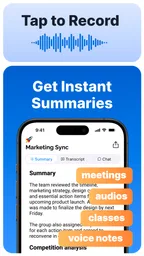
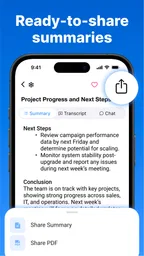
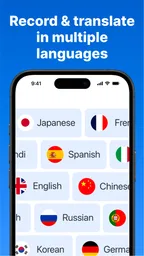
Summary is a productivity app from Labhouse Mobile. Its central idea is to record audio, convert speech into text, and produce a summary of meeting notes. Those steps form a practical chain: capture the conversation first, then use the written version to revisit it, and finally use the condensed notes to get back to the main points without replaying everything.
That can change how I participate in a conversation. Instead of trying to write down every sentence, I can focus on what people are saying and use the recording and transcript as a reference afterward. The summary is most useful as a starting point, not as a substitute for checking important wording. If a decision depends on a precise detail, I would still consult the transcript or the original audio rather than relying on a condensed account alone.
The distinction matters because speech is messy. People interrupt one another, change direction, and leave details implied. A summary can help surface the broad shape of a discussion, but it should not be treated as a perfect record of every commitment. I would use it to orient myself, then verify names, dates, figures, and assigned tasks against the source before sharing anything consequential.
From recording to a useful follow-up
A sensible workflow is to decide before a conversation what I need to retrieve afterward. For a planning meeting, that might be the agreed direction and unresolved questions. For a class or interview, it might be the explanation or answer worth revisiting. Knowing the purpose helps me judge whether the resulting summary is useful, rather than expecting it to organize every conversation in exactly the same way.
After the recording is processed, I would read the summary once for the overall story, then use the transcript to check anything that affects a decision. That two-pass approach is more dependable than treating the short version as definitive. It also saves attention: I can scan for the central points first and spend time with the longer text only where details matter.
One practical tip is to make a brief personal note immediately after a session about what I want to do next. The app’s summary can help me remember the discussion, while my own note can distinguish an actual commitment from an idea that was merely raised. This is especially useful in conversations where several possibilities are explored but only one is chosen.
I would also avoid recording conversations casually just because the tool makes it convenient. In a shared meeting, it is considerate to make sure people know a recording is being made and that it fits the setting. That habit is good practice for any recording workflow and helps keep the technology from becoming an awkward surprise.
Where it earns its place in an ordinary week
Imagine finishing a project check-in with several open questions and a change to the original plan. During the call, I want to contribute rather than split my attention between speaking and typing. Once it ends, a transcript gives me a way to check how the plan was described, while the summary offers a quicker reminder of the main discussion. I can then write a clear follow-up message in my own words.
This is a stronger fit for conversations with useful spoken content than for every sound I might want to keep. A meeting with decisions, a lecture with explanations, or an interview with detailed answers gives the transcription and summary something meaningful to work with. A short chat that contains little worth revisiting may not justify recording and reviewing it at all.
There is also a useful distinction between this workflow and a conventional notes app. A blank page asks me to capture information while it is being spoken; Summary starts from the audio and gives me text afterward. That can reduce the pressure to keep up, but it does not automatically provide the personal organization or careful interpretation that I might build into notes by hand. The two approaches solve different parts of the problem.
Compared with simply recording audio, the transcript makes the conversation easier to scan, while the summary aims to reduce the amount I need to read. Compared with typing everything myself, the trade-off is that I give up some control over what gets emphasized in the first draft. I find that a reasonable exchange when speed and recall matter more than polished, individually structured notes.
Accuracy, attention, and other trade-offs
The main limitation is inherent to turning speech into text: a transcript is only as useful as its handling of what was actually said. Unclear speech, overlapping voices, specialized terms, or context-heavy shorthand can make a passage harder to interpret. I would treat the output as an aid to memory, not as a verbatim legal record or a guaranteed account of every speaker’s intent.
Summaries introduce another layer of judgement. Condensing a discussion means some details receive less attention than others, and a brief recap may not preserve every caveat. When the distinction between “we will do this” and “we might do this” matters, I would check the source before acting. The convenience is real, but so is the responsibility to review the result.
There is a small but important shift in effort, too. Recording may reduce note-taking during a session, yet it does not remove the need to review afterward. If I never open the transcript or act on the recap, the app has only moved the work to a later point. It is most helpful when I already have a reason to revisit the conversation and a simple follow-up habit to go with it.
People who prefer a clean, manually organized notebook may find that a transcript is too much raw material. In that case, a standard note-taking app can be better: I can capture only the points I care about and arrange them as I go. Likewise, someone who needs exact, carefully edited meeting minutes should not assume an automated summary is ready to distribute without checking and revising it.
There is also a cost consideration. The app is free to install, with in-app purchases listed from $8.99 to $79.99 per item. I would try the basic experience first and decide whether its recording-to-summary workflow fits my routine before spending. Since the value depends on how often I have discussions worth reviewing, a person who rarely records conversations may not get much from paying for additional access.
Who is likely to benefit most
I would recommend trying Summary if you often leave meetings or lessons wishing you had listened more and typed less. It is particularly suited to people who want both a searchable written reference and a compact recap, and who are willing to check important details before relying on them. Students, interviewers, and people coordinating spoken discussions may appreciate that combination when their conversations contain information they need to revisit.
It is less compelling for someone who only wants a private scratchpad, dislikes reviewing transcripts, or needs every note arranged in a highly specific format from the outset. A conventional notes app gives more direct control over structure. A basic voice recorder is a simpler choice if preserving the sound is enough and text is unnecessary. Summary makes most sense when the bridge from audio to readable notes is the part that saves you time.
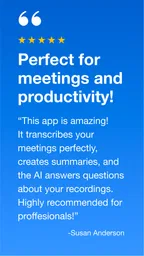
In the app store, Summary has a 4.6 average from around 157,000 ratings and more than a million installs. It is rated for Everyone, and its current version is 2.23.1, with Android 8.0 as the minimum operating system. Those figures suggest a widely used app, but they do not tell me whether its results will suit a particular conversation; trying it on a low-stakes discussion is a better way to judge that fit.
My overall view is that Summary – AI Note Taker has a clear, useful role: it turns spoken material into something easier to revisit, with a recap that can help me find the thread again. I would not hand it responsibility for final minutes or important commitments without checking the source. But for the everyday problem of wanting to stay present in a conversation and still remember what happened afterward, it is a practical approach—and one worth testing if spoken discussions regularly leave you with a note-taking backlog.
What we like
- Automatically turns recorded conversations into organized notes.
- Summaries make long discussions quicker to review.
- Useful for capturing details during meetings and lectures.
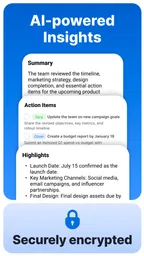
- AI-generated notes can help identify key points.
- Reduces the need to write notes while listening.
What could be better
- AI summaries may miss context or important details.
- Transcription accuracy can vary with accents and background noise.
- Review notes before relying on them for important decisions.
- Recording conversations may require others' consent.
- Some features may require an account or paid plan.





