
Stop Motion Studio review
 Analysis by Appsdrops
I like the idea behind Stop Motion Studio: instead of treating animation as a complicated editing project, it turns a camera and a sequence of still images into something you can build one frame at a time. That makes it appealing to families, teachers, hobbyists, and anyone curious about making a small object appear to move. Its interface and the physical process both matter, though: you need to frame shots, keep your device steady, and repeat precise actions, so the experience will not suit every person or situation equally well.
Finding your way around a frame-by-frame workflow
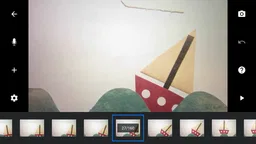
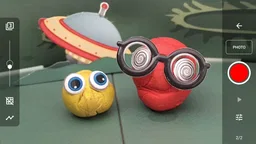
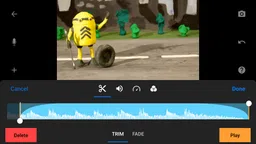
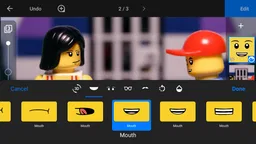
Made by Cateater, this free photography app is focused on stop-motion creation rather than general photo editing. I find that focus helpful: the central task is to capture a frame, make a small change to the scene, then capture another. You can concentrate on the sequence instead of sorting through the many unrelated tools common in all-purpose editing apps.
The basic idea is easy to grasp, but stop motion has a learning curve that comes from the work itself. New users may expect a quick camera effect, then discover that even a short clip can involve many deliberate adjustments. A useful first project is deliberately modest: move one object across a tabletop, changing its position only a little between shots. That teaches the rhythm of capture and playback without adding character design, elaborate lighting, or a complicated set.
The app is rated for Everyone, and its broad appeal makes sense for simple creative projects. Still, an age rating is not a guarantee that every child can work independently. Younger makers may need someone to help position the device, keep the scene from being bumped, and understand why a tiny movement between frames produces smoother motion than a large jump.
The app’s history and current support are also worth noting when deciding whether to try it. It was released on March 9, 2015, and its current version is 26.10.8583. It requires Android 7.0 or later. I would check that requirement before planning a shared classroom or family project, especially if some devices are older.
Its audience is substantial: it has over 10 million installs, a 4.1 average rating from around 127,000 ratings, and roughly 10,000 written reviews. Those figures suggest that many people have tried it, but they cannot tell you whether its hands-on workflow fits your needs. I would judge it by trying a tiny scene before committing to a longer animation.
Make the interface work with the project
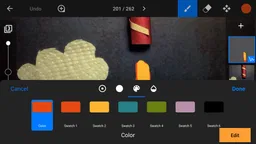
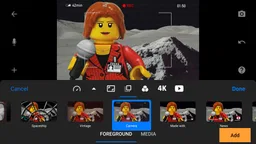
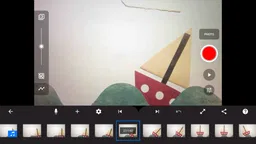
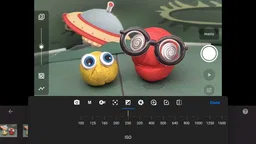
For readability, I would approach the screen as a camera workspace, not a page to read for long stretches. Keep the subject visually distinct from the background, and avoid placing important details near the edges of the shot. A clear, uncluttered setup makes it easier to judge whether the object has moved as intended, which is especially useful when small controls and a busy scene compete for attention.
It also helps to prepare the set before opening the capture rhythm. Put the objects, background, and any props within comfortable reach, then settle the device in position. This reduces the need to navigate away or reach across the scene repeatedly. It is a practical improvement for anyone who finds frequent switching or repeated fine adjustments tiring.
Unlike a standard camera app, which is usually designed to take one picture and move on, stop-motion work asks you to return to the same composition again and again. That repeated framing is the defining strength of the format, but it can also make navigation feel less forgiving. If you prefer to make a quick edit to a finished photograph, a conventional camera or photo editor will be faster and less demanding.
Motor effort, sensory load, and pacing
The main physical challenge is not simply tapping a capture control; it is keeping the device and scene stable while making tiny changes. A stand or other steady support can help, and a project on a table is often easier to manage than one that requires holding the phone in the air. I would also choose props that are easy to grasp and move, rather than tiny pieces that demand repeated pinching and precise placement.
For someone with limited fine-motor control, the app’s creative premise may still be appealing, but solo capture can become frustrating if each frame requires a delicate adjustment. One workable approach is to split the tasks: one person handles the device while another moves the subject, or a helper stabilizes the setup while the creator directs the action. That preserves meaningful creative choices without pretending the physical work disappears.
Stop-motion projects can also be sensory-intensive. Repeatedly changing an object and checking playback involves visual attention and patience; a lively scene, flickering light, or noisy surroundings can make that harder. I would use a simple background and steady lighting, work in short sessions, and pause before fatigue turns small alignment errors into a source of irritation. The ability to work gradually is a real advantage of making an animation frame by frame.
There is a useful trade-off here: the slow pace gives the maker control over each movement, but it asks for sustained attention. Someone who enjoys detailed craft projects may find that absorbing. Someone who wants an immediate, polished result may find it too repetitive, even if they like the idea of animation.
Projects that fit different places and people
A realistic home project is a short “before and after” scene: a toy gradually crossing a desk while a child narrates the story aloud or plans the next move. The setup can stay small, and the creator can stop whenever attention runs low. For a classroom, the same method can turn a science demonstration or a paper-cutout story into a group activity, with students taking turns directing, moving objects, and checking the result.
Shared projects can make access more flexible because the work divides naturally into roles. One participant can plan the sequence, another can move the props, and another can watch for changes in framing. This is not a substitute for independent control when that is the goal, but it can make animation a collaborative activity rather than a test of who can perform every small action fastest.
Lighting and location matter more than a new user might expect. A table near a bright window can seem convenient, but changing daylight may make consecutive frames look inconsistent. I would choose a stable indoor light source and avoid shifting the setup mid-project. Likewise, a busy household or crowded classroom can make a carefully arranged scene vulnerable to accidental bumps; a quiet corner and a clear “do not touch” boundary can save substantial rework.
On the go, the app is best suited to a short, controlled setup rather than spontaneous filming while walking around. The repeated framing makes movement of the device a problem, and a portable project still needs a stable surface and room to arrange the scene. If your priority is capturing an unplanned moment quickly, the usual phone camera is the more practical choice.
Where the experience can still be difficult
The biggest limitation is inherent to stop motion: every movement has to be planned and captured in sequence. The app cannot remove the time involved in moving props, checking composition, and correcting a scene that has drifted. I would not choose it for a last-minute video that needs to look natural or for someone who has no patience for repeated setup.
Small visual changes can also be hard to assess if the subject blends into its background or if the camera shifts. Before starting a longer sequence, make a few test frames and play them back. If the motion looks jumpy, reduce the distance between object positions; if the framing changes, secure the device and mark where props belong. These simple habits prevent a common disappointment: discovering only at the end that the scene does not flow.
Another friction point is that different bodies and environments call for different ways of working. A person who has difficulty reaching a tabletop may need a more comfortable surface height or help arranging the set. Someone sensitive to visual repetition may prefer brief sessions. A reader who relies on a particular text or input adjustment should test the interface on their own device before starting an ambitious project, rather than assuming that a creative app will automatically accommodate every preference.
The app is free to download, with in-app purchases listed at $5.99 per item. I would begin with a small project before deciding whether any optional purchase is worthwhile. That keeps the initial experiment low-commitment and lets you assess the core workflow on your own device. The free entry point is useful, but it does not mean every possible tool or workflow should be assumed to be included without charge.
Who should choose it—and who should not
I would recommend Stop Motion Studio to people who enjoy making things slowly and shaping a story through small physical changes. It is particularly well suited to a child-and-adult activity, a classroom group, or a hobbyist who wants to turn household objects, toys, or paper figures into a short animation. Its photography focus is more appropriate than a general video editor when the desired effect depends on deliberate frame-by-frame movement.
I would steer someone toward a regular camera app for quick event recording, and toward a conventional video editor when the source material is already filmed and the main job is trimming or arranging clips. Those alternatives demand less repeated manipulation of a physical set. If you want to create animation but find the capture routine tiring, the right choice may depend less on the app’s creative potential than on whether you can make the setup comfortable and share the work.
My inclusive verdict is positive but practical: the app offers a clear creative activity that can be adapted through shorter sessions, simplified scenes, stable positioning, and shared roles. Its frame-by-frame nature is also its central barrier, especially for people who find fine movements, sustained visual attention, or repeated actions difficult. I would try a simple three-part scene first, with a steady camera and easy-to-move props. If that process feels satisfying, there is room to build more ambitious work; if it feels like a chore, a faster photography or video tool will probably serve you better.
What we like
- Frame-by-frame editing gives precise control over animation timing.
- Onion-skin overlays help align objects between frames.
- The interface is approachable for beginners.
- Projects can be saved and continued later.
- Supports external cameras for more flexible capture.
What could be better
- Advanced tools may require a paid upgrade.
- Capturing many frames can take considerable time.
- Small objects can shift between shots with minor bumps.
- Editing on a phone screen can feel cramped.
- Export options may vary by device and version.





