


State Farm® review
 Analysis by Appsdrops
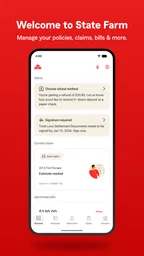
When I need to check an insurance detail, I’d rather reach for my phone than search through a drawer or try to remember where I saved a document. State Farm® is built around that everyday need: it gives customers a mobile way to access State Farm accounts, policies, ID cards, and more. The idea is straightforward, and that focus makes the app easiest to understand as part of a real task: start with a question about your account, find the relevant information, and then use it to take the next step.
From a quick question to the right account
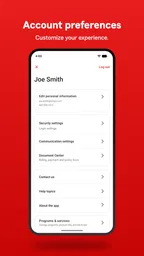
State Farm® is a free finance app from State Farm Insurance. It has been available since April 29, 2010, and its current version is 10.169.0. The app is rated for everyone and requires Android 10 or later. Its broad purpose is account access rather than general money management, so it is most relevant to people who already use State Farm and want a convenient mobile route to their insurance information.
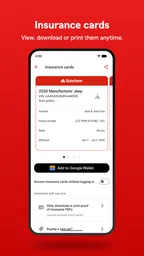
The starting point is familiar: something prompts you to check a policy or retrieve an ID card. Maybe you are away from home, preparing for an errand, or simply trying to confirm an account detail without locating paperwork. In that situation, an app that gathers insurance information in one place can be more practical than relying on a folder or a memory. I like that State Farm’s central promise is easy to grasp before you open it: it is meant to connect you with your State Farm accounts and documents.
That narrow focus is worth keeping in mind. This is not a general finance dashboard for comparing unrelated accounts or tracking every kind of spending. The value comes from having a mobile access point for State Farm services. If you are already a customer and your immediate question concerns a policy or ID card, the app’s purpose lines up neatly with the job. If you are looking for broader financial tools, the name and summary alone suggest that this is not the main reason to install it.
Following the task through
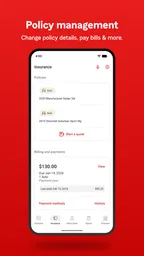
A useful way to judge an insurance app is to follow one ordinary workflow rather than imagine a long list of features. You begin with a need, open the app, look for the account information tied to that need, and then use what you find. State Farm is designed to support that basic sequence by bringing account access, policies, and ID cards into the mobile experience. That makes the app relevant not only when you are browsing, but when you need a specific piece of information and want to move on.
The first part of the flow is getting to the appropriate account. Once there, the next task is locating the policy or document that answers your question. The usefulness of this arrangement is practical: instead of treating an ID card or policy as something that exists only on paper, the app gives customers a place to access those materials from a phone. I find that especially appealing for occasional, task-driven use. You may not need to check insurance details every day, but when the moment comes, having a familiar mobile destination can reduce the hassle of searching elsewhere.
From there, the outcome depends on what you needed to do. If your goal was simply to bring up an ID card or review a policy, the app’s stated role is to help you reach that information. If your question takes you beyond the documents and account access, the app sits at the start of the process rather than guaranteeing that every follow-up can be completed in one uninterrupted visit. That distinction matters: a helpful access point can make a task easier without replacing every conversation or decision involved in insurance.
For a current customer, this kind of workflow can feel more natural than starting from scratch each time. You already know which company the information belongs to; the app provides a mobile channel for reaching it. I see the best fit as a simple routine: open the app when an insurance-related question comes up, find the relevant account material, and use that information to decide what to do next. The benefit is less about novelty and more about having the essentials within reach.
When information needs to move elsewhere
Insurance tasks can involve more than one step. You might begin by checking a policy, then realize you need to speak with someone or handle a matter outside the document itself. That is where the handoff becomes part of the experience. State Farm’s role, as described, is to provide access to accounts, policies, ID cards, and more. Those resources can help you understand your starting point, but the next action may still take you beyond simply viewing information in the app.
I think of that as a normal boundary for a company-specific account app. A mobile app can make information easier to retrieve, while a more involved question may require a different kind of interaction. The important thing for a user is to know what the app is good for: bringing State Farm account materials closer at hand. When the task calls for a follow-up, the information you have just checked can still be useful as context for that next conversation or action.
This also shapes expectations around convenience. If you open the app with a clear, document-focused goal, the experience has an obvious destination. If you arrive with a broad question and expect every part of the issue to be handled in the same place, you may find that the app is only one stage of the process. That is not necessarily a flaw; it is simply a reminder that access to information and resolution of a complicated insurance matter are different jobs.
What the app delivers best
The strongest outcome is straightforward access. State Farm is aimed at helping customers reach account information, policies, and ID cards from a mobile device. That practical purpose is easy to explain, and it gives the app a clear role in daily life: use it when the relevant information is more useful on your phone than in a paper file or elsewhere. I appreciate products that make their central job understandable without needing an elaborate pitch.
Its reach is substantial, too. State Farm has more than 10 million installs, with an average rating of 4.6 from around 503,000 ratings and about 36,000 written reviews. Those figures show that many people have turned to it, though individual experiences will naturally vary. They are useful context, but I would still judge the app against your own needs: whether you are a State Farm customer, how often you need policy information, and whether mobile access suits the way you handle insurance tasks.
For someone who regularly needs to retrieve an ID card or look over a policy, keeping that access in an app can feel like a sensible convenience. It can also be useful for occasional needs, precisely because you do not have to make a habit of checking it for the app to matter. The app’s value is tied to those moments when the right information saves you from a needless search. In that sense, it works best as a dependable utility rather than something you open for entertainment or general browsing.
The app’s long presence also gives it a clear place in State Farm’s mobile offering. It was released on April 29, 2010, and remains available in version 10.169.0. Those details are useful when identifying the product, but the practical question is still whether it serves your routine. If your insurance relationship is with State Farm, a company-specific account app is a logical place to start when you need your documents or account details on the go.
Where the flow can feel limited
The same focus that makes the app easy to place can also define its limits. State Farm is centered on State Farm accounts and insurance materials, so its usefulness depends on having a reason to access those services. Someone who does not use State Farm is unlikely to get much from installing it. And someone hoping for an all-purpose personal finance tool should look at the app for what it is: a company’s mobile account and policy access point, not a universal organizer.
There can also be friction whenever a task grows beyond checking information. A document may answer one question but lead to another, and a mobile app cannot make every insurance decision effortless just by putting account materials on a screen. I would approach it with a specific goal in mind. Start by asking whether you need an account, policy, or ID card; if so, the app’s purpose is relevant. If the issue is broader, expect that viewing your information may be only the first step.
That realistic expectation keeps the experience in perspective. The app is not valuable because it promises to remove every handoff; it is valuable because it gives customers a mobile way to reach key State Farm materials. When that is the task, the focused design makes sense. When the task involves something else, the app may still help you orient yourself, but it is not a substitute for every part of the process.
My take for State Farm customers
State Farm® is a practical choice for customers who want their insurance account information, policies, and ID cards accessible on a phone. I’d recommend considering it if you already rely on State Farm and want a direct mobile route to those materials. Its appeal is simple rather than flashy: it supports a real-world task, helps you begin with the information you need, and gives you a convenient place to return when another insurance question comes up.
Overall, I see it as a useful companion to an existing State Farm relationship, not as a replacement for every service interaction. The workflow is clearest when you know what you need to retrieve and want to get there without searching through paper. If that matches your situation, the app has a focused purpose and a broad user base behind it. If you are not a State Farm customer or want wider financial features, its central strength may not be relevant to you.
What we like
- Drive Safe & Save may reward eligible safe driving.
- Mobile access to insurance cards can be useful during traffic stops.
- Claims can be started through the app at any time.
- The app supports bill payments from a mobile device.
- Some users can connect with a local State Farm agent.
What could be better
- Features vary by insurance policy and state.
- Some services require a State Farm account.
- Drive Safe & Save requires location access for tracking.
- Claim decisions and payments may still take time.
- The app may not replace every task handled by an agent.





