
Start.gg review
 Analysis by Appsdrops
I judge event apps by whether they help me make a plan I can actually follow: find the right competition, understand what I need to do, and avoid scrambling when the day arrives. Start.gg is built around competitive gaming events, so its value depends less on how often I open it and more on whether I take part in tournaments or follow them closely. For a casual player who rarely joins organized play, it may be easy to overlook. For someone who wants competitive events in one place, it has a clearer purpose.
Free access, with a focused purpose
Start.gg is a free Events app from Start.gg, and that makes trying it a low-commitment choice. I don’t have to weigh a purchase against occasional use; I can decide whether its event-focused approach fits my gaming habits. Free access is useful here because tournament interest can come in bursts: I might look for a local competition one month, then barely need the app until the next one.
The app is currently version 1.5.2 and requires Android 5.1 or later. Its content rating is Everyone, and it has an average rating of 4.0 from around 35 ratings, with a small number of written reviews. Those figures offer only a modest snapshot of other users’ experiences, so I wouldn’t treat them as a guarantee that every event or workflow will suit me.
What matters most is the kind of free access on offer: this is not a general gaming companion that happens to mention tournaments. Its reason to exist is competitive events. I’d install it if I wanted to keep tournament activity within reach, but I wouldn’t expect a free app to replace the preparation, communication, or game knowledge that participation itself requires.
What the app’s focus is worth
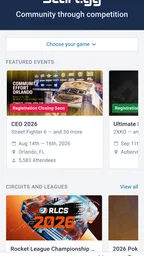
The clearest value is convenience for people who already care about organized competition. A dedicated event app can make more sense than checking scattered social posts, community chats, and game-specific pages every time I want to see what is happening. Rather than treating competitive gaming as an occasional announcement, Start.gg gives that activity its own home on my phone.
That focus is also a boundary. If I mostly play alone, want a broad catalogue of games, or simply need casual entertainment, a tournament-centered app may not earn a lasting place on my home screen. I would get more from it when I have a concrete reason to look for an event or keep track of competitive activity than when I open it with no particular goal.
The app has 10K+ installs, which suggests that it has found an audience among people interested in its specific niche. I see that as context rather than proof of quality: the useful question is whether competitive events are part of my routine. Start.gg’s value is strongest when the answer is yes.
How it fits into an event day
One practical way I would use Start.gg is to make it part of a tournament checklist. Before committing to an event, I’d use the app as a place to orient myself around the competition, then make a separate note of anything I need to bring, any travel arrangements, and any personal reminders. Keeping those tasks distinct helps avoid the common mistake of assuming that an event app automatically covers every real-world detail.
On the day itself, I would check event information before leaving rather than waiting until I arrive. That simple habit is useful with any event-focused tool: it gives me time to notice a change, revisit my plan, or ask an organizer a question while I still have options. I would also avoid relying on a single phone screen as my entire backup plan. For a serious bracket or a long day, I’d keep essential details somewhere I can reach quickly if my battery or connection becomes a problem.
A more experienced player can use the app as part of a wider routine: check for relevant competitions, decide which ones fit a training or travel schedule, then use the game itself and community conversations for preparation. The key trade-off is that finding an event is only one step. I still need to judge whether its format, timing, location, and expectations fit me rather than signing up just because something appears relevant.
Useful habits and honest trade-offs
My first tip is to search with a specific intention. If I’m looking for a competition for a particular game or trying to follow a particular event, I’d start there instead of browsing aimlessly. A focused search makes a niche service feel more useful and helps me avoid treating every listing as a realistic option.
Second, I’d verify the details that affect my plans before I commit. Competitive events can involve practical decisions beyond the app itself, including whether I can attend and what I need to do to participate. I would read the event information carefully and follow up with the organizer when something important is unclear. That is not a criticism of Start.gg; it is sensible event planning, especially when a missed detail could cost me a trip or a place in a competition.
Third, I’d use the app to support rather than replace my own reminders. If an event matters to me, I’d put the relevant time and preparation tasks into the calendar or notes system I already check. This is a small extra step, but it protects against the assumption that one app will handle every notification and personal deadline exactly as I need.
The main friction is the narrow audience. A person who wants general news, casual multiplayer suggestions, or a broad guide to gaming may find the event emphasis too specialized. There is also a difference between seeing an event and being ready for it: players may still need to learn the rules, arrange transport, coordinate with friends, or manage their own schedule. I would not mistake an event directory or hub for a complete tournament coach.
How it compares with familiar alternatives
Compared with searching the web or asking in a gaming community, a dedicated events app offers a more deliberate starting point for tournament activity. General search can be flexible, but results may be spread across announcements and pages. A group chat can provide useful firsthand advice, yet details are easy to lose in a busy conversation. Start.gg is the option I’d consider when I want an event-oriented place to begin, rather than another general channel.
Those alternatives may still be better in particular situations. A local community can answer practical questions in a human way, while an organizer’s own communication is the place I’d rely on for final instructions. If I’m only curious about a game’s competitive scene, informal communities may be more engaging than an app built around events. I’d use Start.gg as a complement, not assume it removes the need to check the channels that matter for a specific competition.
That distinction affects its value. The app can help reduce the effort of getting oriented, but the payoff comes from what I do with that information. If I never follow up, plan, or attend, a dedicated event tool can feel redundant. If I regularly explore competitions, the same focus can save me from starting from scratch each time.
Who is likely to get the most from it?
I’d recommend trying it to players who enter tournaments, want to find competitive events, or keep an eye on the organized side of gaming. It also makes sense for someone who is curious about moving beyond casual matches and wants a more purposeful way to explore competitions. Because it is free, testing that fit does not require a purchase decision.
It may also help friends who coordinate around competitive play. One person can look into an event while the others decide whether the date and commitment work for them. I’d still share key details directly with the group rather than assume everyone has checked the same screen. That small bit of coordination is especially helpful when several people need to agree on travel or timing.
I would skip it if I have no interest in events, rarely play competitively, or want a broad all-purpose gaming app. I’d also choose direct organizer communication or a familiar community when my main need is a specific answer about an event, not a place to discover or follow competitive activity. The best choice depends on the task: Start.gg for event-oriented exploration, a direct contact for a detail that needs confirmation, and a calendar for personal commitments.
My verdict on whether it is worth installing
For me, the decision is straightforward: Start.gg is worth trying when competitive events are already part of my gaming life, and much less compelling when they are not. Its free price makes experimentation easy, while its specialized purpose means it should not be judged as a general gaming utility. I’d install it with a specific goal in mind, such as finding an event or keeping competitive activity organized, then keep it only if it becomes useful in my actual routine.
The 4.0 average rating is a reasonable sign of a generally positive reception, but the relatively small pool of ratings means I would treat it as a hint, not a decisive verdict. What matters more is whether the app helps me move from interest to a sensible plan. If I use it alongside careful event checks, personal reminders, and the right community or organizer channels, it can earn its place without pretending to do every part of tournament preparation.
My recommendation is therefore a qualified yes for tournament-minded players and a comfortable skip for everyone else. I like that the app has a clear job rather than trying to serve every kind of gamer. Its value is not in how many times I open it, but in whether it helps me find and follow the competitive events I genuinely want to attend.
What we like
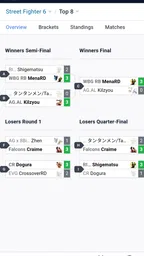
- Brackets and match schedules are easy to find.
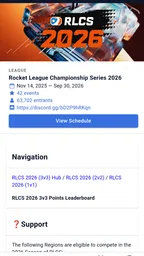
- Event pages show useful tournament details.
- Players can follow events and check their progress.
- The platform supports a wide range of esports titles.
- Organizers can manage tournament registration online.
What could be better
- Some features work best with a Start.gg account.
- Event information depends on organizers keeping it updated.
- The interface can feel crowded during large tournaments.
- Not every event offers online registration.
- Finding smaller events may require extra browsing.





