

Starlink review
 Analysis by Appsdrops
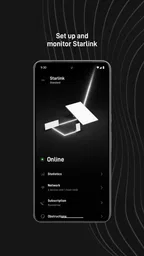
I think the Starlink app makes the most sense when you treat it as a control panel for your own satellite internet setup, not as a general speed-testing tool or a way to browse the web. Its job is to help you get service running and keep an eye on it. That focus is useful: when the connection feels slow, you can check the equipment and service context rather than immediately assuming your phone or router is at fault.
What to expect from speed and setup
Because this is a companion app for Starlink service, it cannot make a connection faster simply by being installed. The speed you experience depends on the service and the conditions around the Starlink equipment. I would use the app to understand and manage that setup, then judge internet performance through the activities that matter to me, such as a video call or a large download.
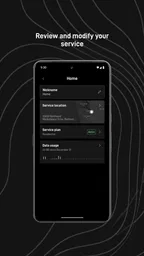
The setup role is especially valuable for people installing service somewhere less conventional than a typical apartment: a rural home, a cabin, or a temporary location. Instead of relying only on generic Wi-Fi settings, you have a dedicated place to work through the Starlink-specific process and monitor the service afterward. That can reduce guesswork, although it does not remove the practical need to place equipment sensibly and give it a suitable view of the sky.
A useful habit is to check the app when performance changes, rather than repeatedly restarting devices without a reason. If the service looks normal in the Starlink interface but one laptop struggles, the problem may be local to that laptop or its Wi-Fi connection. If the app points to an issue with the Starlink setup, you have a more relevant place to begin troubleshooting. This distinction is more helpful than expecting one screen to explain every network problem.
When the connection has to work hard
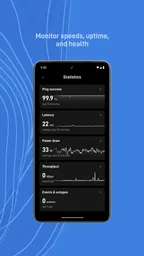
For ordinary browsing, messaging, and occasional streaming, most people will care less about a headline speed than about whether the connection stays usable throughout the day. The app is useful in that practical sense: it lets a Starlink customer monitor the service rather than treating the dish and router as invisible hardware. I would check it before an important remote meeting if the connection had recently been inconsistent, but I would still have a backup plan if missing the meeting would be costly.
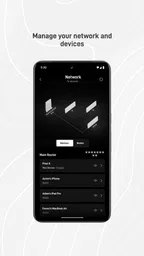
Consider a realistic evening at a rural house: one person is on a video call, another is streaming, and someone else starts a large download. If the call begins to stutter, the app can help you inspect the Starlink side of the connection. It cannot tell you, by itself, whether every device is sharing bandwidth fairly or whether a particular room has weak Wi-Fi. That is where a separate router interface or a device-level network check may be more useful.
There is also a trade-off in relying on a service-specific app. It is better suited to Starlink equipment and service than a generic network utility, but it is not a universal dashboard for every router or internet provider. If you use several connections and want one tool to compare them all, a general network monitor is likely a better fit. Starlink’s narrower purpose is a strength when diagnosing its own setup and a limitation when looking beyond it.
Reliability is more than a green screen
I would not use any single app status as proof that every part of a home network is reliable. A Starlink connection can appear healthy while a phone is too far from the router, a device has a software issue, or local Wi-Fi is congested. The most sensible workflow is to use the app to inspect the service, then test the affected device and location separately. That avoids blaming the satellite connection for a problem that is actually inside the home.
When service drops, the app’s value is partly in giving you a Starlink-specific place to check before you resort to guesswork. Still, troubleshooting can feel circular if the phone itself has no internet connection and you have not prepared an alternative way to get online. For a remote property, I would keep essential contact details and any time-sensitive work accessible offline, and make sure someone in the household knows how to reach the app when the main connection is unavailable.
Another practical point is to check performance at the location where you actually use the internet. A good result near the router does not guarantee the same experience in a distant room or outdoors. The Starlink app helps with the service side; it should be paired with ordinary Wi-Fi checks when the complaint is limited to one corner of the building. That separation saves time and helps identify whether the next step is adjusting the home network or investigating the Starlink setup.
Phone, operating system, and everyday demands
Starlink is a free Tools app from Space Exploration Technologies Corp. It is rated for Everyone, and its listed minimum operating system is version 8.0. That makes it accessible to a broad range of compatible devices, though a phone that is old, low on storage, or already struggling with other apps may still feel less responsive in day-to-day use. I would keep the operating system reasonably current where possible, especially if the app is part of essential setup or troubleshooting.
I would not expect the app to consume heavy resources simply because it monitors a service, but there is no reason to keep it open constantly. Open it when setting up, checking status, or investigating a connection problem, then return to the task you were doing. If the app is slow to respond, first distinguish that from slow internet: an app loading slowly can be caused by the phone, its connection, or the service it is trying to reach, and those are not interchangeable symptoms.
For a household with several people managing the same connection, the useful question is who will handle setup and checks. The app is most valuable when the person using it understands the basic layout and can describe what they see to others. If you are helping someone remotely, have them check the app while also noting which devices are affected and whether the problem happens everywhere or in one room. Those details make a support conversation more productive than simply saying that “the internet is bad.”
Where it fits among network apps
Compared with a standard router-management app, Starlink’s advantage is its close connection to Starlink service. A general router app may be better for managing a mixed home network or inspecting devices connected through a range of equipment. A conventional speed-test app is better when your only question is how a particular device performs at a particular moment. I see Starlink’s app as the service-specific layer between those tools: it helps you manage the Starlink side, while other utilities can answer broader network questions.
That division also clarifies who should skip it. If you do not use Starlink, this app has little practical reason to occupy space on your phone. If you want an independent speed test, a router dashboard, or a complete view of several providers, choose a tool designed for that job instead. For existing Starlink customers, however, relying only on generic Wi-Fi tools would leave out the service-specific setup and monitoring that make this app worthwhile.
Popularity, updates, and my verdict
The app has a 4.6 average from around 259,000 ratings, with over 10 million installs, so it is clearly used by a large Starlink audience. It is free, and its current version is 2026.28.0. Those figures are useful context, but they do not guarantee that every person’s setup will be trouble-free; equipment placement, the phone, and the local network still matter. I would judge it by how well it helps me manage my own service rather than by its popularity alone.
My main reservation is that people may expect a single status screen to diagnose the whole path from satellite connection to a device in another room. In practice, that path has several parts. The app is most useful when you treat it as a focused Starlink companion and combine it with simple checks on the affected device and Wi-Fi location. That is a little less convenient than an all-in-one explanation, but it is a more realistic way to troubleshoot.
Overall, I recommend Starlink to people who already use the service, particularly those who handle their own setup or need to check connectivity at a rural or temporary property. It gives them a dedicated way to get the system running and monitor it without confusing those tasks with general networking. I would not install it expecting a speed boost or a universal network manager. Used for what it is designed to do, it is a practical companion; when the problem is clearly a device or home Wi-Fi issue, another tool is the better next step.
What we like
- Satellite internet reaches many rural and remote locations.
- The app makes it easy to check service availability.
- Built-in tools help diagnose connection issues.
- Users can monitor network status from their phone.
- The service can be moved between locations with eligible plans.
What could be better
- Service may be unavailable in areas with limited satellite capacity.
- Monthly fees can be higher than many wired internet plans.
- Heavy rain or snow may temporarily affect the connection.
- A clear view of the sky is needed for reliable performance.
- Equipment may require a suitable outdoor mounting location.





